
On this page
- Contents
- In a nutshell
- Warning: Backup your site before using an un-tried module
- For Windows users: "\" versus "/"
- Find a module to use
- Module project page
- 'Downloads' section
- 'Issues for...':
- Resources:
- Understand the various module versions available
- 'Recommended releases'
- 'Other releases'
- 'Development releases'
- 'Version' column
- 'Download' column
- *.tar.gz versus *.zip file formats for all project downloads #
- Codebase and database overview
- Module location in the codebase
- Using sub-folders of the 'modules' folder
- Moving modules that have already begun to be used
- Importing the module
- Module import - Overview
- Automated module import with URL - Overview
- Automated module import of local file - Overview
- Manual module import - Overview
- For the two 'automated' import methods...
- Enable the Drupal core module 'Update manager'
- Security: Enable 'Update manager' regardless
- Module import - The steps
- Automated module import with URL - The steps
- Automated module import of local file - The steps
- Manual module import - The steps
- Enabling modules
- 'Modules' page overview
- Check-box column
- 'Name' column
- 'Version' column
- 'Description' column
- Missing libraries and other possible non-module requirements of a module
- 'Operations' column
- Enable your new module
- Broken site problems - Run the update script, and 'Clear all caches'
- Configuring modules
- Module 'Help' link
- Module 'Permissions' link
- Permissions overview
- Your module's permissions
- Module permissions security warning
- Module 'Configure' link
- Module documentation and help
- Trial and error
- Project page content
- Project page 'Read documentation' link (when existing)
- Module "README.txt", or "INSTALL.txt" files
- Google search limited to drupal.org
- Your site's 'Module' page "Help" buttons/links (when existing)
- Updating the module
- Uninstalling the module
Installing modules
Drupal 7 will no longer be supported after January 5, 2025. Learn more and find resources for Drupal 7 sites
Extend your Drupal 7 site's functionality beyond the features that come from the built-in 'Drupal core' modules, by installing contributed modules from Drupal.org.
This page will detail, from a beginner's point of view, how you can find a module or theme to use, import it into your Drupal 7 site, enable a module (turn it on), and then configure a module.
Contents
- In a nutshell
- Warning: Backup your site before using an un-tried module
- For Windows users: "\" versus "/"
- Find a module to use
- Module project page
- Understand the various module versions available
- Codebase and database overview
- Module location in the codebase
- Importing the module
- Enabling modules
- Configuring modules
- Module documentation and help
- Updating the module
- Uninstalling the module
In a nutshell
This page will obviously be of greater benefit to you if you have an existing Drupal 7 site.
You should feel free to experiment with any module, because you can always disable the module and remove it from your site.
I recommend that if you are trying out modules that you have not used before, only install one 'new-to-you' module at a time. And before you move on to another module, test the first module as thoroughly as necessarily to see how it changes things on your site, in particular, whether or not it breaks things that are already working.
Drupal modules 'In a nutshell':
- Find a module (or theme) to use.
- Go to that module's (or theme's) "project" page, and see if it seems like something to try.
- Pick a version of the module (or theme) to use.
- Import the module (or theme) into your Drupal site.
- Enable the module on your site.
- Configure the module, if needed.
Warning: Backup your site before using an un-tried module
That warning is not really relevant if you are just getting started with Drupal, because on the off-chance that a module breaks your site beyond your ability to quickly fix it, you can just create a new site. It's good practice to create additional Drupal sites.
If, however, your site reaches a point at which you would hate to have to re-build it from the beginning, read on.
Backup your site, and test your backup to see that it works before you use a module that you have not used before, especially if it is an 'Other releases' or 'Development releases' version that has not yet been released as being suitable for a live website.
Before using a contrib module that you have not used before, you should always backup your site first, in particular your database with a record of which version of Drupal core that was used with that database.
Also, critically, you should always test the contrib module on a test site (also known as a 'development' site), not on a live site (also known as a 'production' site), just in case the module breaks your site.
For Windows users: "\" versus "/"
A Windows computer file system uses a back-slash character ("\") as a separator between parent\child folders, but for simplicity sake, the following guide will only use the forward-slash character ("/"), as is used on MAC and Linux computers, and used on online webhosts using UNIX based Apache servers.
Find a module to use
Go to the main page for contrib Modules from drupal.org ~ drupal.org/project/project_module ⎘.
That page is the 'Modules' sub-tab of the drupal.org main section 'Download & Extend'
Core compatibility: "7.x" - Set the fourth item down from the page-top, 'Core compatibility', to "7.x".
Other search options: Feel free to change any of the other search items. You can also put a keyword or two in the textarea box for 'Search modules'.
The item 'Sort by' is, by default, set on "Most installed", which means that the search results will be sorted by the most-popular first.
Click the button "Search".
On the search results page, the 'name' of each module (or theme) is a link to it's home-page, known at drupal.org as its 'project' page.
Click on the name of a module (or theme you would like to investigate further).
Module project page
This section is an overview of a few things of importance on project pages. In addition to contrib 'modules', contrib 'themes' are also known on drupal.org as 'project'(s), and all drupal.org project pages have the same basic layout.
Module project pages vary in depth of detail, however, because the content of each project page is created by one of the module's developers.
The project page is usually worth reading carefully.
Among other things, if the module is dependent on another module(s), or possibly an extra 'library'(s), that information will be posted. It is not critical if you forget about a module or library dependency, however, because later when you try to enable or use the module, you will get a notice about what you are missing.
'Downloads' section
A project page will always include links to get the various versions that are available for that module.
Those 'Downloads' links will be discussed in more detail in the next section, Understand the various module versions available.
'Issues for...':
The module's project page will always include links under the heading 'Issues for...'. Those links are in the right-hand column when your browser window is wide enough, or they are near the page bottom under the 'Downloads' and 'Maintainers for...' sections when your browser window is narrower.
The 'Issues for...' links take you to the issues queue for that specific module project. The issues queue is the official place where all of the problems ('Bug report'), support requests, ('Support request') and new-feature requests ('Feature request') can be found and searched for.
So, if you run into problems with a module, search the module's issue queue. If your problem (or request) has not already been addressed, post your question or issue using the link 'Create a new issue', and someone will try to help you out.
Resources:
Just under the 'Issues...' section, in the section under the heading 'Resources', I always look for the link 'Read documentation'. That link will not always exist, but if it is there, it is a link to what the project's developers consider the most useful information for their project.
The 'Read documentation' link might take you to a page on drupal.org in the 'Documentation' section, or the link might take you to a page off of the drupal.org site.
Generally speaking though, every contrib module will have a "README.txt" file and/or an "INSTALL.txt" file in its top-level folder that you can view after you download the module, or after you import it into your site.
The various Documentation resources available for a module (or theme) will be discussed in greater detail near the bottom of this page, in the section Module documentation and help, but notably at this time, you can view any project's 'README.txt' file, or see its other documentation without downloading anything, by following the instructions below in the 'Module documentation and help' sub-section Module "README.txt", or "INSTALL.txt" files
Understand the various module versions available
On the "project" page, see the section 'Downloads' under which are the sub-headings 'Recommended releases', 'Other releases', and 'Development releases'.
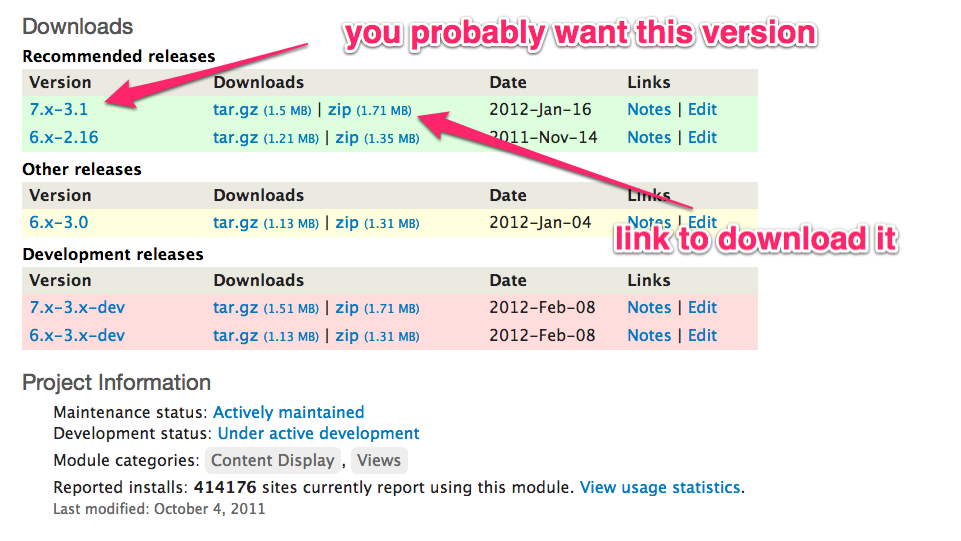
The version you choose must be compatible with the version of Drupal you are using. So since you are using Drupal 7, you can only use a 'Version' that begins with '7.x-...'. But do not worry. If you try to use a Drupal 6 or 8 version on a Drupal 7 site, your site will not allow it to be used.
'Recommended releases'
Look for the uppermost 'Version' that you can find for Drupal 7. That is the version that you should try first, and hopefully it will be under the sub-heading 'Recommended releases', which means that it is stable enough to use on a live site (also known as a 'production' site).
'Other releases'
If no 'Recommended releases' is available, your next best option is to try an 'Other releases' version, if available.
'Other releases' are generally on their way to becoming a 'Recommended releases' version.
But, on the other hand, on a rare occasion an 'Other releases' version is an older stable version of the module before major changes were made to it. In that somewhat rare case, the older stable version will have been moved from the 'recommended releases' when the newer version was ready. One reason for keeping an older version around in the 'Other releases' section would be if some other separate module project were dependent on the older 'Other releases' version for that dependent module to work properly.
'Development releases'
The 'Development releases' version of the module is in some stage of development.
It is the current 'state of the art of development' version, as the developers are working out bugs, or are adding new features.
Be aware that the 'development release' might be being prepared for a future version of Drupal. Taking Drupal 8, for example, even though today Drupal 8.1 is the current recommended version of Drupal 8 core, the module's 'development release' might be being prepared for future use with the Drupal core version 8.2, or 8.3, which will have features not found in the current 8.1 core version.
'Version' column
This column is for the version number of the module on that row.
For more detailed information about the version numbering scheme that is being used, go the drupal.org page Version numbers ⎘.
'Download' column
This column contains the download links for you to actually get the module.
*.tar.gz versus *.zip file formats for all project downloads #
Each module (or theme) is available in both the *.tar.gz and *.zip formats. Each of these files contains all of the module's (or theme's) files and folders in a single file that has been archived (multiple files and folders in one file), and compressed (made small as possible).
The *.tar.gz version is smaller, but the contents of the *.tar.gz and *.zip files are identical.
MAC and Linux users should use the *.tar.gz version
Windows users:
Use the *.zip version if you intend to extract the file onto your computer.
-
A Windows extraction of a *.zip file onto a personal computer is a one-step process. If, however, you extract the *.tar.gz file onto your Windows computer using, for example, the built-in Windows tool, (that was first introduced in Windows 7, or 8) the extraction process will first extract the *.tar.gz file to a *.tar file, and then you will have to repeat the extraction process with the *.tar file to fully complete the extraction.
Granted, as a Windows user, if you are only grabbing the download link for an automated import of the module using the steps below in the section 'Automated module import with URL', then either version would do. Similarly, if you are only downloading the file onto your computer before using the automated import method detailed below under 'Automated module import of local file', then either version would do.
In other words, Windows users will only find difficulties when they are extracting the *.tar.gz file onto their computer, because of the two-step requirement, and because older versions of Windows do not have a built-in tool for extracting *.tar.gz files.
In conclusion, Windows users: Use the *.zip version.
Codebase and database overview
Although a Drupal site requires a server program (Eg. Apache or IIS), a database program (Eg. MySQL or MSSql), and a PHP interpreter to run, everything that is unique to your site is contained in your database and codebase.
Database
The database is something which I have never needed to edit or adjust. It takes care of itself, so to speak. It is stored separately and away from the codebase.
Online, the database is one or two directory levels above 'public_html'. If you are running Drupal locally on your computer, the database is, using Windows as an example, somewhere at the location you installed the 'stack', possibly in 'C:\Program Files'.
Codebase
The codebase is a set of the files and folders that you can navigate around in, just like any other set of files and folder on your computer.
The codebase is made up of Drupal core, contrib modules, contrib themes, and any other extra files you have added, like images or videos. These files are the ones that you will on occasion need to, or want to modify.
The top level folder of your Drupal codebase will be referred to on this page as [d7-root].
If you are running Drupal on your computer 'local'-ly, your codebase is in a location that your 'stack' knows where to find it. That location might be set by you, or might be in a default location determined by a stack installer, if that is what you used.
Windows example: As an example, if you installed your Drupal site using Acquia Dev Desktop on a Windows computer, your codebase will by default be within:
C:\Users\*YOUR-USER-ACCOUNT-NAME*\Sites\*YOUR-D7-ROOT-FOLDER-HERE*
Please note that the 'Sites' folder above, which is intended to hold all of your Drupal installations, is not the 'sites' folder within your codebase at [d7-root]/sites
Module location in the codebase
All of the module's (or theme's) files and folders will be contained in a single parent folder in your codebase. That parent folder will be named similarly to the module itself, using lowercase-alphabetic characters, and occasionally the underscore character ("_") between multiple words.
When you import a module into your Drupal codebase using either of the two automated processes discussed below, the module will be placed at the default recommended location:
[d7-root]/sites/all/modules/*NEW-SINGLE-MODULE-FOLDER-HERE*/*MULTIPLE-MODULE-FILES-AND-FOLDERS-HERE*.
[Themes default location: [d7-root]/sites/all/themes/*NEW-SINGLE-THEME-FOLDER-HERE*/*MULTIPLE-THEME-FILES-AND-FOLDERS-HERE*]
Manual import location
If you import a module 'manually', you should place your module in that same default recommended location, *HERE*:
[d7-root]/sites/all/modules/*HERE*
[Themes: [d7-root]/sites/all/themes/*HERE*]
After you perform a manual extraction of a *.tar.gz or *.zip file, be sure to check the file/folder structure to make sure that the module's folders are in the proper place, and are structured properly. This will be discussed below in more detail at Check file/folder structure after manual extraction
Other possible locations
While it is possible to use locations other than the default recommended location for modules, you should have a very specific reason for using any other location.
One legitimate exception would be, for example, if you are running a Multisite Drupal ⎘ with several Drupal sites sharing the same codebase, and you want your new module to only be available to a 'specific_site'. In that case, the module should go into the folder:
[d7-root]/sites/*specific_site*/modules/*NEW-SINGLE-MODULE-FOLDER-HERE*
[Themes: [d7-root]/sites/*specific_site*/themes/*NEW-SINGLE-THEME-FOLDER-HERE*]
Otherwise, with a multi-site setup, if a module will be shared between all sites, it should be placed in the normal default recommended location:
[d7-root]/sites/all/modules/*HERE*.
[Themes: [d7-root]/sites/all/themes/*HERE*
For simplicity sake
The rest of this page will be based on your using only one Drupal website, and not a multi-site setup.
Do not use the core 'modules' (nor 'themes') folder
Be careful not to use the Drupal core 'modules' folder for you new module.
The 'modules' folder that you see at the top level of your Drupal installation at [d7-root]/modules, is reserved for Drupal core modules (the ones that come with the original download of Drupal). Your contrib modules should not be placed there. They could go there, but they should not.
[Folder reserved for 'core' themes: [d7-root]/themes]
If you keep your contrib modules out of [d7-root]/modules, that makes it easy to update your site later, because you can delete the entire [d7-root]/modules folder, and replace it with the updated version of the core [d7-root]/modules folder.
Themes, likewise: If you keep your contrib themes out of the core 'themes' folder at [d7-root]/themes, when you update Drupal core, you can delete the entire [d7-root]/themes folder, and simply replace it with the updated version of the core 'themes' folder.
Using sub-folders of the 'modules' folder
Some advanced users who intend to modify the contrib modules, or to create modules of their own, or who simply have a lot of contrib modules, organize their non-core modules in sub-folders of the contrib 'modules' folder [d7-root]/sites/all/modules.
Keep in mind that each module must be unique in both the 'machine name' used for its folder name, as well as the name it uses in the *.info file.
{{COMMENT: If the above paragraph is not entirely accurate, or if you can think of a better way to phrase it, or if you can add more details for clarity, please 'Edit' this page, or add your suggestions using the 'Discuss' link. Thank you.}}
A typical organization scheme might be:
-
[d7-root]/sites/all/modules/contrib
for original versions of contributed modules -
[d7-root]/sites/all/modules/custom
for all custom modules -
[d7-root]/sites/all/modules/features
for modules created using 'Features' contrib module ⎘
If you put your new module into a sub-folder of the 'module' folder before you first use it, then you can rest assured that Drupal will use your new module without any problem.
Moving modules that have already begun to be used
If you want to move modules that you have already begun using on your site, see the page Moving modules and themes ⎘.
Importing the module
Importing a new module (or theme) into your site can be done in several ways. From a beginner's stand-point, the three ways are:
- Automated module import with URL
- Automated module import of local file
- Manual module import
PS! Advanced users very often prefer to use Drush, the Drupal Shell. It requires familiarity with the command line.
Module import - Overview
The process of getting your module into your codebase is at times referred to, elsewhere, as 'installing' the module. I use the word 'import' instead of 'install', because the import methods discussed below simply place the module into your codebase. Until you enable the module, it is dormant, and unused by your site.
The two 'automated' methods are accomplished using your browser in the administrative area of your site, just like any other task you might perform on your Drupal site. The two automated methods can be used for both 'local' and 'online' sites, and are occasionally referred to as using your Drupal site's front-end UI (User Interface).
The 'automated' methods take care of placing the module where it goes in your codebase, and also takes care of extracting the module's file and folders from the *tar.gz or *.zip file.
The automated import processes will extract all of the module's files and folders into your codebase at
[d7-root]/sites/all/modules/*NEW_MODULE_HERE--A_SINGLE_FOLDER*/*MULTIPLE_MODULE_FILES_AND_FOLDERS_HERE*
[Themes: [d7-root]/sites/all/themes/*NEW_THEME_HERE--A_SINGLE_FOLDER*/*MULTIPLE_THEME_FILES_AND_FOLDERS_HERE*]
Automated module import with URL - Overview
With this first automated method, you go to the module's project page at drupal.org, and copy the URL for the version of the module you want to use. You paste that URL into the appropriate box on the appropriate page of your site, and click "Install".
If your site is online, this process is particularly fast, since it involves two online servers talking to each other, and bi-passes your personal computer. And, my online webhost server also extracts files at least ten times faster than my home computer can.
Pros: You do not have to download the module, you do not have extract it, and you do not have to worry about putting it where it goes in your codebase.
Automated module import of local file - Overview
With this second automated method, you start with the module in a *.tar.gz or *.zip file on your computer.
That file will usually be the one that you downloaded from the module's project page.
The *.tar.gz or *.zip file might also be a *.tar.gz or *.zip file you created yourself after having made custom changes to the module. That is a fairly uncommon thing to have to do, however, and I have never had need to do it myself.
With the *.tar.gz or *.zip file on your computer, you go to the appropriate page on your Drupal site, you click the button 'Browse', and navigate to the file's location on your computer. Then, click "Install".
Pros: You do not (usually) have to extract the *tar.gz or *.zip file after downloading it, and you do not have to worry about where the module goes in your Drupal codebase.
Manual module import - Overview
The 'manual' method amounts to your manually put the module where it belongs in your codebase.
That will either be locally on your computer, or at an online site by uploading it with your webhost Control Panel, or with SFTP.
Also, you must manually extract the module's files from the *.tar.gz or *.zip file, either before importing it, or after.
A manual import for a 'local' site running on your computer is not really such a chore, particularly if you are already familiar with using *.tag.gz or *.zip files.
With a manual import to an 'online' site, it is much faster to upload the module as a single *.tar.gz or *.zip file, than it is to upload the multiple files and folders extracted from a *.tar.gz or *.zip file.
If, for an online site, you first upload the *.tar.gz or *.zip file, you can easily extract it using your webhost Control Panel's 'File Manager' in a matter of two or three seconds, by doing this:
How to extract an online *.tar.gz or *.zip file using your webhost Control Panel
- Login to your webhost Control Panel.
- Go to "Files" > "File manager".
- Navigate to the *.tar.gz or *.zip file.
- Click on the file once to highlight it.
- Click the page-top button "Extract".
For the two 'automated' import methods...
You can use either the 'Install new module' button near the top of the 'Modules' page, or you can use the 'Install new theme' button near the top of the 'Appearance' page, to import either a module or theme.
The respective addresses that you will see in your browser's address-bar for the pages you will be taken to after you click 'Install new module' or 'Install new theme' are:
[d7-root]/admin/modules/install
and
[d7-root]/admin/appearance/install
but both pages are essentially identical, and will work fine with either modules or themes.
You will not, however, see 'Install new module' and 'Install new theme' on the 'Modules' or 'Appearance' page, if the Drupal core module 'Update manager' is not enabled. That is the subject of the next section.
Enable the Drupal core module 'Update manager'
Both of the automated import methods require that you have the Drupal core module 'Update manager' enabled. For security reasons, however, you should have it enabled regardless of whether or not you intend to use those import methods.
If you see 'Install new module'
If, at the top of the 'Modules' page, you see the button (or text-link) 'Install new module', then 'Update manager' is enabled. You can Jump down to section "Module import - The steps"
If you do not see 'Install new module'
If at the top of the 'Modules' page, you do not see 'Install new module', then your Drupal core module 'Update manager' is not enabled. It will not be enabled if you disabled it, of course, and it will also not be enabled if during the browser-based installation of your Drupal site, you removed the check-mark for the box "Check for updates automatically".
So, if you are not seeing 'Install new module', scroll to the bottom of the top section 'Core', and find the row for the module 'Update manager'.
If you see that the box for 'Update manager' is not checked, put a check-mark in the box, then scroll to the bottom of the page, and click the button "Save configuration".
After the 'Modules' page reloads, check again. If at the top of the 'Modules' page you are now seeing 'Install new module', then you can Jump down to section "Module import - The steps"
If you still do not see 'Install new module' at the top of the 'Modules' page, and the box for 'Update manager' is checked:
Maybe you forgot to click the button 'Save configuration' after you selected the box for 'Update manager' earlier, and you have not yet navigated away from the 'Modules' page.
Refresh the 'Modules' page, and double-check that 'Install new module' is still not at the page top. Check whether or not the box for 'Update manager' is in fact still showing as checked.
After you are sure that you have enabled 'Update manager', it is possible that you may not yet be seeing the button/link "Install new module" at the top of the 'Extend' page.
So, if the button/link 'Install new module' is still missing, I suggest that you try 'running the update script', and 'Clear all caches', using the steps for those two processes outlined below (with a couple of other suggestions if those do not work) at Broken site problems - Run the update script, and 'Clear all caches'.
Security: Enable 'Update manager' regardless
Regardless of whether or not you intend to use one of the automated methods for importing your module, you should always have your Drupal core module 'Update manager' enabled.
It is important that you are notified when Drupal core updates are available that are 'security updates', so that you can IMMEDIATELY update your site.
Otherwise, you run the extremely rare, but possible risk, of having your site hacked into after the Drupal security team releases the details of a Drupal site's vulnerabilities, as they do, if needed, on the third Wednesday of the month between 12 noon and 5pm Eastern time. Security release numbers and release timing explained.
For all the scary details relating to the most infamous occurrence of this, (known officially as 'Drupageddon', without the 'l', but also commonly known as 'Drupalgeddon', with the 'l') do a Google search for Drupalgeddon 2014-10-15.
During the original browser-based creation of your Drupal 7 site, the check-box for 'Update notifications': "Check for updates automatically" may not have been left selected.
Or, you may have un-'Enabled' the 'Update manager', because you do not want to see daily notices in your email about your Drupal site having updates available.
Set it to weekly, if that is the case. Go to [d7-root]/admin/reports/updates/settings, which you can get to by going to your 'Modules' page, and at the far right-hand side of the 'Update Manager' table row, click the 'Configure' button. (The 'Update manager' module must be enabled for the 'Configure' button to be visible) On the configuration page, select the radio-button for 'weekly', instead of the default option 'daily'.
For more information about what the core module 'Update manager' can do, see the drupal.org page Update manager (and Update status).
Module import - The steps
These are the actual steps for importing a module (or theme) using the three different methods.
As recommended above, at this point, you should have the Drupal core module 'Update manager' module enabled, and you should be seeing, "Install new module" at the top of the 'Modules' page. That is, in fact, required for the two 'automated' module import methods discussed below.
Also, as mentioned above, the first two 'automated' methods for importing a module, in some rare cases, are not permitted by some servers, and so the third method, 'manually' importing your module, will be required instead.
-
Automated module import with URL - The steps(The next section immediately below)
Automated module import with URL - The steps
This is the easiest method to use, and is what I do every time I am checking out a new module (or theme). It works for 'local' Drupal sites running on your computer, and for 'online' sites at a webhost.
This automated import process will extract all of the module's files and folders into your codebase at [d7-root]/sites/all/modules/*NEW_MODULE_HERE--A_SINGLE_FOLDER*/*MULTIPLE_MODULE_FILES_AND_FOLDERS_HERE*
[Themes: [d7-root]/sites/all/themes/*NEW_THEME_HERE--A_SINGLE_FOLDER*/*MULTIPLE_THEME_FILES_AND_FOLDERS_HERE*]
This 'automated' method requires you to have the Drupal core module 'Update manager' enabled. Jump up to Enable the Drupal core module 'Update manager'.
Go to 'Modules' page.
Go to your 'Modules' page, and near the page-top, just under the word 'Modules', you should see the button/link "Install new module".
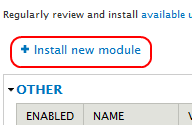
[As stated above, the 'Install new module' button/link works just fine for themes also.]
If you do not see the button/link "Install new module" at the top of the 'Modules' page, return above to this page's section Enable the Drupal core module 'Update manager' and carefully follow all of the steps outlined there.
Click "Install new module".
The page you are taken to does not have a title, but the address is [d7-root]/admin/modules/install
Go to your module's drupal.org project page, and 'Copy' the module's download link
Return to the project page for the module you want to install, and scroll down to the 'Downloads' section.
If you need help deciding which version to use, jump up to the section Understand the various module versions available.
In the 'Download' column, RIGHT-click the text-link for either the *.tar.gz file, or the *.zip file. (Windows: use *.zip)
In the drop-down 'context menu' that appears, if you use:
- FireFox - Click "Copy link location"
- Chrome - Click "Copy link address"
- Internet Explorer - Click "Copy shortcut"
Return to your site
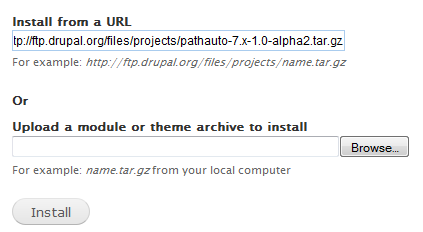
Paste the URL, which you have 'copied', into the box for: 'Install from a URL'.
[Ctrl]+[V] - I prefer to do my 'pasting' by clicking once inside the box, so that the cursor is flashing on the left. Then I hold down one of my two "Ctrl" (Control) keyboard keys, and then I press the key "V". (The MAC 'Command' key = my Windows 'Ctrl' key)
Click the button/link "Install".
This automated import process will extract all of the module's files and folders into your codebase at [d7-root]/sites/all/modules/*NEW-SINGLE-MODULE-FOLDER-HERE*
[Themes: [d7-root]/sites/all/themes/*NEW-SINGLE-THEME-FOLDER-HERE*]
"Installation was completed successfully."ꞈ
On the next page that loads, you will see "Installation was completed successfully."
Click the link "Enable newly added modules" to return to the Drupal 7 'Modules' page.
[Themes: Click the link "Enable newly added themes", and you will be taken to your site's 'Appearance' page]
Not that I am recommending it, but if you want your module moved from its current default location in the folder 'modules' at ...
[d7-root]/sites/all/modules/*NEW-SINGLE-MODULE-FOLDER-HERE*
...into a sub-folder of the 'modules', as for example, into a sub-folder named 'contrib', at...
[d7-root]/sites/all/modules/contrib/*NEW-SINGLE-MODULE-FOLDER-HERE*
...then now is the ideal time to do it-- before you start using it, as was discussed above at Using sub-folders of the 'modules' folder.
Although I recommend that you read the next two sections that describe the other two methods for importing a module into your site, you can jump over them and continue at the section Enabling modules.
Automated module import of local file - The steps
This method is used to automatically import a module into a local or online site from a *.tar.gz or *.zip file on your computer.
This 'automated' method requires you to have the Drupal core module 'Update manager' enabled. Jump up to Enable the Drupal core module 'Update manager'.
This automated import processes will extract all of the module's files and folders into your codebase at
[d7-root]/sites/all/modules/*NEW_MODULE_HERE--A_SINGLE_FOLDER*/*MULTIPLE_MODULE_FILES_AND_FOLDERS_HERE*
[Themes: [d7-root]/sites/all/themes/*NEW_THEME_HERE--A_SINGLE_FOLDER*/*MULTIPLE_THEME_FILES_AND_FOLDERS_HERE*]
Go to 'Modules' page.
Go to your 'Modules' page, and near the page-top, just under the title 'Modules', you should see the button/link "Install new module".
[As mentioned above, the 'Install new modules' button/link works just fine for themes as well.]
If you do not see the "Install new module" button/link, carefully follow all of the instructions above at Enable the Drupal core module 'Update manager'.
Click "Install new module"
The page you are taken to does not have a title, but the address is [d7-root]/admin/modules/install
Download module from project page
Return to the drupal.org project page for the module (or theme) you want to install.
Scroll down to the 'Downloads' section.
In the 'Download' column, find the version you want to download. If you need help deciding which version to use, jump up to the section Understand the various module versions available.
Click the text-link for either the *.tar.gz file, or the *.zip file (Windows: use *.zip)
Typically, that will start the download of the file.
If you need help controlling exactly where downloads are saved onto your computer, see this section on a different drupal.org page: Know your browser's file-download location; or change browser's download location. ~ drupal.org/1248034#dl_location ⎘.
Return to your site page 'Modules'
Under the heading 'Upload a module or theme archive to install', click the button "Browse".
Navigate on your computer to the location of the *.tar.gz or *.zip module file you downloaded.
Click the button/link "Install".
This automated import process will extract all of the files and folders from the archived/compressed *.tar.gz or *.zip file into your codebase at [d7-root]/sites/all/modules/*NEW-SINGLE-MODULE-FOLDER-HERE*
[Themes: [d7-root]/sites/all/themes/*NEW-SINGLE-THEME-FOLDER-HERE*]
"Installation was completed successfully."ꞈ
On the next page that loads, you will see "Installation was completed successfully."
Click the link "Enable newly added modules" to return to the Drupal 7 'Modules' page.
[Themes: Click the link "Enable newly added themes", and you will be taken to your site's 'Appearance' page.]
Not that I am recommending it, but if you want your module moved from its current default location in the folder 'modules' at...
[d7-root]/sites/all/modules/*NEW-SINGLE-MODULE-FOLDER-HERE*
...into a sub-folder of the 'modules', as for example, into a sub-folder named 'contrib', at...
[d7-root]/sites/all/modules/contrib/*NEW-SINGLE-MODULE-FOLDER-HERE*
...then now is the ideal time to do it-- before you start using it, as was discussed above at Using sub-folders of the 'modules' folder.
Although I recommend that you read the next section that describes the third method for importing a module into your site, you can jump over it and continue at the section Enabling modules.
Manual module import - The steps
With this method of importing a module, you manually put the module where it belongs into your 'local' or 'online' codebase. You will also have to extract the module's files and folders from the module's *.tar.gz or *.zip file either before or after the move to the codebase.
Download module from project page
Return to the project page for the module you want to install.
Scroll down to the 'Downloads' section.
In the 'Download' column, find the version you want to download. If you need help deciding which version to use, jump up to the section Understand the various module versions available.
Click the text-link for either the *.tar.gz file, or the *.zip file (Windows: use *.zip)
Typically, that will start the download of the file.
If you need help controlling exactly where downloads are saved onto your computer, see this section on a different drupal.org page: Know your browser's file-download location; or change browser's download location.
Local
If your site is running locally on your computer, paste the downloaded file at [d7-root]/sites/all/modules/*HERE*.
[Themes: [d7-root]/sites/all/themes/*HERE*]
Extract the file's contents into that folder by doing the following.
For Windows,
to extract the contents of the *tar.gz or *.zip file, RIGHT-click on the file, and in the drop-down context menu, click "Extract here" to use the built-in Windows extractor. Or better yet, use a program like 7-zip ~ 7-zip.org.
On modern Mac systems,
double-click the .tar.gz file.
Check the structure of the folders after a manual extraction to make sure that the module's folders are in the proper place, and are structured properly. This will be discussed in more detail in the next section Check file/folder structure after manual extraction
You can now delete the *.tar.gz or *.zip file from your computer if you like.
Online
If your site is 'online', upload the file using your webhost Control Panel, or use SFTP (secure file transfer protocol). I highly recommend against using FTP because it is not secure.
Put the *.tar.gz or *.zip file at [d7-root]/sites/all/modules/*HERE*.
[Themes: [d7-root]/sites/all/themes/*HERE*]
You can then extract the *.tar.gz or *.zip file using your webhost Control Panel 'File Manager'. Navigate to the file, highlight it, and then click the page-top button "Extract".
Or, to extract it after it is online, your SFTP program might have a feature for accomplishing that task.
You can now delete the *.tar.gz or *.zip file from your website, if you like.
Check file/folder structure after manual extraction
You should examine the files and folders structure of your module after you perform a manual extraction to make sure that everything is in its proper place.
This is not something you have to do after using one of the two automated import processes, but is something you should do after you manually extract a *.tar.gz or *.zip file on your computer, or online.
The problem lies in the possibility of the module's parent folder being created twice: Once as a parent folder, and again as a child of that parent, with both folders having the same name.
The possibility of that problem is not limited to, but is common when, for example, you are dealing with *.tar.gz files on a Windows computer.
Using, for example, the module 'Token', what you do not want to have is a parent and its child both named 'token', like this:
[d7-root]/sites/all/modules/token/token/*MULTIPLE_MODULE_FILES_AND_FOLDERS_HERE*
If you see that situation, eliminate one of the two identically named module folders by moving the *MULTIPLE_MODULE_FILES_AND_FOLDERS* up one level, so that you get this (again, using the 'token' module as an example):
[d7-root]/sites/all/modules/token/*MULTIPLE_MODULE_FILES_AND_FOLDERS_HERE*
[Themes: Similarly, using the theme 'Zen' as an example, you do not want to have multiple 'zen' folders inside of each other, and so if you see the following, it is a problem: [d7-root]/sites/all/themes/zen/zen/*MULTIPLE_THEME_FILES_AND_FOLDERS_HERE*]
Enabling modules
After a module (or theme) has been imported, it is only taking up space. It is not actively using any of your sites resources except storage space. Only after you enable it does it become active, and if you disable it, it again returns to a dormant state, just taking up space, but no longer affecting your site.
To enable your new module, go to your site's 'Modules' page.
Module enabling: In a hurry? If you put a check-mark in the box for a module on the 'Modules' page, and scroll to the page bottom and click the button "Save configuration", you will enable that module.
'Modules' page overview
On the 'Modules' page, every module that exists in your codebase had a row of its own in the tabular list.
Check-box column
The first column on the left is for check-boxes.
When the check-box is not checked, it means the module is not enabled. If you were to check it, and scroll to the bottom of the page, and click the button "Install", that would 'enable' that module.
When the check-box is checked, it means that the module is enabled, and therefore 'working' on your site.
'Name' column
To the right of the check-boxes is the module's 'human readable' name.
'Version' column
The third column is for the 'Version' of the module.
'Description' column
The fourth column is for the 'Description'.
At the bottom of the description, you will see 'Requires:', and/or 'Required by:' whenever those items are applicable to a module.
Requires: If this item exists, it will list all of the modules that your module depends on.
Those other listed modules will need to exist on your site, and be enabled for your module to work.
Following each module in that listing, you will see either see nothing, or you will see '(disabled)', or '(missing)'.
'Nothing' is good. That means that the module that your module requires, is already on your site and enabled.
'(disabled)' means the other module is on your site, but it is not enabled. You do not have to bother with enabling any '(disabled)' module, because when you try to enable your module, you will be prompted to let the Drupal system enable the '(disabled)' module for you.
'(missing)' means that the other module is not on your site (assuming it is a 'module' that is missing, and not something else, like a 'library'), and you will have to go that module's project page at Drupal to get it.
Missing libraries and other possible non-module requirements of a module
At times, a module will be dependent on something besides another module that is missing from your site, as for an example, a library.
'Required by:'ꞈ The item 'Required by', when it exists in a module's description is most helpful if, and when, you are considering uninstalling that module, because you can see which other modules, if any, that uninstalling it will affect.
The 'Required by:' modules that are listed (if any) will be followed by either nothing, or by '(disabled)'. '(disabled)' means it exits on your site, but it is not enabled; whereas if '(disabled)' is not displayed, then that module is both 'on your site' and 'enabled'.
Multiple modules packaged in one project
Please note that it is not unusual for a contrib module to actually be a of set more than one module. Yet, even if a single contrib module project comes with multiple modules, all of the modules from a single download will be found together in a single section on the 'Modules' page.
If your module came as a set of more than one module, one of them is the main module, and, usually, the other module(s) will be dependent upon the main module to work.
You will usually want to enable the main module, but you may or may not want to enable the other modules (if any) that came with it.
The description to the right of the module name (in the tabular list on the 'Extend' page) should give you a good idea of which module is the main one.
And, as explained earlier, the description will tell you which other modules it is dependent on, if any, and whether or not they already exist on your site, and whether or not they are enabled.
Do not worry though, because if the module you try to install has another module that it depends upon, and which is either not on your site, or is not enabled, you will get a helpful notice to that effect. If the other module is on your site but not enabled, the notice you will get will also be giving you the option to continue by allowing it to enable that other module for you.
If, on the other hand, the module you are trying to install is dependent upon another module that is not already on your site, you will have to return to drupal.org, and get that other module from its project page.
Also, a module might be dependent on something other than another module, as for example, upon a 'library' that needs to be found and downloaded. In that case also, when you try to enable the module, you should get a notice telling you what you are lacking.
The description for a specific module will also usually list which, if any, of the other modules you have on your site, both enabled and not enabled, that are dependent upon that module.
If it should happen to be that the module is designed strictly for development purposes, and that it should not be used on a 'live' site for security reasons, or, as another example, because it dramatically slows down the responsiveness of your site, that information would, at a minimum, have been explained on the module's project page, and might also be in the description on the 'Modules' page.
'Operations' column
The operations column will have one or more links labeled 'Help', 'Permissions', or 'Configure' if those options are applicable to that module.
Those items will be discussed individually in the next section, "Configuring modules", after you are done enabling your new module.
Enable your new module
Find your new module on the 'Modules' page
Your new module will never be in the top section 'Core', which is reserved for Drupal all of the Drupal 7 core modules that came with it originally.
Your module could be in any one of the sections that follow the 'Core' section, but, as to which one, that is dependent on how the module's developer(s) wanted to categorize it.
Scroll down the page until you find the module you just installed.
Put a check-mark in the left-hand box for any of the modules that you want to enable.
Click the page-bottom button "Save configuration"
"Some required modules must be enabled"
If you happen to be installing a module which 'requires' another module (or several) that are already on your site, but are not enabled, you will get this notice:
____________________________
Some required modules must be enabled You must enable the *REQUIRED-MODULE-NAME-HERE* module to install *YOUR-MODULE-NAME-HERE*. Would you like to continue with the above?
 ____________________________
That will be followed by a button "Continue", and a text-link "Cancel".
Click the button "Continue".
When the 'Modules' page reloads, and displays at the top, "The configuration options have been saved", then you know you have successfully enabled your new module.
If you would like to double-check that the module is installed, scroll down the module list, and make your new module has a check-mark in its box.
Broken site problems - Run the update script, and 'Clear all caches'
When my site is acting strangely, or displays bizarre errors, or displays a blank page, particularly after I have just enabled a module, the first thing I do is refresh the page I am on.
After that, I have quite often found that 'running the update script', followed up with 'clearing all caches', solves the majority of any problems.
Of the two, 'Clear all caches' is an easier, and quicker 'fix' to try, and is at times effective, but the steps below will start with 'running the update script', because that is the most thorough of the two, and is the first thing I do anytime my site is giving me trouble.
I will generally always follow up my running of the update script with clearing all caches, out of habit, since my Drupal 7 site's module 'DHTML-Menu' required me do do so every time I ran the update script.
So, the following two steps seem to me to be the most logical things to do first when addressing any site problems, and you should feel free to run the update script, or clear all caches, anytime you want.
-
# Run the update script for your Drupal 7 site
Add a single forward-slash character, and 'update.php' behind your website address in your browser.
Eg.
http://sample-site/update.phpPress your keyboard-key [Return/Enter].
At the page 'Drupal database update', click the button "Continue".
The next page should report, 'No pending updates.' Click the link "Administration pages".
If, by any chance, that page does not display 'No pending updates', but rather indicates that updates are pending, then apply the pending updates. That would, by the way, be an indication that you should have run the update script at some earlier point in time, as for example, after having updated a module, or perhaps, after updating Drupal core.
-
Clear all caches
Go to your site page: "Administration" > "Configuration" > 'Development': "Performance"
[d7-root]/admin/config/development/performanceClick the button "Clear all caches".
If any problem I have persists, then, out of blind desperation, I also 'run cron'.
Go to the page 'Reports' > 'Status Reports' and click 'Run cron' near the top of the page.
Lastly, I try a search at Google.com. If I had error reports associated with the problem, I load the first portion of the error message into the search box.
Configuring modules
Go to the 'Modules' page if you are not already there.
Go to the far right-hand side of the row for the module that you just enabled.
In that column, 'OPERATIONS', you might have one or more of the links 'Help', 'Permissions', or 'Configure'.
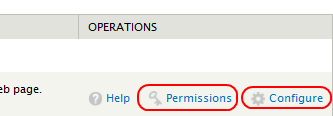
Those links, however, will only be displayed after a module has been enabled.
Save time by not having to go hunting.
I consider the 'Extend' page to be the best place to establish whether or not a module has 'permissions' options, or 'configure' options, associated with it. And, conveniently, those are direct links to those options when applicable.
It is true that a configuration page for a module will be accessible from your site's 'Configuration' page, but you need to know ahead of time whether or not a configuration page for a module even exists, and then you need to know under what heading it is located on the 'Configuration' page.
Instead, I find the module on the 'Extend' page, and check to see whether or not it has a 'Configure' link, which takes me directly to the configuration page.
It is also true that you can go to the 'Permissions' page via the Admin-menu item 'People' > "Permissions" to set permissions for a module, but it would be very helpful to know ahead of time whether or not permissions for a module even exist, and if so, it would also be helpful to know exactly under what heading name they are classified on the 'Permissions' page.
Instead, I find the module on the 'Extend' page, and check to see whether or not it even has a 'Permissions' link, which takes me to the right spot on the 'Permissions' page.
Module 'Help' link
The amount of readily available help documentation provided by the developers of a module varies between modules, both in terms of existence, depth of detail, and in its level of usefulness to new users.
Module documentation will be discussed in more detail below in the section "Module documentation and help", but for now, the 'Help' button found on the 'Extend' page will be briefly discussed in terms of its usefulness for module configuration.
On the 'Modules' page of your site, if for a particular module you see a "Help" link, click on it and see what you get.
I recommend that you at least scan the help page to get an idea of what it contains.
That page might contain details that will be relevant for you when you next use either the 'Permissions' or 'Configure' buttons for your module (if applicable).
Other module documentation and help options will be discussed below in the section Module documentation and help.
When you are done exploring the 'Help' page, return to the 'Modules' page.
Module 'Permissions' link
Not all modules have 'permissions' associated with them, but if a module does, you should be seeing a 'Permissions' link for the module to the right of its description on the 'Modules' page.
Whenever a contrib module is first enabled on your site, the 'Administrator' role is automatically granted full permissions for that module.
Yet, some modules will require that you set permissions for the 'Anonymous user' and 'Authenticated user' roles to get a module to work for those roles in the manner that you want it to.
Permissions information for your new contrib module might have been at the 'Help' link discussed just above, or it might be in 'README.txt' or 'INSTALL.txt' files at the top level of the module folder as will be discussed below in the section Module documentation and help.
Permissions overview
If you have never been to the 'Permissions' page before, it would be helpful for you to have an idea of what it looks like as you read further.
To get to the 'Permissions' page, you can click on any one of the 'Permissions' links on the 'Modules' page; or, in your page-top admin menu, click "People", and at the "People" page, click the page-top tab (or link) labeled "Permissions".
By default, your Drupal site creates three permission levels, one for each type of basic site user: 'Anonymous user', 'Authenticated user', and 'Administrator'.
The 'Administrator' role user accounts
As you might guess, you are an 'Administrator', and as such, your account is granted the highest level of permissions allowed on your site: permission to do anything and everything.
By default, every time a contrib module is first enabled, it grants full-access permissions to you, and any other user with the 'Administrator' role user account.
Note about Drupal 7 core modules not originally enabled: In the past, a Drupal 7 core module that was not enabled at the time the site was created, as for example, the 'Book' module, did not necessarily grant the 'Administrator' role permission to use it when it was enabled for the first time. That may be different now, but it is something you will want to be aware of as something to double-check after you enable a Drupal 7 core module for the first time.
The 'Authenticated user' role user accounts
'Authenticated user' accounts are accounts that are created, for example, by complete strangers, who come to your site, and register for an account.
When authenticated users are 'logged in' to their accounts, your site classifies them as having a role of 'Authenticated user', and they will be granted permission to do the things, but only the things, that you have set permissions for an 'Authenticated user' to do.
By default, the 'Authenticated user' role has relatively few permissions granted to it, but by default an 'Authenticated user' can post comments, and use shortcuts.
The 'Anonymous user' role user accounts
An 'Anonymous user', however, can do little more, by default, than view site content, and use the site-wide contact form.
You are in control
You can change the various permissions for each role as you like.
You are in control
You can also create any number of additional new accounts, and specify each account as being either an 'Authenticated user' account, or an 'Administrator' account. You give each account a minimum of a username and password, though you might also assign an email address as well.
Additional user roles
In addition to the three user roles that come with Drupal core, you can create any number of additional user roles if, for example, you want individuals that you trust to be able to administer certain things, but you do not want them to have permission to administer everything on your site.
To create another user role, at the top of the 'Permissions' page, click the tab 'Roles', and near the bottom of that page, click the button 'Add role'.
Your module's permissions
If on the 'Modules' page, you have a 'Permissions' link for your module, click that.
The 'Permissions' page for your module is at [d7-root]/admin/people/permissions
Whenever you click on one of the 'Permissions' links on the 'Modules' page, you will be taken to the 'Permissions' page at a point on the page with the first of the relevant permission(s) at the top of the window (There may be more than one permission associated with the module).
You might have to scroll up a line, bringing the window down a hair, because the permission you want might be hidden just under the admin-menu at the page's top.
Be aware, however, that if the 'Permissions' page should happen to present itself as being scrolled all the way down, then the permission you seek will probably not be at the top of your viewing window. In other words, since the page is down as far as it can go, and your specific permission is too near the bottom of the list, your permission, therefore, will not be at the top of the viewing window, but rather, somewhere in the middle of it.
The 'Administrator' column check-boxes (furthest to the right) will always be checked after you first enable a new contrib module.
Note about Drupal 7 core modules not originally enabled: In the past, a Drupal 7 core module that was not enabled at the time the site was created, as for example, the 'Book' module, did not necessarily grant the 'Administrator' role permission to use it when it was enabled for the first time. That may be different now, but it is something you will want to be aware of as something to double-check after you enable a Drupal 7 core module for the first time.
Whether or not you allow 'Anonymous' and/or 'Authenticated' users to have a particular permission is up to you.
If it is not clear to you what each permission is intended to control, and what the full implications might be behind allowing a permission for either 'Anonymous user' and/or 'Authenticated user', then please consult the 'Help' link for the module on the 'Extend' page (if the 'Help' link exists). Or, consult the 'README.txt' or 'INSTALL.txt' files at the top level of the module folder, as will be discussed below, along with additional help options, in the section Module documentation and help.
Module permissions security warning
Any permission that displays the following words, should only give given to individuals that you trust 100%.
Warning: Give to trusted roles only; this permission has security implications. And, importantly, even though a permission does not have the full warning quoted above, if it uses the word 'Administer' in its first-column description, then that item might also be a huge security risk, and should be given only to individuals you completely trust.
For example, the 'Taxonomy' permission reads, "Administer vocabularies", but it does not display the full warning above.
And yet, if you give someone permission to administer taxonomies, you will be giving them access to editing fields, which puts your site in jeopardy.
In conclusion, when a 'Permission' uses the word "Administer", only give it to those individuals who you completely trust.
Return to the 'Modules' page when you are done making changes on the 'Permissions' page.
Module 'Configure' link
On the 'Modules' page, if the link 'Configure' is available for your new module, click that.
If the link 'Configure' does not exist, then your module has no configurable options.
If it is not clear to you what a each configuration option is intended to control, and what the full implications are behind each option, then please consult the 'Help' link for that module on the 'Extend' page (if the 'Help' link exists). Or, consult the 'README.txt' and/or 'INSTALL.txt' files at the top level folder of a contrib module, as will be discussed below, along with additional help options, in the section Module documentation and help.
Module documentation and help
Some modules do not actually need you to do anything, and they just do what they do behind the scenes. Those modules, however, probably have no configurable options, or that serve only as those upon which other modules are dependent upon.
More commonly, a module you are concerned about is something that you can adjust permissions and options for. Some projects are easy to use, which is to say, their use is 'intuitive', and it will be relatively clear to you what you can adjust, and what you need to do to accomplish whatever it is that you may want to do.
If you want to know all of the relevant details that you need to intelligently use the module you just installed, then, offhand, I can think of several things you may need to do, or places to look.
The following suggestions are ordered roughly by ease-of-use.
Unfortunately for beginning end-users like us, Drupal is in constant development, and while we are lucky to be able to freely benefit from all of the great work by the developers, their time is limited, and I think it is safe to say that the best of the developers are not inclined to be the most diligent of documentation creators for the benefit of newbies, which is what we are, else you and I would not be here now.
I would encourage you to document and post your trials and tribulations as you are learning to use Drupal, for the benefit of the thousands of individuals who will in your shoes in the coming day, months, and years.
I accept it as the ultimate challenge to create this documentation, in-spite of (or because of) the seemingly endless irritations, frustrations, and aggravations-- of using the new documentation section at Drupal-- and to a lesser extent, the undo challenges of learning and using Drupal, which could have been eliminated if adequate newbie 'How-to's had previously been created by others like you and I-- but especially, I am happy in my assumption that you, my friend, will benefit from this.
You, like me, do not have to know anything about 'development' or programming to share what you 'do' know, and are learning.
Trial and error
You can just jump right in and start using the module, or start playing with its configuration options.
Or in cases where after research on your part you can not figure out what an option does, or what all of the potential implications of using an option might be, you should feel free to just try anything that your adventurous soul thinks best
Whenever you reach a point in time that a module requires guesswork on your part, you really do not have to worry about trying out any option available to you, because your site is backed up, and you can always revert to a former version of your site. You site is backed up, right?
Given that it may not be immediately apparent to you what all of the affects a module or a particular option for that module will have across your site, it is for that reason that I recommend that you only try out one module at a time, and that you navigate to every corner of you site, and try using your site in every way that you can conceive of-- creating new pages, and trying different configuration options-- before you move on to adding another contrib module.
Otherwise, if you enable more that one new module, and you then encounter problems or situations that seem weird to you, you will not know which of the new modules is responsible for that which is troubling you.
Project page content
Each module 'project page' is its home-page at drupal.org. The project page is where I usually go first both when I am considering whether or not to try out a module, or when I encounter problems, or have questions about a module I have just enabled.
If you carefully read the project page in its entirety, you can be relatively certain that you have all of the most important information you need. For example, when considering whether to try out a module, if any other modules are required for the module to work, those other modules will be listed somewhere on the project page.
The project page might also include other helpful links of interest for a variety of things relating to that module.
The project page content might be intended for new Drupal users, or might be geared toward more advanced users/developers.
Project page 'Read documentation' link (when existing)
In the right-hand column, (a column that drops to the page-bottom on mobile devices, or inside other narrow browser windows) you will always find the heading 'Resources', under which you may, or may not find a link 'Read documentation'.
Not all project pages have a 'Read documentation' link, however, and in that case, hopefully you will have found helpful documentation links in the project page's main content area.
When the 'Read documentation' link does exist, it will be to what the developer(s) consider to be the single most relevant resource for you to use to begin your quest for more information.
The contents of each project page is determined by, and under the control of, that project's initial creator, and possibly a few other individuals to whom the initial creator has given such permission.
Other drupal.org members without access to changing the project page, will, never-the-less, have very often created other d.o pages with great information about the module you want to know about. Unfortunately, however, those other pages will only very rarely have links to them on the project page
Finding those pages which are not linked-to on the project page will be discussed below in the section Google search limited to drupal.org
Module "README.txt", or "INSTALL.txt" files
The "README.txt" file has historically been the official place where all of the truly relevant and necessary information for a module (or theme) is documented, including anything relevant when the module (or theme) is updated to a newer version.
The README.txt file is in the top level folder of the contrib module (or theme) after it has been extracted, if it exists.
To view a module's (or theme's) 'README.txt' file without having to download anything, visit the URL :
http://cgit.drupalcode.org/project/PROJECT_MACHINE_NAME.git/blob/HEAD:/README.txt
Replace the expression PROJECT_MACHINE_NAME in the URL above with the short 'machine name' of the particular project.
The 'machine name' is in your browser's address-bar URL when you are at any drupal.org project page, as for example, the 'PROJECT_MACHINE_NAME' portion of this sample URL-- a URL similar to the one for every project:
https://www.drupal.org/project/PROJECT_MACHINE_NAME
If the "README.txt", or "INSTALL.txt" files do not exist, the module is probably one for which their are no configurable options, and is simply a module that works silently in the background, and is necessary for other contrib modules to work.
When there is no README.txt file, or if you want to see all of the other documentation for a project, use the following URL (replace 'PROJECT_MACHINE_NAME'):
http://cgit.drupalcode.org/PROJECT_MACHINE_NAME/tree/?id=HEAD
At the top-right corner of that 'drupalcode.org' page, you may have to 'switch' to the Drupal core version that you are interested in exploring.
Note: When the INSTALL.txt file exists for a Drupal 7 project, it might have important information not found in the README.txt file.
Google search limited to drupal.org
If you want a search that is limited to the entire drupal.org site, this is what I do. I use this method quite often for searches of drupal.org, or of any other domain of my choice.
I go to google.com ⎘ , and I type:
site:drupal.org
Note that there is No space following the colon (":") in front of the domain name. And do not use 'www.' at the beginning of any domain name.
Add a 'blank-space' following whatever the domain name is, and type whatever keywords you can think of, namely, for our discussion today, the module's name.
You might have considered using the search engine provided by drupal.org at the top of all drupal.org pages. I tried that a few times years ago, and I would encourage you to try it for yourself only if you like exercises in futility.
I have at times also found it helpful to try to limit a Google search specifically to 'Drupal 8' (instead of also getting results for D6, D7...) by adding "Drupal 8" into the Google search engine text-area box. By using double-quotation marks, Google will then return search results for pages that contain the exact two-or-more word expression in double-quotes. (...mostly.)
To see what information is available for a specific module all across the Earth, including pages both inside of, and outside of drupal.org, omit 'site:drupal.org'.
To get 100 Google search results per page, instead of 10, when you are at any Google search results page, click the top-right 'gear' icon, and in the drop-down menu, click 'Search settings'. At the next page, under the heading 'Google Instant predictions', click the radio-button "Never show instant results", Then under the heading 'Results per page', drag the slider all the way to the right. Your searches will now take an extra three-thousandths of a second, however, or something like that.
Your site's 'Module' page "Help" buttons/links (when existing)
On the 'Modules' page of your site, in the 'Operations' column for a module, you will sometimes have a 'Help' button/link for that module which takes you to a page generated by your site.
Unfortunately, however, to gain access to the help page on your site for a module, not only do you have to have the module imported into your site, but also, the 'Help' button/link will only be visible if that module is enabled. And, unfortunately, not all contrib or core modules have a 'Help' button/link available for it, but you will have no way of knowing if one is available unless you first enable the module.
For those problematic reasons, I have never relied on, nor used those 'Help' buttons, though looking at them now I see that they do often lead to pages that contain good information.
Updating the module
See the page Updating modules (Drupal 7).
Note: After you update a module that you have existing on your site (which you should only do after making a backup of both your database-- and your codebase folders: 'modules, 'sites', and 'themes'), is is a good idea to, and sometimes critical to, 'run the update script', a process detailed above at Broken site problems - Run the update script, and 'Clear all caches'.
Those instruction amount to you typing /update.php following your site address in your browser's address-bar, as for example http://www.example.com/update.php, then press your [Return/Enter] key, and on the page that loads next, click 'Continue'.
Or, to 'run the update script', click the link 'update script' at the top of the 'Extend' page.
To keep up-to-date on any issues and fixes related to your newly installed module(s)
You can create a user account on Drupal.org (if you haven't done so already), and then subscribe to the feed of each module you are using from the issues page for that module.
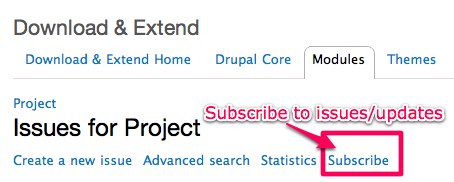
You can get to the 'issues' page for each module from its drupal.org project page, under the heading 'Issues for ...'.
Uninstalling the module
See the page Uninstalling modules.
Help improve this page
You can:
- Log in, click Edit, and edit this page
- Log in, click Discuss, update the Page status value, and suggest an improvement
- Log in and create a Documentation issue with your suggestion
