
Working with the overlay
This is documentation for Drupal 7, which is no longer supported. Learn more and find resources for Drupal 7 sites
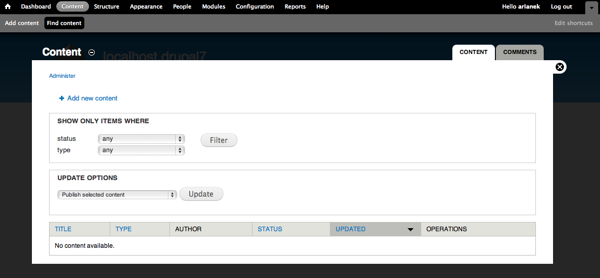
The administrative overlay makes it easier to administer a Drupal site by displaying administrative pages as a layer over the current page (using JavaScript), rather than replacing the page in your browser window. Once an overlay is active, you can use the close link on the overlay to return to the page you were viewing before you clicked the link. In a "Standard" install, the Overlay module is enabled by default.
Uses
Example
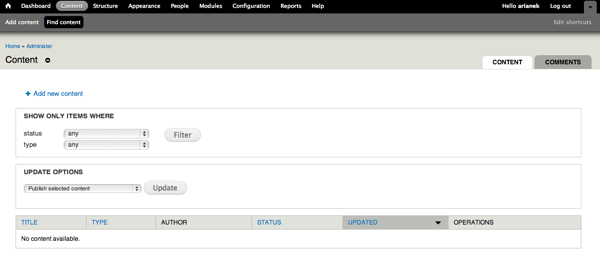
Administrative interface without the overlay:
Administrative interface with the overlay:
Accessing the overlay
When enabled, the overlay will appear when you click on administrative links. If you manually enter a URL in your browser, overlay will not be used. To reset so that overlay is used again, leave the admin section of your site, then return to the page on which you want to use overlay.
Roles and permissions
Users must have "access overlay" permission in order to see administrative pages in the overlay.
Disabling
- On the admin toolbar, click Modules.
- In the Core section, disable the Overlay module.
- Click Save Configuration.
Altering the appearance of the overlay
This is an advanced topic and the task should not be necessary in the majority of cases of Drupal administration. However, if you find that a node is not displaying correctly inside the overlay, the overlay can be modified using code.
The following example shows how to modify the overlay when a specific node type (test) is displayed inside the overlay. The script re-sizes the overlay to 450px wide and also hides some unwanted items.
If you want to alter all the layouts no matter what, then overlay.tpl.php would be a better choice.
Declare your hook:
function mymodule_overlay_child_initialize() {
  // Add our custom JavaScript.
  drupal_add_js(drupal_get_path('module', 'mymodule') . '/overlay-child.js');
}
Add the code to your JavaScript file:
(function ($) {

  // Adjust the overlay dimensions.
  Drupal.behaviors.myModule = {

    attach: function (context) {
      $('#overlay:not(.mymodule-adjusted)', context).each(function() {
        var $test = $(this).find('.node-type-test');

        if ($test.length){
          // adjust the overlay
          $(this).css({
            'width'     : '450px',
            'min-width' : '450px'
          });

          $('.add-or-remove-shortcuts', this).hide();  // hide "add short-cut" button
          $('#branding', this).hide();  // hide branding container
        }
      }).addClass('mymodule-adjusted');
    }

  };

})(jQuery);
Help improve this page
You can:
- Log in, click Edit, and edit this page
- Log in, click Discuss, update the Page status value, and suggest an improvement
- Log in and create a Documentation issue with your suggestion
