
On this page
Global settings
This is documentation for Drupal 7, which is no longer supported. Learn more and find resources for Drupal 7 sites
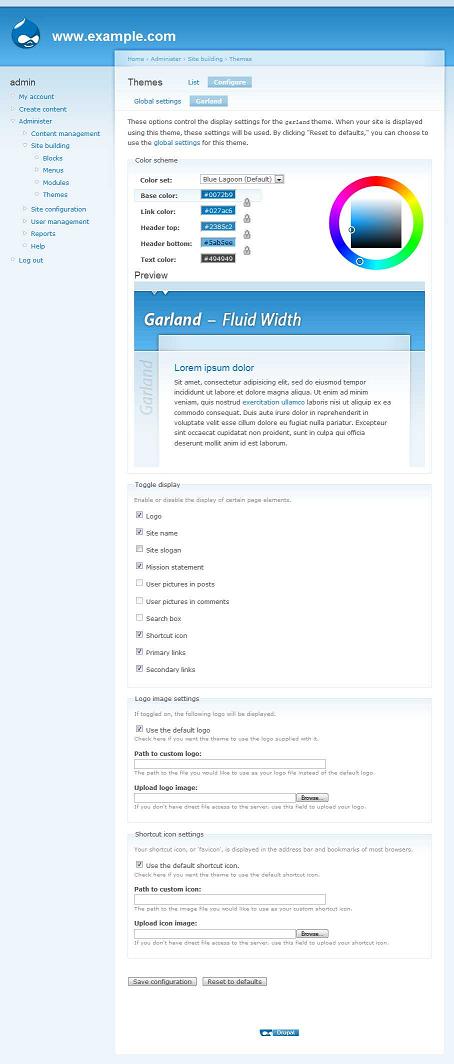
Next to List, select configure. This will show the global theme settings option where you can toggle the display of features supported by themes. Note that these are the global settings (admin/appearance/settings) and can be overridden on a per-theme basis by configuring the each theme individually.
This is a list of the default features with a brief explanation and tips to help you get started.
Note that not all themes support all features, and some may not be displayed at all (themes can hide the display of features they don't support).
- Logo
- Most themes print a clickable logo, this setting toggles it on or off. You can upload your own logo using the form on the configuration page or replace logo.png in the theme folder (most themes use the logo.png convention).
- Site name, Site slogan
- Toggle the Site name or slogan on or off. These are both set in the "Site Information" admin page. Most themes print the Site name and slogan in the header.
- Mission statement
- Many themes support a Mission statement which you can add in the "Site Information" admin page. Mission statements only print on the front page by default.
- User picture in posts, User picture in comments
- If a user has uploaded a user picture, or you have set a default user picture, you can toggle the display on or off for both nodes and comments. If these settings are grayed out, you first need to visit the User Settings admin page and enable support for user pictures.
- Search box
- Many themes print a search form, often in the header or a sidebar. If this option is grayed out you need to enable the Search module.
- Primary links, Secondary links
- These are both menus, which you can add links to either from node forms or in the Menu admin section. Many themes display Primary and Secondary links as horizontal menus in the header. Not all themes support Secondary links, but most support Primary links.

Themes - Garland
For starting out Garland has the ability for you to select several areas of its color scheme. Drupal 6 comes with fifteen preset color choices and your own custom choices. Feel free to experiment. It is required that the color module is enabled, which it is by default.
Help improve this page
You can:
- Log in, click Edit, and edit this page
- Log in, click Discuss, update the Page status value, and suggest an improvement
- Log in and create a Documentation issue with your suggestion
