
Overview
This is documentation for Drupal 7, which is no longer supported. Learn more and find resources for Drupal 7 sites
Flexibility meets simplicity
Solutions for content management struggle to balance flexibility and simplicity. If a solution is too simple, it can only be used for a single purpose; if it is too flexible, it may be too difficult for newcomers to learn.
The average content management system (CMS) is like a toy truck—specific assumptions have been made about how it will be used, and these assumptions are difficult to override. Content management frameworks, on the other hand, are like the raw materials needed to make any toy—no assumptions have been made about how they’ll be used, and the builder needs expert technical knowledge in order to make anything at all.
Drupal is designed to be the perfect content management solution for non-technical users who need both simplicity and flexibility. It accomplishes this through a modular approach to site building. Unlike other CMS's, Drupal isn’t a prefabricated toy truck, but rather a collection of wheels, windshields, axles, frames, etc., that a toy maker can easily assemble. With Drupal, a maker could create a toy truck, but she or he could just as easily create a toy airplane, submarine, or robot. For this reason, Drupal may be described as both a content management system and a content management framework—one unified system that strives to have the strengths of both, without their deficiencies.
So, whether a site builder is looking to create a news site, online store, social network, blog, wiki, or something else altogether, it’s just a matter of combining the right modules. The only limitation is the creator’s imagination.
Drupal in action
To clarify the difference between Drupal and other CMSs, consider the example of a news site. You want to be able to post news articles on the site, and you want the homepage to have a section featuring the five most recent ones. Next, you decide that you want to add a blog section, and put a list of links to the five most recent blog entries on the homepage as well.
If you were using an ordinary CMS, first you would install a plugin that handled news articles and could put short blurbs on the homepage. Next, you’d install a plugin that would track the latest blog posts and put a list of those on the homepage. Each plugin would only be responsible for tracking and managing a particular kind of content, and each would remain relatively isolated from the others.
But, what happens when you have that brilliant, middle-of-the-night idea to blend these two functions by showing a list of blog posts about the latest news items, ordered according to contributor activity? If you’re using a “toy truck” CMS, you may be out of luck. Or, you may need to hire a developer to write a custom plugin from scratch. But through the power of the Drupal way, the way of manageable abstraction, you can accomplish this task quickly and easily. Since Drupal's modules do things in a standard way and interface with a common underlying system, building all sorts of clever, customized features is just a matter of snapping parts together. In this example, you could just use Views.
Of course, this flexibility comes at a certain cost. While a toy truck is instantly understandable and ready to use without much thought, a modular vehicle construction kit will by nature require you to read the instruction manual first. The building blocks are available, but you'll need to learn how they fit together before you can take a paper prototype and turn it into a full-featured website.
Drupal core, and the thousands of contributed modules that build on it, requires an initial investment to learn but mastering the Drupal way is immensely rewarding; the passionate community is a testament to Drupal's power to liberate site builders from the simplicity/flexibility dilemma. Once you've tried Drupal, you'll likely leave your toy truck and boat in the closet to gather dust.
How Drupal does it
Intrigued yet? Let's take a closer look at how Drupal works.
People often think of a website as a collection of static pages, perhaps with some functions like a blog or a news engine thrown in to round it out. When they go to manage their site, they are thinking in terms of a tree-like hierarchy of pages that they will edit.
Drupal, however, treats most content types as variations on the same concept: a node (more on this in a moment). Static pages, blog posts, and news items (some possible node types) are all stored in the same way, and the site's navigation structure is designed separately by editing menus, views (lists of content), and blocks (side content which often have links to different site sections).
It’s a lot like the separation you find in standards-compliant page coding—XHTML provides the meaningful structure of the information, while CSS arranges it for presentation. In Drupal, nodes hold the structured information pertaining to a blog post (such as title, content, author, date) or a news item (title, content, go-live date, take-down date), while the menu system, as well as taxonomy (tagging of content) and views, creates an information architecture. Finally, the theme system, along with display modules like Panels, controls how all this looks to site visitors.
Since these layers are kept separate, you can provide a completely different navigation and presentation of your content to different users based on their specific needs and roles. Pages can be grouped differently, prioritized in a different order, and various functions and content can be shown or hidden as needed.
Nodes: The secret to Drupal's flexibility
We don't talk about "nodes" every day, but since they are at the heart of Drupal's design, they deserve further investigation. Essentially, a node is a set of related bits of information. When you create a new blog post, you are not only defining its body text, but also its title, content, author link, creation date, taxonomy (tags), etc. Some of these elements will be shown by the theme layer when the node is displayed. Others are meta-data that control when the node will show up at all - such as taxonomy or publishing status.
As suggested before, you aren't limited to a single way of presenting your site's content. You can define as many navigation schemes, custom themes, or designs for the site. You can look at some contributed themes at https://www.drupal.org/project/Themes
Comments also illustrate the Drupal way. Comments are typically thought of as part of a blogging system, but there isn't a separate "blogging system" in Drupal. Drupal simply manipulates nodes to function in a manner that most people think of as a blog. But comments can be enabled on any content type (or node) you choose - be it blog posts, news items, book pages (which provide basic wiki features) or any other type you may create. Drupal's modular system is limited only to the imagination of the site builder.
Collaborative at the core
Creating an informational website that broadcasts from “one to many” is something that most CMSs do right out of the box. Drupal shines, however, by empowering site users to create content and to interact with each other - moving from "one to many" to "many to many."
With some CMSs, you can set up a blog, and you can install plugins to handle having a community of users. But what happens when you want to give individual blogs to each of your users, sorting their contents so that they can be displayed individually with their own skins, while also generating cross-blog topical digests, top five lists, and links to elaborate, customized user profiles? What if you also want to integrate those blogs with forums, a wiki-like environment, and user-owned galleries of tagged photos? A typical CMS's approach to information makes such a scenario very difficult to implement. In contrast, the Drupal way makes such a scenario not only easy to establish, but also incredibly manageable over time.
Drupal is designed from the ground up so site builders can delegate content creation, and even site administration, to users. All a site builder has to do is define user permissions for everyone to start collaborating.
Get started quickly, customize extensively
Drupal's flexibility is incredible, but installing it is surprisingly easy. With a simple FTP upload and a few short web-based configuration questions, you can connect with your database and have your first Drupal site up and running within an hour.
Pick one of the included themes, and just start adding content. Do you want to have visitors log in? Then you should switch "authentication" on or off. Want to switch on some of the included tools? Then you should turn on "forums"; enable commenting on node types; turn on the book module for wiki-like collaboration; create forums and polls; use taxonomy to give site content structured, hierarchical categorization or free-form tagging.
Do you want your own skin applied to the site? Drupal's theme system uses tiny snippets of PHP that you can insert into the appropriate spots in your design to replace your placeholder Lorem Ipsum text with dynamic content. Drupal’s generated markup is clean, standards-compliant XHTML. No old-school tables. No cruft. No kidding.
The Drupal flow
If you want to go deeper with Drupal, you should understand how information flows between the system's layers. There are five main layers to consider:
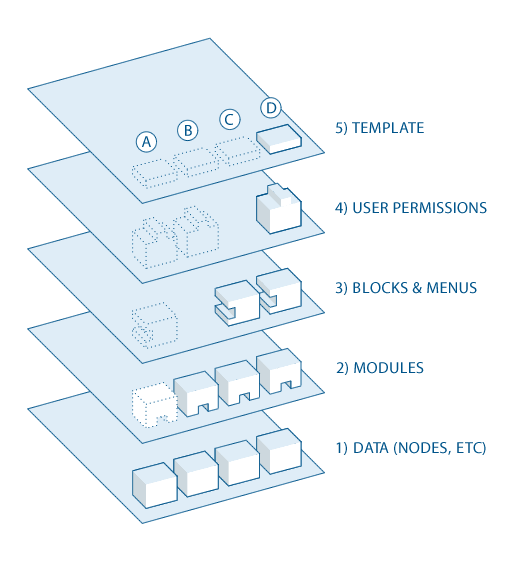
- At the base of the system is the collection of nodes—the data pool. Before anything can be displayed on the site, it must be an input as data.
- The next layer up is where modules live. Modules are functional plugins that are either part of the Drupal core (they ship with Drupal) or they are contributed items that have been created by members of the Drupal community. Modules build on Drupal's core functionality, allowing you to customize the data items (fields) on your node types; set up e-commerce; programmatically sorting and display of content (custom output controlled by filters you define); and more. There are thousands of different options within the fast-growing repository of contributed Drupal modules. They represent the innovation and collaborative effort of everyone from individuals to large corporations.
- At the next layer, we find blocks and menus. Blocks often provide the output from a module or can be created to display whatever you want, and then can be placed in various spots (Regions) in your template (theme) layout. Blocks can be configured to output in various ways, as well as only showing on certain defined pages, or only for certain defined users. Menus are navigators in Drupal, which define the content coming on each defined menu path (relative URL). Menus are a core element of Drupal which provide links to all the pages created in Drupal.
- Next are user permissions. Permissions determine what users are allowed to do and see. Permissions are assigned (or not) to various "roles", which are in turn given to users.
- On the top layer is the site theme (the "skin"). This is made up predominantly of XHTML and CSS, with some PHP variables intermixed, so Drupal-generated content can go in the appropriate spots. Also included with each theme is a set of functions that can be used to override standard functions in the modules in order to provide complete control over how the modules generate their markup at output time. Templates can also be assigned on-the-fly based on user permissions.
This directional flow from bottom to top controls how Drupal works. Is some new functionality you want not showing up? Perhaps you uploaded the module into the system but have not activated it yet, and this is making everything downstream non-functional (as in "A" in the diagram above).
Maybe the module is installed and activated, but you still don’t see what you want on your site. Did you forget to place the block, as in "B"? Or are your user permission settings conflicting with what you want and your users are not set to see the output as in "C"?
Additionally—as mentioned earlier—getting the kind of granular control you want over the details of the XHTML module outputs requires understanding this flow. Are you using a module that does exactly what you want, only you wish the markup was just a little bit different? Maybe you’d like it to use different tags, or you’d like to assign a CSS class to something? You accomplish this by copying the output function from the module and pushing it up to the functions document in your theme. Modify the code there, and when the system goes to output, it will see your customized function and use that instead.
Get up close and personal
Now that you’ve gotten a brief introduction to the Drupal way, why not install Drupal on your server or online (simplytest.me) and try it for yourself? The Installation & Configuration guide gives step-by-step instructions if you need help getting started.
Welcome to the community of Drupal users, and happy site building!
Help improve this page
You can:
- Log in, click Edit, and edit this page
- Log in, click Discuss, update the Page status value, and suggest an improvement
- Log in and create a Documentation issue with your suggestion
