
 Come together with the global Drupal community in Rotterdam, 28 Sept – 1 Oct 2026. Sessions, contribution, connection, and Early Bird savings until 8 June.
On this page
Webform FAQ and Common Problems
This page lists (very) common problems users encounter with Webform. If the question you have is not answered here, please submit an issue to the Webform issue queue, after searching issues first. If you submit an issue to the Webform queue with one of these questions your issue will be immediately closed and you'll get a link to this page. Please mention that you have researched the problem here before submitting a new issue.
Common Problems:
- Not receiving e-mails
- White screen when submitting a webform
- Unable to add or rearrange components or conditions on large forms
- IE7+ Form Cannot be Submitted (either disabled or blanked upon submission)
- Sub-tabs missing under "Webform" and "Results" tabs (can't find e-mail configuration or export options)
- Downloading webform results with very large tables causes "internal server error" (PHP fatal error)
Common Problems
- Not receiving e-mails
-
The most common cause of this problem is running your web server (or more importantly your SMTP mail server) on Windows. For whatever reason, many Windows servers are unable to send e-mails with the format
"Name of sender" <email@example.com>. Instead, they are only able to send the shorter syntax ofemail@example.com. This excellent thread discusses some of the common symptoms and resolutions of solving this problem: warning: mail() [function.mail]: SMTP server response: 501 5.5.4 Invalid Address.Solutions:
- Install the SMTP module to help your server circumvent this problem
- When configuring webform nodes, select a custom "From name" and leave the field blank. This will cause Webform to use the shorter syntax.
- Don't use Windows as your webserver. ;-)
Other notes:
Your entire Drupal installation might not be able to send e-mails. Check that you can receive e-mails by using the "Request new password" link (the Drupal path is "user/password") when logged out, or enable the Contact module (part of core) and try to receive an e-mail through that module. If you cannot receive e-mail from Drupal at all, please do not open an issue in the Webform queue.
- White screen when submitting a webform
-
Usually this is caused by your webserver running out of memory. However, you can find out what is causing this error for sure by enabling error-reporting in your PHP installation. A blank white screen in PHP is commonly referred to as a "White Screen of Death", or WSOD for short.
To see the real cause of the problem, turn on error reporting with one of these methods:
- If you're working locally, you should edit your php.ini file. Update the line for "display_errors" to look like this:
display_errors = On - If don't know where your php.ini file is or you don't have access to it, you can do the same thing by editing your .htaccess file. Find the section of PHP settings for your version of PHP. If unsure, add this line in all three places (PHP4/Apache1, PHP4/Apache2, PHP5):
php_value display_errors 1
Now, try to perform the action that got you a white screen before. You'll probably get something like this:
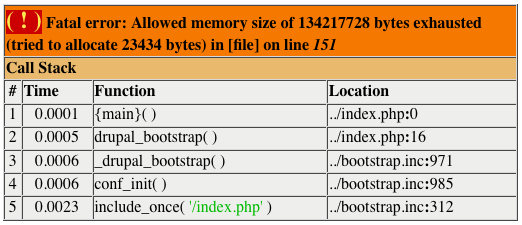
This means that Webform does not have enough memory to process the submission.
Solutions:
- Increase the amount of memory allocated to PHP. You can do this in several ways: Increase the memory_limit line in php.ini, put a line like
php_value memory_limit 64Min your .htaccess file (below the display_errors option added above), or set the memory limit in sites/default/settings.php with a line such asini_set('memory_limit', '64M');. - Decrease the size of the webform. Webforms with more than 100 components will require large amounts of memory. Webforms with more than 400 fields is strongly discouraged.
Other notes:
White screens of death can also be caused by PHP code entered in the Additional Validation or Additional Processing fields (if Webform PHP is installed). Remove any of this code or create a new webform node when trying to find the cause of an error.
- If you're working locally, you should edit your php.ini file. Update the line for "display_errors" to look like this:
- Unable to add or rearrange components or conditions on large forms
-
After adding a large number of fields or conditions to a form (around 400 components or 60 conditions), you may find that you're unable to add new components or conditionals. Rearranging the list of components or conditionals and clicking Save merely reloads the page, with no apparent action taken.
This issue is usually caused by the PHP max_input_vars setting on your server. By default, this is set to 1000. If your administrative forms contain more than 1000 values, then the remainder of the form's values are truncated (including the indication of which button was pressed). This causes the page to simply reload instead of taking an action. To resolve this problem, set the
max_input_varsvalue in your php.ini file to a higher value, such as 5000, to handled larger forms.
- IE7+ Form Cannot be Submitted (either disabled or blanked upon submission)
-
If you're experiencing a problem where the form cannot be submitted in Internet Explorer, this is likely caused by malformed HTML being present on the page. Examples could be an unclosed HTML tag, nested form tags, or unclosed quotes around an attribute. To find these problems, run your site through an HTML validator, such as the W3C Validator. See #1419162: Internet Explorer 9 and Textarea for more information on this problem.
- Sub-tabs missing under "Webform" and "Results" tabs (can't find e-mail configuration or export options)
-
Some themes may not display sub-tabs properly, which causes severe usability problems in Webform. In Webform, you should have tabs available on every Webform-enabled node that appear as follows:

Webform tabs in Drupal 6 in the Garland theme.
Webform tabs in Drupal 7 in the Seven theme.The "Results" tab also contains sub-tabs to access the table, analysis, and export options. If you do not have these tabs, it's recommended to either: A) use an admin theme for administering your site and enable the option to use the admin theme on content creation forms or B) fix or switch your theme to one that supports sub-tabs. Sub-tabs are used in many places besides Webform module, and a lack of support for them is a major bug in any theme that cannot display them.
- Downloading webform results with very large tables causes "internal server error" (PHP fatal error)
-
If you have a webform with a very large number of submissions, downloading the results from
/node//webform-results/download
can result in a PHP Fatal error saying something like "Maximum execution time of 30 seconds exceeded", the result is you get an WSOD, an "Internal Server error" page or simply the same page, but no download. This is because the script to download your results in a table exceeds your maximum execution time set in your php.ini file. To resolve this go edit your php.ini file, find the line with
max_execution_time = 30
(it might say something different from 30), and set it to something higher, eg. max_execution_time = 90
Reboot apache (or whichever webserver you use), and you should now be able to download even very large result tables from webform.
Help improve this page
You can:
- Log in, click Edit, and edit this page
- Log in, click Discuss, update the Page status value, and suggest an improvement
- Log in and create a Documentation issue with your suggestion
