

 Come together with the global Drupal community in Rotterdam, 28 Sept – 1 Oct 2026. Sessions, contribution, connection, and Early Bird savings until 8 June.
I have made a view block link to a node, most of the part works but the Genre field shows nothing. My nodes are about videogames and I can't have this detail. I test with two asin code : B002SSTELI (God of war 3) and B003RRYARM (need for speed). Do I forgot something or is this a bug ? I don't know if it's important, I use the french amazon locale.
Thanks


Comments
Comment #1
rfayI suspect that books have genre and videogames don't.
Try testing at admin/settings/amazon/test and see if genre comes back in the returned information. Then try testing with a book.
Comment #2
kiero63 commentedI 've try at admin/settings/amazon/test and genre comebacks with informations, in fact that why I ask why this field don't work in views.
edit: I've also try with a book to see result ASIN code : 226615253X and genre don't comeback with informations
Comment #3
rfayThanks. Sounds like a bug then.
Thanks for mentioning what locale you use. That's really important and helpful.
Comment #4
kiero63 commentedI have done some test that maybe can help your to understand what's wrong with Genre_field.
I have put the display field on " small image & full infos" and modify "amazon-item-details.tpl.php" file to add the Genre value.
The first thing is that the module don't use the video-game template, I've test with a book and it use well the book template.
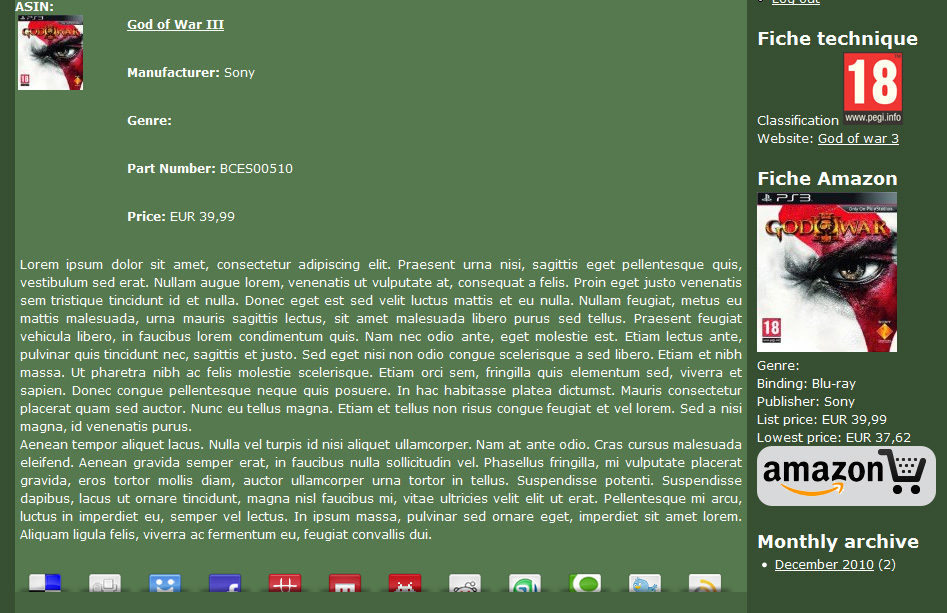
The second thing is that I can't see genre value inside node or in the views block, but it's correctly show inside the page test.
I have uploaded two pictures to show you.
Thanks
Comment #5
kiero63 commentedOops sorry for this double post...
Comment #6
kiero63 commentedSeems something as bug during my post, here the two screenshot