

 The 2026 Drupal Business Survey is open. Your response will help shape the future of the Drupal business ecosystem.
hi,
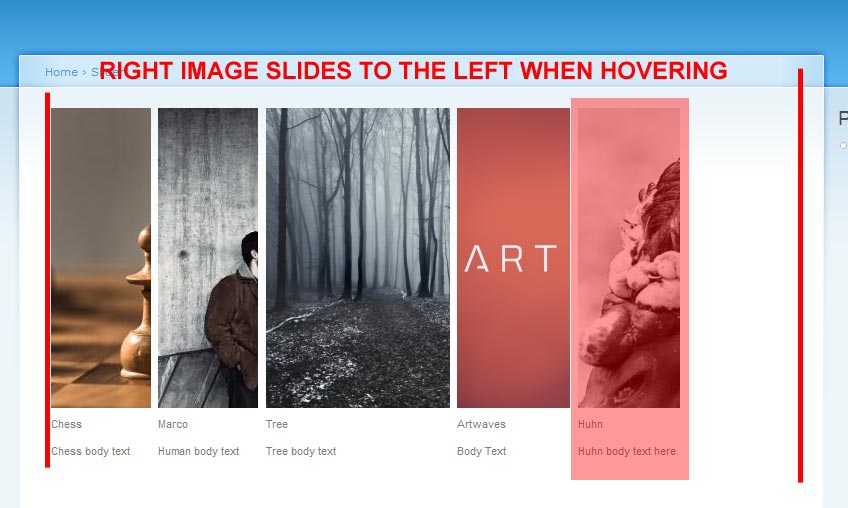
thanks for the module, its awesome. i have only one problem - the right image is losing its position when hovering fast between the images. you can see it on the demonstration page. is there a fix for that? can the right image stay fixed in its place?
this website ( http://marine.cpo.co.il/content/water-0 ) uses ur module and they somehow fixed it.
thanks.
| Comment | File | Size | Author |
|---|---|---|---|
| #6 | slider1.jpg | 51.28 KB | SHS |
| #5 | slider2.jpg | 56.7 KB | SHS |


Comments
Comment #1
marcoka commentedi hovered very fast. i can not see anything strange? wich browser?
Comment #2
marcoka commentedComment #3
SHS commentedHey, thanks for responding.
im using ff3.5.15, but i checked it also on chrome and ie8. the thing is when i hover between images the right image (the last image) will slide to the left. the first image (the far left one) will always stick to its place coz its floating to the left. the last image is also floating to the left so when hovering fast it slides to the left after the other images which gets minimized. i really hope im explaining it properly, if not i would record a video and upload it so u can see what i mean.
thanks :]
Comment #4
marcoka commentedi do not get it. i can not see any misbehavior. screenshot?
Comment #5
SHS commentedok ive got a screenshot for you.
when you hover above a given image it has an animation that maximize it and another image has an animation which minimizes it. when you hover fast and more than 2 animations are active simultaneously the width of the slider will change.
Comment #6
SHS commentedComment #7
marcoka commenteda well yes. my plan for the next release is to integrate:
http://cherne.net/brian/resources/jquery.hoverIntent.html
so that the hover will only be triggered if the user intends the hover.
Comment #8
ranx commentedsubscribing
Comment #9
marcoka commented-
Comment #10
mikeaja commentedJust to clarify, hover / hoverIntent is not the issue here.
I have hoverIntent working, but it does not change the right positioning issue.
This is happening on the demo, so don't understand how it is possible not to see this issue. It is a minor thing, but when hovering, there is movement of the other slides that are to the right of the one animating.
It happens in FF (various versions) and Chrome.
Perhaps this is a jquery animation issue? Either way, it is making the difference between this module being ok rather than great.
I've tried playing with the CSS but have not had success yet.
Comment #11
marcoka commentedi now understand the problem. the jquery needs to be adjusted. patches welcome
Comment #12
marcoka commentedComment #13
graubnla commentedThe following will fix this behaviour:
Add to your slider.js:
$('.views_horizontal_slider div.item-list li.hslider-last').css('width', maxWidth);And change
$(lastBlock).animate({width: minWidth+'px'}, { queue:false, duration:animate_in});to
$(lastBlock).not('.hslider-last').animate({width: minWidth+'px'}, { queue:false, duration:animate_in});Finally add this in your views_horizontal_slider.css
(div.views_horizontal_slider width my vary depending on your layout)
What does it do? Basicly the last item is always expanded, but just out of view because of overflow:hidden. This way the whitespace does not show up anymore.
Comment #14
stanl3y commentedOh yeah, thanks that works great!
Comment #15
dsoundmn commentedstarting port
Comment #16
dsoundmn commentedComment #17
dsoundmn commented