Needs review
Project:
Smart Crop
Version:
7.x-1.x-dev
Component:
Code
Priority:
Normal
Category:
Task
Assigned:
Unassigned
Reporter:
Created:
21 Dec 2010 at 18:26 UTC
Updated:
18 Oct 2011 at 11:44 UTC
Jump to comment: Most recent file


After I dig up my old notebooks from image processing classes I come to a though that SmartCrop can do much better. First of all there is no case that allow the images to be cut off on both sides equally when the image slices have equal or almost equal entropy and get some context while analyzing slices. Second the way as the entropy is counted is quite insane, as every color should be treated separate and final entropy should be the vector of three values, but I simplified this to count the geometrical distance to the black to have only one value. Third I've got much better results when the image is filtered to enhance edges.
All the changes I included in the patch.
| Comment | File | Size | Author |
|---|---|---|---|
| #10 | 1004456-10.png | 397.51 KB | bforchhammer |
| #1 | image.gd_.inc_.patch | 3.79 KB | vito_swat |
| #1 | test.PNG | 107.58 KB | vito_swat |


Comments
Comment #1
vito_swat commentedAttached patch and the sample crops from sample images found in #907984: Smart crop examples.
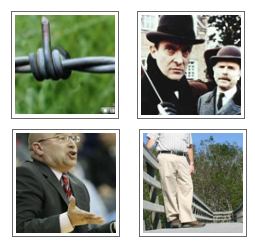
Note that changed algorithm will much more focus on sharp, edgy elements (as first plan object in most cases) giving better results in case of images in top-right and bottom left. Image in top-left still has tendency to reduce left than right side because of some bottom-left element (copyright notice?). The worst result is in bottom-right as person head was completely cut off but very edgy tree wins here and original result is not better anyway.
Images cropped with settings: scale 200x200 (upscale) + smartcrop 100x100
Comment #2
grendzy commentedI probably won't have time to review this for a while - are you by any chance going to Drupalcon Chicago?
A prerequisite to reworking the algorithm is probably a good test script and sample library... perhaps a drush command could be written to perform this task.
Comment #3
bryancasler commentedsubscribe
Comment #4
FiReaNGeL commentedsubscribe
Comment #5
FiReaNGeL commentedSo I tried this on my ghetto 5.x install for esciencenews.com and the results are overall much better than with standard smartcrop (and much, much better than just center crop, of course). This gets +1 from me.
Comment #6
vito_swat commented@grendzy I'm not sure if I'll ever be on any drupalcon as I have little free time to spend on drupal community, sorry. I agree that good sample library is very needed here and this should be different kind of images in different forms and sizes. Drush script is not needed as configuring some testing image profiles is not big deal and creating lots of thumbnails in one click is simply matter of good views.
@FiReaNG3L if you tested it on the bigger number of pictures, can you share some screen shots comparing standard and new method? My use case is very specific as I need smart crop mainly for graphic works where edges play very important role, but I found out that for common photos this also has good results.
I think we can improve even more by trying to incorporate color information into algorithm (we can even think about busting skin colors during entropy calculation for better people recognition) but this implies to change image into HSV or similar color model. Unfortunately I cannot find fast method to change into HSV color model and work on that data in easy way. Any help here will be much appreciated.
Comment #7
FiReaNGeL commented@vito: it's running live on esciencenews.com - every thumbnail there is generated with it. I'm afraid I don't have available screenshots with the old algorithm, but it was definitively much better.
Comment #8
rwohlebsubscribe
Comment #9
karljohann commentedSubscribe
Comment #10
bforchhammer commentedJust tried this as well; results are overall mostly better with the patch, but there's also cases where it makes it worse. Attached are some examples for profile pictures. The green ones (1+5) I'd consider better, the red one (3) is definitely worse with patch, the orange one (4) is different but still fine; the remaining two are pretty much the same with and without the patch.
Hope this helps. :-)