Closed (works as designed)
Project:
BeautyTips
Version:
6.x-2.0
Component:
User interface
Priority:
Normal
Category:
Bug report
Assigned:
Unassigned
Issue tags:
Reporter:
Created:
22 Dec 2010 at 16:43 UTC
Updated:
25 May 2012 at 20:15 UTC


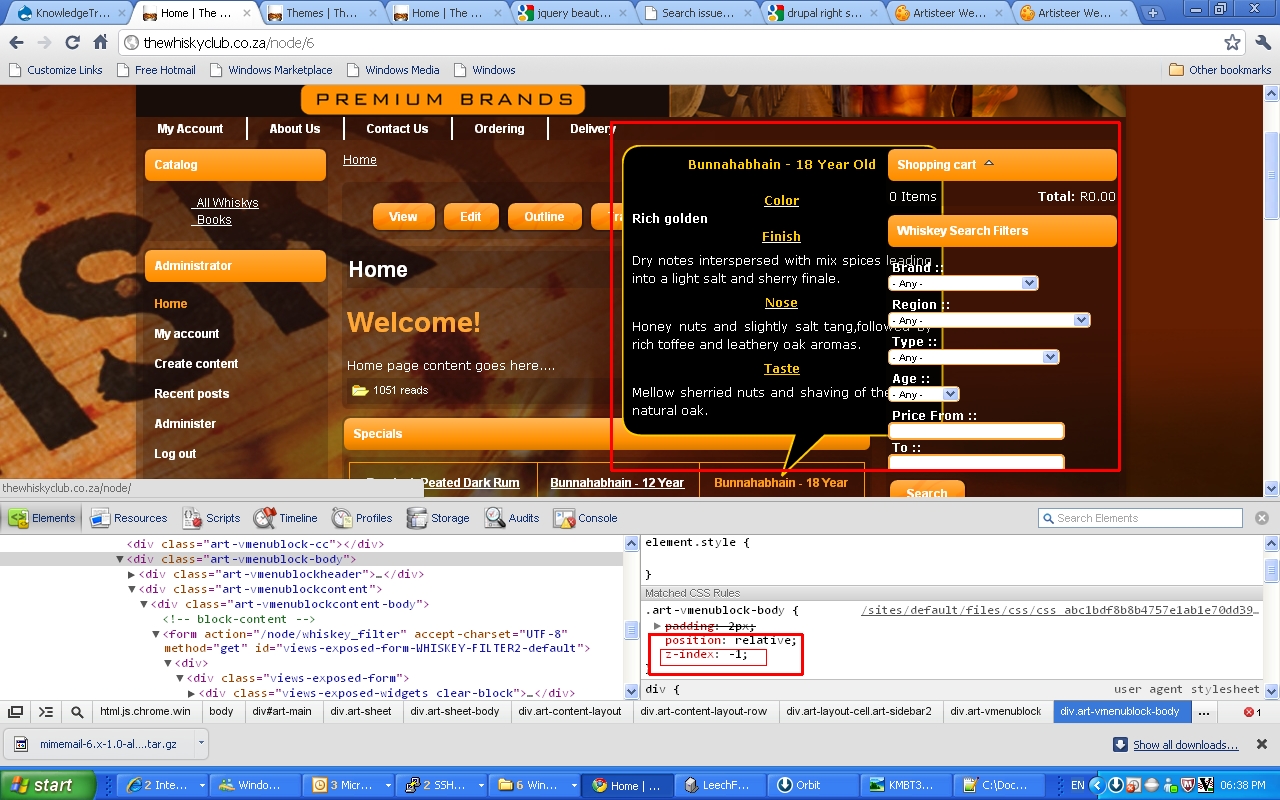
It seems to be a problem with z-index styling, althou i'm not getting it resolved.
On my site the menu bar and the right navigation items display on top of the tool tips instead of the other way round.
After setting both of these to z-index: 0 the menu is now displayed under the the tip but not the right menubar.
Any insight into the problem will be apreciated. I have edited the beautytips.min.js and set the zIndex at values between 99 and 19999 with no diffrence in behavior.
The theme i use has been buiuld with artisteer.

Comments
Comment #1
vacilando commentedVery similar problem - tips created on items in a side bar float under the main body content in the Fusion theme Mix & Match. Is there a quick way to fix display level issues like this?
Comment #2
taisei516 commentedsame problem. fusion custom theme..
Comment #3
upasaka commentedI had the same issue with a fusion sub-theme, I got it working by using "overflow:visible" in CSS for the blocks that had the issue.
Hope that helps.
Comment #4
izmeez commentedsubscribing
Comment #5
vacilando commented@upasaka, thank you, that was a solution. I simply added the following to my module's CSS:
I hope the maintainer will fix this in the module (or is it something that has to be done in Fusion theme?)
Comment #6
erald commentedI have/had the same problem part of the solution for the sidebar was #5. But still had the problem with the primary menu.
In my style there was a z-index:5; for the menu. Changed that to z-index:0; and it worked.
Looks like the z-index in the script does not do anything.
Comment #7
brunorios1 commentedsame problem here with fusion sub-theme...
Comment #8
jakemonO commentedthe issue is actually a css spec issue. the z-index is relative to the parent element. What you'd want to do is set the beauty tip param 'offsetParent' to 'body'. Unfortunately, this seems to affect spike's location in Firefox
Comment #9
kleinmp commentedThis is really more of a css issue on individual sites and I don't think it's really a bug. If this is bug, then it will have to be reported on the jquery plugin, because the plugin decides where the beautytip content is place within the DOM.
As @Vacilando noted, the workaround is to set the overflow as visible, if you can. Setting the offsetParent as @jakemonO noted is also a possibility. You'd have to play around with those things to see what works best for you.
Comment #10
ascii122 commentedCould you tell me where exactly to do this ? and maybe what the line of code should look like? I'm having a similar problem and overflow didn't help. I've tried a few variations of offsetParent but keep getting errors.
thanks
Comment #11
ascii122 commentedFound an update for my theme and now it works great
http://www.valleyflorafarm.com/node?mini=calendar%2F2012-06
cheers
-z