Setup:
Drupal-7.x-dev
Installed Modules:
IMCE 7.x-1.0-beta1
IMCE Wysiwyg API bridge 7.x-1.x-dev
Wysiwyg 7.x-2.x-dev
Libraries:
CKEditor 3.5.0.6260
TinyMCE 3.3.9.3
I tried this on 2 different fresh installations of drupal-7.x-dev (released on 2010-Dec-23). I installed the modules and configured the wysiwyg profile for FullHTML to display the IMCE button. When i add new content with textarea fields the standard wysiwyg buttons appear as usual. Just the IMCE button won't show up.
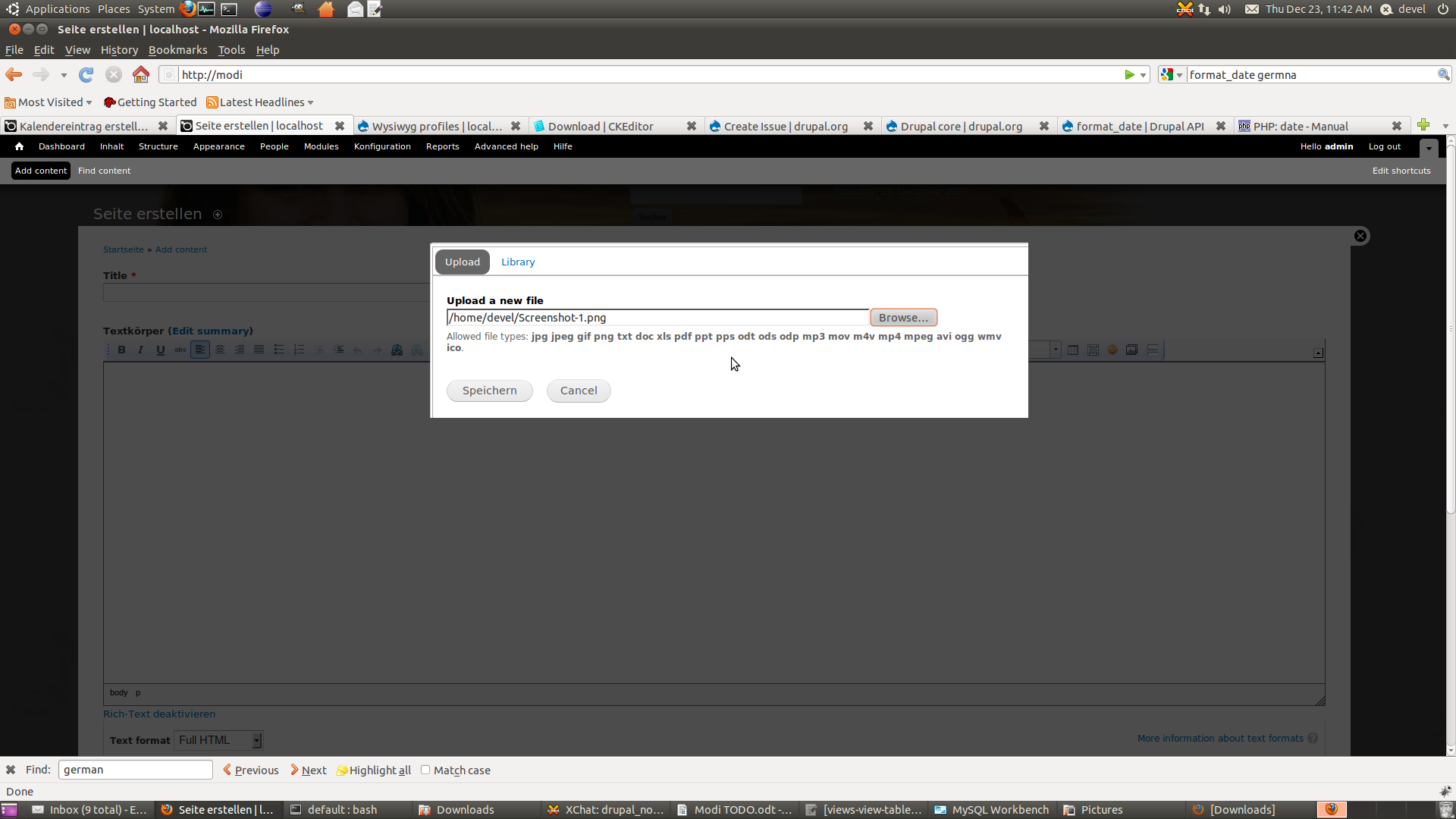
On another installation with drupal-7-rc2 (same module versions) the IMCE button appears as expected in the wysiwyg bar. When i try to upload a picture the process freezes on a black lightbox screen without any content in it and the picture isn't placed within the textarea, it gets uploaded though. Look at the attached pictures for this error.



Comments
Comment #1
DrupOn commentedI'm not sure that this is a imce wysiwyg bridge issue. Maybe it's related to IMCE or wysiwyg as well.
Comment #2
kellylan commentedI'm having the same problem with rc4. The IMCE button does not show at all for me. I enable it in the settings, but it does not show up with the other enabled buttons.
Comment #3
webdesigncapetown commentedI am getting the same thing. Anyone have any fixes?
Comment #4
BillyIdle commentedI had a problem with this as well, and my solution was to make sure the Image button was selected under the Buttons and plugins area of the WYSIWYG profile config. Hope this helps.
Comment #5
DrupOn commentedWhat version of Drupal and the Modules are you using BillyIdle?
Comment #6
BillyIdle commentedUsing D7 stable with imce 7.x-1.1, wysiwyg 7.x-2.x-dev (2010-Dec-19) and imce_wysiwyg 7.x-1.x-dev (2010-Jul-11).
Comment #7
anruethersubscribe
Comment #8
Anonymous (not verified) commentedSame problem here.
Arround rc3 the buttons disappeared.
Comment #9
Anonymous (not verified) commentedWhen using TinyMCE, press Insert/Edit Image and beside the Image URL text field there's a Browse button that will enable IMCE
Comment #10
alarez commentedsubscribe
Comment #11
mjohnq3 commentedI just wanted to chime in and say that everything works correctly using the latest versions of all the modules with Drupal 7.0. You need to make sure that you select the checkbox for the image button and for the IMCE plugin.
Comment #12
David Hernández commentedHi there,
I've testet this with Drupal 7.0, wysiwyg 7.x-2.0, IMCE 7.x-1.1, the latest imce_wysiwyg dev and the latest tinyMCE and I can't reproduce the error. The module works fine.
If you want to add the button, follow the next steps:
- Install the modules: Wysiwyg, IMCE and IMCE Wysiwyg bridge.
- Add the TinyMCE library to sites/all/libraries
- In the settings page of IMCE (admin/config/media/imce) add the profile you want to the roles.
- Configure Wysiwyg as usual and add the buttons Image and IMCE.
Regards,
David.
Comment #13
xurizaemonThanks David, that was the issue which threw me too: you need to enable BOTH the Image and IMCE buttons.
A little JS error checking might be a nice UI improvement there.
Confirmed working for me using CKEditor with: IMCE 7.x-1.2, Wysiwyg 7.x-2.0, IMCE Wysiwyg Bridge 7.x-1.x-dev latest.
Comment #14
mgiffordI missed adding the profile to the role. After that it worked just fine.
Comment #15
Sborsody commentedThe IMCE plugin didn't appear at first on Wysiwyg's buttons and plugins table. I'm not exactly sure what I changed to get it to appear, unfortunately. I disabled then re-enabled imce_wysiwyg and had changed some permissions setting. I did _not_ flush cache.
Comment #16
palamidaras50 commentedYes Sborsody, your post helped me out.
It is a permission issue. For some reason in the People->Permissions tab the IMCE is not permitted for any role, even for administrators. You have to grant this permission in order to show the IMCE checkbox in the WYSIWYG profile
Comment #17
rossmerriam commentedThanks for the help David. I was missing the Imce_wysiwyg step.
Comment #18
David Hernández commentedHi again,
I'm glad to see that my comment help some people. I think we can close this issue. If someone still have problems, can reopen again.
Regards,
David.
Comment #19
SannyVeloo commentedHi Guys,
I am using the latest release of Drupal the modules WYSIWYG 7.x-2.1 and CKEditor 3.6.4.7575 as a library along with the IMCE WYSIWYG Bridge module (latest dev version).
The "Browser Server" button is appearing when I access it through the Image and Link buttons. But althought the IMCE button is enabled in my CK Editor settings, it is not displaying in the CK Editor toolbar.
This used to work for me with CK Editor installed (not via WYSIWYG) and IMCE Bridge. It's just now with WYSIWYG + CK Editor library, it's not picking up the icon on the main toolbar...
Any ideas?
Cheers
Sanny
Comment #20
Taxoman commented#16: I often make the mistake of assigning the new profile i create for IMCE only to "authenticated users" role, expecting it to be inherited if all the above roles in that list are set to "None", but that is not enough.
The desired profile must be chosen for each of the roles for the button to show up.
That is not expected behaviour IMO, can even be seen as a bug.
Comment #21
mulk commentedIf you want to have the "IMCE button" in your CKEditor toolbar, don't forget to check the box:
"Plugin for inserting files from imce without image dialog"
in: CK Editor profile > Editor appearance
because it's unchecked by default...
Comment #22
Z2222 commentedThis is why it wasn't working for me. The IMCE checkbox didn't appear on the WYSIWYG editing page unless I added "administer IMCE" to another role on the permissions page. Very strange...
Comment #23
titkiller commented#21 was the point taht I was missing. After I have checked "Plugin for inserting files from imce without image dialog" in CKeditor > Editor Appearance for both filtered and Full hrml , IMCE button started to apeear. Thanks guys.
Comment #24
mamtarani commentedi have istalled drupal includind tinymce editor bt m not getting the IMCE button