
On this page
- Purpose
- Application process description
- What happens next?
- FAQ
- Where do I see if I can opt projects into security advisory application?
- Do I need to apply for each new project I create?
- Do I need to create a new release each time I fix what reported in a review?
- Do applications verify the projects used for them are bug-free?
- Can I apply using a project for which I am offering to become maintainer?
- Can I apply using an issue branch I created for a project?
- When I apply to be able to opt into security coverage and the application is marked as fixed, will all the maintainers of the project used for the application be able to opt into security coverage?
- Can a person who works on the same organization I work create an application to be able to opt into security coverage using a project where I committed all (or most of) the code?
- Do I need the permission to opt into security coverage to become a project (co-)maintainer?
- I applied to opt into security coverage advisory, I got the permission, but when I edit my project, I am not still able to opt the project into security coverage advisory. Why?
Apply for the permission to opt into security advisory coverage
Please read Security advisory process and permissions policy carefully. Once opted into security advisory coverage, you may not opt-out. Only the Security Team will be able to change this.
Carefully read the Purpose section in this page and Pre-requisites for applying for the permission to opt into security advisory coverage sections on this page. It will avoid the application is closed as won't fix or requires more time to be accepted.
The purpose of these applications is giving to people who apply a Drupal role. Once the role is assigned, it is not necessary to create another application, as it would just end up with assigning the same role already assigned.
You may go through a one-time review process to get permission to opt your projects into security advisory coverage.
This shows people can be more confident in running your project on their site and re-affirms your agreement to work with the Drupal Security Team when necessary.
Purpose
The purpose of these applications is assigning a new Drupal.org role after verifying what you understand of writing secure code that follows the Drupal coding standards and correctly uses the Drupal APIs, following the Drupal best practices, and promoting collaboration over competition.
While the application requires to choose a project for which you committed the code, the focus of the application is not the project.
Application process description
- Obtain basic Git access and create a project for your code. If you already have a project, or you are maintainer for a project where most of the (or preferably, all the) commits have been done by you, this step is not necessary.
- Get your project into a state you feel is release-ready; ideally, you would commit the project early and have a track record of several weeks/months of commits so that application reviewers can get an idea of your development and maintenance style.
- Have a look at the security advisory coverage applications checklist and try to resolve the common issues.
- Once ready, create a new issue in the Drupal.org security advisory coverage applications queue.
- Fill out the issue form.
- Title: The branch name and the project name (For example, for the 2.0.x branch of the Spam Control project, the title would be [2.0.x] Spam Control.)
- Category: Task
- Status: Needs review or, if you want reviewers wait before reviewing the project, Active
Project moderators will add a comment as reminder that a review is done only when the status is Needs review. That does not mean the status must be immediately changed. Take your time to do the necessary changes before reviews start. If you think you need more than seven days before the status is changed, please leave a comment stating that. - Component: Select the option that better describes the type of project used for the application
- Description
- Write a description of what your project does, including how it is different from similar projects (if applicable)
- For themes, a screenshot is also helpful
- Add the link to the project page
- Add the links to reviews of other project applications you did
- Reviewers will then examine the project files and provide feedback over the coming days/weeks (again see Review process for security advisory coverage: What to expect). Please be patient and make the requested changes.
- As the application process is fully volunteer driven, the review bonus program can be used to prioritize which applications are reviewed first. This program gives priority to those who are also helping to review other applications. Participation is not mandatory, but it does provide a significant fast-track through the applications process. Due to limited resources, it could otherwise take a number of weeks between reviews of your own application. To participate in the Review Bonus program, review three other applications and reference them in your own application. We are a community and we help each other, so we are counting on you!
- Once given the sign off, you will be able to opt all your projects into security advisory coverage.
Once this comes into place, there is no need to submit another application for review, since (at this stage) you are considered a trusted contributor.
What happens next?
Once the application is set as fixed, and you have got the role that allows you to opt projects into security advisory coverage, you can edit the project to change the value assigned to the Security advisory coverage field.
You will be able to opt into security advisory coverage every project you create, including the ones created in the past. There is no need to open a new application for a different project.
See Application checklist and What to expect from the review process for more information on the application workflow and how to make the application approval faster.
FAQ
Where do I see if I can opt projects into security advisory application?
On your profile page, you will read Can opt projects into security advisory coverage, as in the following screenshot.

Do I need to apply for each new project I create?
You need to apply only once.
Once the permission to opt into security coverage is given, you will be able to opt every project you create and every project you created into security advisory coverage.
Do I need to create a new release each time I fix what reported in a review?
We do not require that the project used for the application has releases. All the code can simply be committed in a branch. We expect the code is complete for the features described in the project page and close as possible to release candidate quality code. This means, for example, the project should not contain debugging code, or that the most important hooks/functions/methods, without which the project would not work as expected, must be implemented.
Do applications verify the projects used for them are bug-free?
We do not review projects to fix all the bugs in the code.
Reviewers could try to run the project, and report problems they had with the project, but that should be done to point out the code is possibly using the Drupal API in the wrong way. It should not be done to make the code 100% free from bugs.
Can I apply using a project for which I am offering to become maintainer?
You can only use a project for which you committed most of the code in a branch for that project.
This means that, for example, if you are co-maintainer of that project and you want to become maintainer (user with all the permissions on that project), or the new project owner, then you can use that project for the application, as long as there is a branch in that project with code committed mostly by you. This is only required for the offer to be handled by project moderators; project maintainers do not necessarily ask the person offering to be co-maintainer or maintainer to be able to opt projects into security advisory coverage.
Can I apply using an issue branch I created for a project?
An issue branch or a merge request cannot be used for these applications, as the reviews done for these applications can require changes that are not allowed in an issue branch, which is instead used to fix a particular issue in a project. For example, an issue created to change code that uses a deprecated function (or method) cannot be used to fix the content of the README.md file, while a review done for these applications could require you to change the content of that file, or other files.
When I apply to be able to opt into security coverage and the application is marked as fixed, will all the maintainers of the project used for the application be able to opt into security coverage?
Only the person who created the application will be able to opt projects into security advisory coverage. The other co-maintainers/maintainers of the project who cannot opt projects into security advisory coverage will need to create other applications.
Can a person who works on the same organization I work create an application to be able to opt into security coverage using a project where I committed all (or most of) the code?
A person who works on the same organization you work cannot use a project with code committed by you for these applications.
These applications are for giving a new permission to accounts, not to change the projects' status. We need to understand what the person who applies understands about writing secure code that correctly use the Drupal API and follow the Drupal coding standards, not what the project maintainers collectively know about those topics.
Do I need the permission to opt into security coverage to become a project (co-)maintainer?
Being able to opt projects into security advisory coverage is only necessary when the offer is handled by project moderators. Project maintainers do not usually check that, although some of them could.
I applied to opt into security coverage advisory, I got the permission, but when I edit my project, I am not still able to opt the project into security coverage advisory. Why?
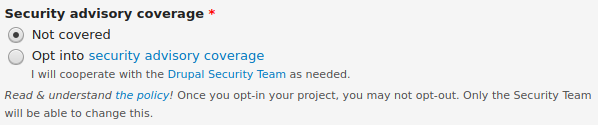
When the project has been created less than 10 days ago, it is not possible to edit the field to opt that project into security advisory coverage. The field will appear as in the following screenshot.

When the project has been created more than 10 days ago, that field will appear as in the following screenshot and you will be able to opt the project into security advisory policy.
Help improve this page
You can:
- Log in, click Edit, and edit this page
- Log in, click Discuss, update the Page status value, and suggest an improvement
- Log in and create a Documentation issue with your suggestion
