

Closed (works as designed)
Project:
Drupal core
Version:
7.x-dev
Component:
taxonomy.module
Priority:
Normal
Category:
Support request
Assigned:
Unassigned
Reporter:
Created:
3 Jan 2011 at 05:30 UTC
Updated:
18 Nov 2011 at 00:38 UTC
Jump to comment: Most recent file

Comments
Comment #1
catchTaxonomy module select options are now set when setting up fields in the field UI, it's not handled in taxonomy admin pages at all now.
Comment #2
sammyman commentedI just setup a new taxonomy term and looked at the fields UI and cannot see the select options anywhere. Is this where I would see those options?
http://www.domain.com/admin/structure/types/manage/forum/fields/field_tag
Comment #3
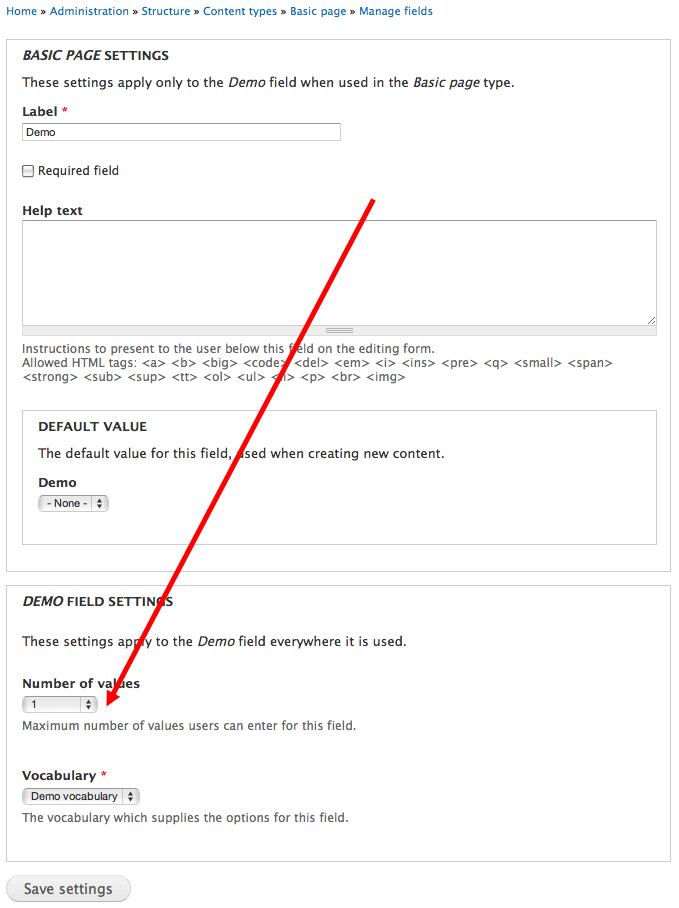
jbrown commentedYou need to set number of values to unlimited in the field settings.
Comment #4
sammyman commentedIn the field settings, all I see is this:
There is nowhere where I can set the number of values to unlimited, even when setting up a new vocabulary.
Comment #5
jbrown commentedClick on the edit tab beside field settings and you'll see it at the bottom.
Comment #6
damien tournoud commentedComment #7
sammyman commentedAll I see in the edit tab is "Forum topic settings" and "Tags field settings", both of which don't give the option to multi select.
Comment #8
jbrown commentedUnder "Tags field settings" there should be a field called "Number of values".
Comment #9
sammyman commentedNot on my version of Drupal. Doesn't exist. I actually created a few new taxonomies hoping to see that option but it isn't there. Maybe I can do it manually in the database for a temporary work around.
Comment #10
jbrown commentedCan you post a screenshot?
Comment #11
xjmThis is an option on the taxonomy field, not the vocabulary. Go to
admin/structure/types/manage, select the content type, and then add or edit your taxonomy field. On the field edit tab, you will have the option to set the allowed number of values. Change to "Unlimited" to allow an unlimited number.