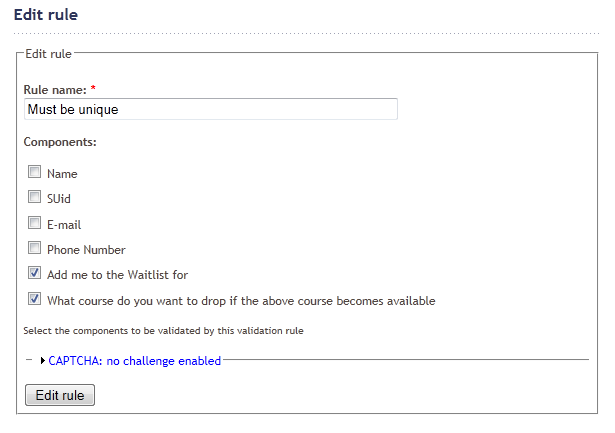
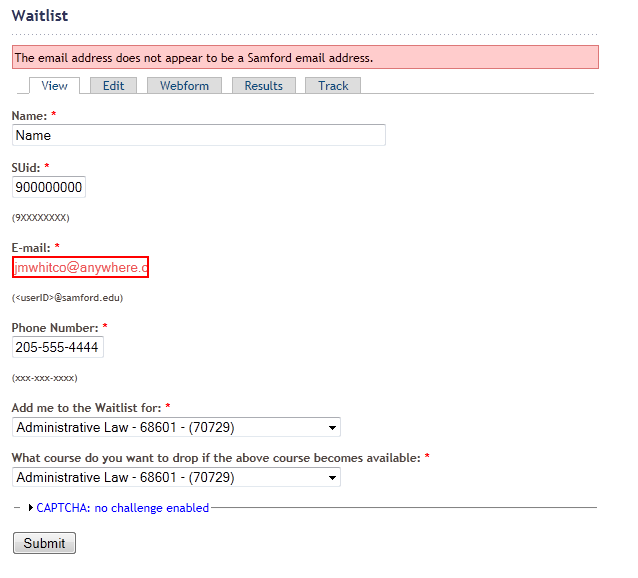
Hopefully I'm doing something wrong, but I have a form where I have two select lists and I want to validate that there is a different value in each field. I have set a rule for Unique Values, chosen the two select lists. When I complete the form, choosing the same value in both select lists, the form doesn't give an error (I purposely gave an invalid Email in the attached screen shot, so the form would show errors instead of submitting).
I saw a few issues on this problem, including http://drupal.org/node/802532, which appears to be my exact issue, but it's not working properly for me.





Comments
Comment #1
svendecabooterNew validation rules that aren't user-contributed will not be created until the next bugfixing release has been shipped.
So marking this as postponed for now.
Comment #2
svendecabooterNevermind, it's no new validator request.
I'll try to reproduce your problem when I find some time...
Comment #3
svendecabooterHi,
Sorry for the late reply. If you are still encountering this problem, could you give me some more info on your set up?
Because in my tests it's all working as expected.
Which version of Drupal and Webform are you running?
What are the keys you used for the select options? Were they numeric?
Are you sure both select lists use exactly the same keys?
Comment #4
jmwhitco commentedI'm using Drupal 6.21 with Webform Validation 6.x-1.4 and Webform 6.x-3.11. When I have two Course selection lists, with Multiple unchecked, Mandatory checked, Listbox checked, Randomize unchecked, and I set them to be unique through Validation, I can choose the same value in both and no validation error is displayed, and the form will submit with the same value in both select boxes.
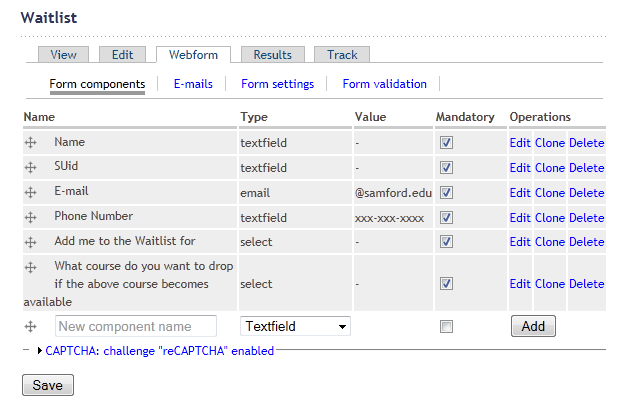
Attached you will find screen shots of the Form Components screen showing the two Select boxes, the form validation screen showing the rule setting the two fields as being unique, the rule edit screen, also showing the rule for the fields to be unique, and a submitted form with an invalid email address showing that the two select boxes have the same value and no error stating they must be unique.
I've also added the select box contents in case there are disallowed characters that are causing the validation to fail.
Please let me know if you need any other information to assist in reproducing the issue.
Comment #5
svendecabooterComment #6
wizonesolutionsThis still an issue? Seems like it might be fixed in -dev.
Comment #7
liam morlandPresuming fixed. If this is still a problem, please re-open and provide details.