

Postponed
Project:
References
Version:
7.x-2.x-dev
Component:
Code: node_reference
Priority:
Normal
Category:
Feature request
Assigned:
Unassigned
Reporter:
Created:
5 Jan 2011 at 20:21 UTC
Updated:
8 Jan 2013 at 21:43 UTC
Jump to comment: Most recent file

Comments
Comment #1
danielb commentedI was going to suggest this myself eventually. I've built this into a few modules like Block reference because some people don't want the autocomplete but still want to reorder the values.
Comment #2
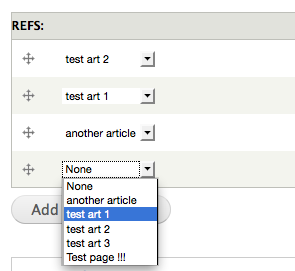
moondev commentedI think it may work if I dynamically replace the textfield with a drop-down with jquery, and make sure the values sync up. But I just need a way to get a list of all the available nodes. Then the top select option could have a "none" option with a value of "" (same as highlighting an autocomplete node and deleting the contents.
I know this is hackish but I am desperate for this feature!
Comment #3
moondev commentedWell, I got it to work with some jquery! A cool side effect of this is we can hide the [nid] since that info is stored in the select value attribute anyway.
The only issue I am having is I cant seem to target the click event for the "add more items" submit button. I need to call my magic function when that gets clicked otherwise the fields revert back to autocomplete textfields. Any ideas?
Also note that the attached js is more of a proof of concept and is nowhere near polished enough to be solid
Comment #4
moondev commentedFound out that the "add more items" event is chained to the mouseDown event. But there was still the problem of waiting for the ahah response to comeback. So I just attached the function to using jQuery's awesome $(document).ajaxStop. Works like a charm!
Just include this file into the footer of your admin theme.
It currently will automatically apply the swap to any autocomplete nodereference field, but I am working on putting this into a module so you can select which items to apply it to, or maybe make it it's own widget.
Comment #5
moondev commentedOne more update:
Fixed a loop with the ajaxstop function and allowed the ability for multiple multi-drags to be on one page
Comment #6
moondev commentedFYI: I have made a drupal 6.x module for this
http://drupal.org/node/1017756
Comment #7
rogueturnip commentedI'd love to use this. Could you post steps on what to do with the JS file?
I'm trying to use node_reference as a field in the module I'm building so ideally I'd like to tag it into that if possible.
Comment #8
jason.fisher commentedChanging that order will affect the deltas stored the database? Could this work for ordering a list of checkboxes?
Comment #9
moondev commentedI know this is late but figured i would post if it helps anyone. An easy way to accomplish this is to use the fieldgroup module http://drupal.org/project/field_group
Simply create a new fieldgroup, and add a single select-widget node reference. Then make the fieldgroup set to unlimited. Voila! Draggable select boxes :) Hope this helps someone.
Comment #10
drawk commentedI did not see a way to make #9 work, at least in D7. "Then make the fieldgroup set to unlimited" - there doesn't seem to be any such option.
Comment #11
jason.fisher commentedMaybe #9 meant the field_collection module?
Comment #12
danielb commentedI can confirm this is possible with Field collection
http://drupal.org/project/field_collection
Comment #13
Alex Andrascu commented