

Closed (fixed)
Project:
Drupal core
Version:
8.0.x-dev
Component:
Bartik theme
Priority:
Normal
Category:
Bug report
Assigned:
Unassigned
Issue tags:
Reporter:
Created:
6 Jan 2011 at 22:37 UTC
Updated:
29 Jul 2014 at 19:16 UTC
Jump to comment: Most recent, Most recent file







Comments
Comment #1
droplet commentedneed some more tests, may broken other place
Comment #3
droplet commented#1: bartik.patch queued for re-testing.
Comment #4
benjifisherI noticed this problem, too. I applied the patch in #1. It adds vertical space where needed, but also where not needed. Instead of using the CSS selector
fieldset .fieldset-wrapper, I suggest usingfieldset legend + .fieldset-wrapper.This is my first time submitting a patch. Please point me to any rules I have broken.
I have attached a patch and three screen shots. The screen shots show two blocks, one with a legend (title) and one without; unpatched, after applying the patch in #1, and after applying my patch.
Comment #5
droplet commented@benjifisher,
how to create patch: http://drupal.org/patch/create (check out git part, more simple)
now we still supports IE6, so avoid use "+ selector".
attached a new patch for test.
Comment #6
benjifisher@droplet,
Thanks for the advice. Maybe I will set up git tomorrow. For today, I will stick with patch and diff.
I like your idea: move the legend on top of the fieldset, then make the top margin of the fieldset big enough to hold the legend. BUT you moved the legend up too much. (At least, that is what I see: Firefox on Mac OS, looking at
node/9/edit.) ForlegendI changedtopfrom -30px to -2em (or -24px). (Sinceheightis declared to be 2em, I think that makes sense.) I also removedmargin-bottomandmargin-topdeclarations from fieldset, since yourmargindeclaration overrides them.Comment #7
droplet commented@benjifisher,
Thanks for the clean up. I forgot it, hehe. It's more nice now. reroll patch for drupal bots.
Tested with:
IE6 ~ IE9
FF 3.6
Chrome 10
Opera 11
** PASSED **
Comment #8
droplet commentedforgot upload it
Comment #9
benjifisherI see why you originally used 30px for the offset, which looked bad to me. In Firefox (3.6 on Mac OS) the font-size is 12.25px; in Chrome (8.0 on Mac OS) it is 14px; and in Opera (didn't check the version, Windows 7) it is 18px. The legend has height 2em, so if you move it up or down, measure the amount in em, not px.
It might also be a good idea to use ems for the top and bottom margins.
Is there a Drupal coding standard for border radius? For fieldset, you used
but further down, fieldset legend has
Comment #10
droplet commentednot sure but I think no :)
we can start a new issue to clean up it with shorthand, more clear.
Comment #11
benjifisherI just marked #869950: Legends overlapping fieldsets as a duplicate of this issue. Comment #5 there proposes a different patch. I would test it out, but I need my beauty rest.
I am happy with the patch in #8. Am I supposed to change the status to "reviewed and tested"?
Comment #12
droplet commented@benjifisher,
I was thought to do something like that comment #5 in that issue and I don't recommend. because sometimes, it may not following with "description".
yes. you can change to reviewed.
Comment #13
benjifisherThe patch in #8 works for me.
Comment #14
aspilicious commentedWe usualy use the shorthand version BUT we can't use it for the webkit lines because older versions of safari don't support the short version. In a year or so those versions won't be used anymore but anyway we have to support it for a while...
Comment #15
droplet commented@asplilicious,
can you share me which version, thanks.
and is there any chart tells which browser drupal is supported ?
here is the only chart Ive known: http://developer.yahoo.com/yui/articles/gbs/
we really need some more code standard rules for shorthand, supported broswer ..etc
Comment #16
aspilicious commentedSafarai <=4.
More info:
http://csswizardry.com/2010/03/a-quick-note-on-border-radius/
But when I go to the browser statistics. Safari 4 is almost dead...
AND from safari 5.0 border-radius (standard without the prefix) is supported. So actually we don't need the webkit prefix anymore...
More info:
https://developer.mozilla.org/en/css/-moz-border-radius
But for now we need to support safari 4.0 so we have to split the webkit rules.
Comment #17
benjifisher@aspilicious,
Thanks for the correction. I made a new patch, using the long form for the webkit lines. While I was at it, I changed the top and bottom margins for fieldset from 40px and 20px to 3em and 1em. See the screen shot for Chrome 8 on Mac OS. Because of this change, I am bumping the status back to "needs review."
Comment #18
droplet commentedok. it makes me rethink again.
1. can't only add padding to "description" because sometimes is following other elements
2. can't change top left/right border-radius to 0px, because it may have no LEGEND inside fieldset
+ top: -1.9em;
hide top left/right border-radius
+div.vertical-tabs .vertical-tabs-panes fieldset.vertical-tabs-pane .fieldset-wrapper {
+ margin-top: 0;
+}
I don't like this .class chain but lots of such pattern everywhere in Drupal, so ...... just following them.
Comment #19
benjifisherThat looks pretty good to me, but if you are setting
top: -1.9emfor the legend, then you should change the top margin of the fieldset to 2.9em instead of 3em:That will make the spacing between the fieldset and the blocks above and below it more even.
I think a better solution would be to add just enough top margin (or maybe padding?) to the fieldset to contain the legend and then add 1em of top margin to the enclosing div. At least, that would make the page I am looking at (node/9/edit) more consistent. I have not thought about other pages that this CSS affects.
Comment #20
benjifisherThe patch in #18 no longer applies. It wants to replace the selector
.node-form .fieldset-wrapperwith.node-form .filter-wrapper .fieldset-wrapper. Unfortunately, that selector has already been replaced by.vertical-tabs .fieldset-wrapper.I have prepared a new patch. It leaves alone the line I just mentioned, and it incorporates my suggestion from #19. Other than that, it is the same as the patch in #18.
Another problem, now that I have updated to the latest drupal 7-dev: when I add a file field to my content type, the widget no longer uses a fieldset. This is what I was using to test the patch. (It is also how I noticed the problem in the first place.) I am no longer so sure about my suggestion in #19.
Comment #21
benjifisher#18: fieldset_6.patch queued for re-testing.
Comment #23
droplet commentedthe patch still works.
change Number of values to more than 2 will uses a fieldset
Comment #25
benjifisher@droplet,
Thanks. I started using a new test site, and I did not make all the same settings as the old one.
I think I am right about applying patches, and the system rejects the patch in #18, which I re-submitted. Did you remember to get the latest 7.x-dev before testing your patch?
The system also rejects my patch, but I think I fixed that by using
git diff --no-prefix. Here we go again!Comment #26
benjifisherDo I have to bump the status from "needs work" to "needs review" in order to get the system to test my patch?
Comment #27
droplet commented@benjifisher,
we make lots patch, haha. and I notice the testbots stop accepts GIT patch since few day ago.
following is also fix the "Text format" section, too much space between the editor textarea I think.
Comment #28
benjifisher@droplet,
Did you forget to attach a new patch?
Maybe it is time, as you said in #10, to finish work on this issue. If you want to make further adjustments to the spacing, that can be a new one.
Comment #29
droplet commentedSteps to reproduce bug:
1. turn off overlay and change admin theme to Bartik
2. add more help text to field and change "Number of values" to unlimited
Patch isn't only fix for create content page, every fieldsets are affect, please help test patch :)
Comment #30
benjifisherCorrect me if I am wrong: the only difference between the patches in #26 and #29 is an adjustment to the vertical spacing in the "text format" block on the node edit page.
I agree that the patch in #29 is an improvement over the patch in #26.
I think that either of the patches in #26 or #29 fixes the original problem.
I have tested in Chrome 8 and Firefox 3.6 on Mac OS.
Comment #31
tim.plunkettNeeds signoff from jensimmons or Jeff Burnz before RTBC.
Also, there is an odd mismatch of em's and px's throughout this patch.
+ margin: 2.9em 0px 1em 1px; /* Leave room for the legend. */0, not 0px. And normally we leave out comments like this, especially since this would need RTL styling.
The discrepancy between 0px and 1px seems arbitrary, but if it's not, then style-rtl.css needs to have the opposite.
Comment #32
droplet commentedokay. while I reload dev. version today. seems the main error is fixed. I don't know if it still worth me spend time on it :)
but it can be an improves. I will leave here to jensimmons or Jeff Burnz.
1px is gone since X-dev. verison
Comment #33
benjifisher@tim.plunkett,
The mix of em's and px's is not so odd. The em's all measure vertical distances (see below). I am not sure why you want to mess with the left and right margins, but the default values in my browsers seem to be 0 to 2px. There was already a comment like the one you point out; I just updated it.
I updated to the latest dev version, too (git pull) and I still see the problem. I have created a simple example at http://test.3mile.org/node/13 . Here is the HTML:
(The text format is set to "Full HTML.")
I propose a simpler patch than the ones droplet suggested. Here is the original CSS (showing just the values that affect my patch)
My patch simply changes the top values to 2em and -2em, to match the height of the fieldset; I think this is the only reliable way to do it. Then, I change the top and bottom margins of the fieldset to 1em and 3em. This may be more white space than we really want, but you need at least 2em at the bottom since we shifted the fieldset down by that much. The font height is different in different browsers, so I think all of these measurements should be in em's.
I have attached screen shots (before and after, Firefox and Chrome, all done on a Mac) and a patch.
The only really ugly part is all the extra space when you have a fieldset without a legend. I cannot think of a way to avoid this.
Comment #34
adriaanm commentedsubscribing
Comment #35
Jeff Burnz commentedCan some please state exactly what the issue is, there is discussion on how to fix the problem but no description of the bug.
For example what form elements are we talking about here - I see reference in the OP to "help text" which I assume is
#type => 'markup',placed above something - does it have any wrapping markup such as paragraph tags? This is important - please see the docs on FAPI.If there is anywhere in core that shows this (even a contrib module please), so I can look at this. I have seen it but I can't recall where, I need to know precisely what is causing the issue before we start looking at solutions.
Comment #36
droplet commented@Jeff,
Probably issue do not exists, it's pretty old topic (2month) and some change already make into Dev version. anyway, I hope you can review our patch and see if it has something better than exist codes. (you can think it is a css cleanup & improve more than a bug now.)
Comment #37
Jeff Burnz commentedOther than showing where this might occur (core or contrib) can someone give me some tips on how to structure form elements within a fieldset to consistently reproduce the problem. Right now I can't comment about the fixes because I don't even know that the problem is to start with - in my mind this is actually a form markup issue (FAPI) but I want to see the problem first hand to confirm it.
Comment #38
Jeff Burnz commentedI had a crack at trying to reproduce this myself, so this is what I found:
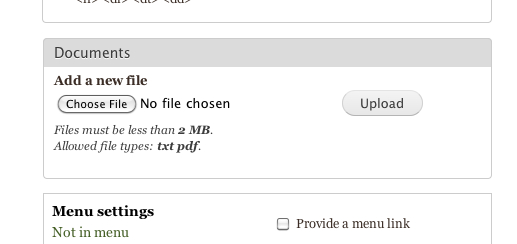
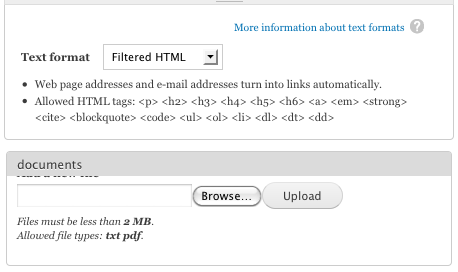
1. The OP screeshot shows a filefield with help text inside a fieldset - however core does not do this normally, please see bartik-filefield.png - you can see not only is this not in a fieldset but the help text is actually below the file field.
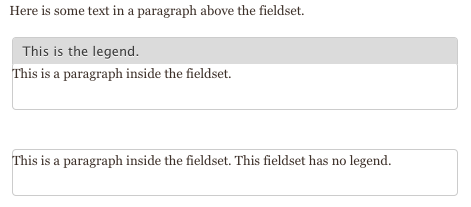
2. I made some custom fieldsets using FAPI, see the second screenshot, in the first fieldset I have some text using #markup and a fieldset description (which has a div wrapper by default) and in the second fieldset its the same markup text but no fieldset description, as you can see there is no issue, this was taken in FF4 however this looks basically identical in FF3 and Chrome 10.
I don't know how old Chrome 8 is but normally we only support the latest version of browsers that do not have a substantial market share, I don't have Chrome 8 so I can't test with it, in any case this is either 1) a real edge case or 2) I'm missing something fundamental here.
Currently this is marked as postponed, I'm gonna leave it as so for now.
Bartik Filefield.
Custom Fieldsets
Comment #39
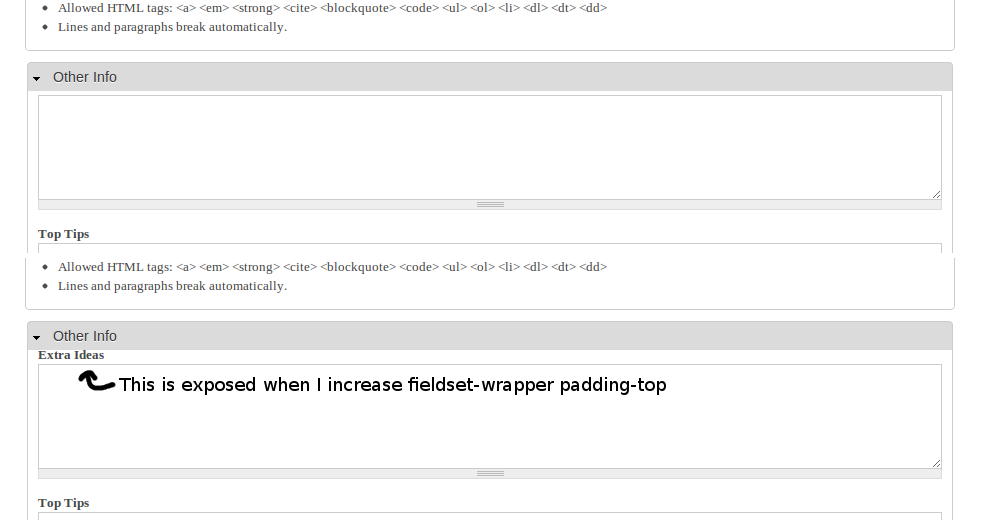
Shadlington commentedI ran into this issue with the Field Group module, specifically in this issue: #1040494: Fieldset overlaps field titles
So its not limited to file fields.
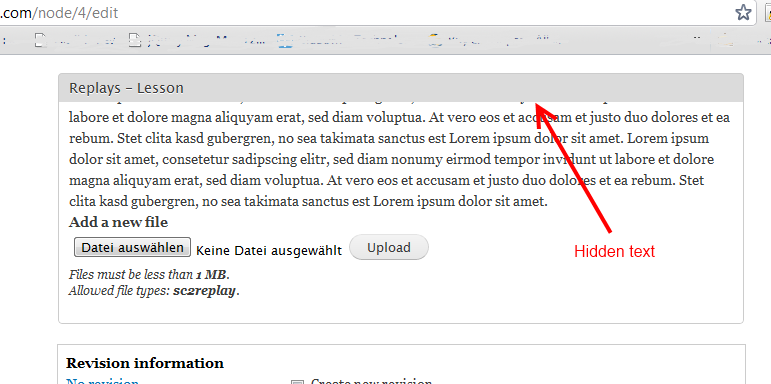
When I'm editing a content type that I have added a field group to (with the 'fieldset' format selected), the title of the first field in the group is overlapped by the title of the field set. Increasing the padding-top of the class 'fieldset-wrapper' pushes the field title down to make it visible (not suggesting that that is a solution).
I am using Bartik on my content edit pages and I have overlay disabled, if that's relevant at all.
I am using the latest chrome. Also tested with FF3. Identical in both.
Attached is a screenshot.
Comment #40
Jeff Burnz commentedProblem solved, can someone please roll a patch, thank-you Shadlington, you made me realize to look at the node form instead of just the front end.
Comment #41
aspilicious commentedLike this?
Comment #43
Jeff Burnz commented#41, yes just like that.
Comment #44
tim.plunkettJust like that, without Windows line endings :)
Comment #45
Shadlington commentedTested the patch, works like a charm :)
Comment #46
johnvI am confused. Patches #29, #33, #44 get shorter every time. Is that OK? Or should I apply all three. Thanks.
Comment #47
Shadlington commentedI only applied #44
Comment #48
Jeff Burnz commentedUnless otherwise specified you normally only test the latest patch.
This one looks good - I haven't checked if we have any other special casing for fieldset wrapper, if someone can check that and we don't I'd say this is good to go.
Comment #49
johnvSo, each time you do more with less code?
Comment #50
Shadlington commentedIn this particular instance it seems so, yes.
I think the various patches were trying to fix this in different ways.
The final method was actually a very small code change.
Go ahead, apply the patch. It'll work.
Comment #51
johnvOK, I'll be bold :-)
1 more question:
the patch says
But my code looks like:
This shouldn't be a problem, I suppose.
Comment #52
Jeff Burnz commentedOps good spotting johnv!
Needs to be like #40, so needs work.
Comment #53
johnvI don't like what I see..
I was used to the Fieldset legend as in #4 and #38. Now, the title of the first field in the fieldset is shown, but the grey area has disappeared, leaving a pale impression on the user.
Comment #54
Shadlington commentedHuh. I didn't see that change at all.
Also, I didn't notice the patch problem as I performed it manually due to its small size, my bad :(
Comment #55
droplet commentedSorry, just have some time to look back on this issue today. I'm the very first person in this thread but getting lost now.
seems comments after #37 is going to redo my & benjifisher works. if you read again #27 & #33, that already give the solution you are taking after #37. (AND THIS IS NOT EXIST IN -DEV VERSION)
NOW..
what I see is too much SPACE between node form & text format filter.
@Jeff Burnz,
are you the original author of this theme ??
Is it anywhere have some docs about this theme stardard.. see attach(space_problem.jpg). it has space issue
Thanks ALL
Comment #56
johnvcorrection on my findings #53: The patch looks good. I did not remove the old line, but created a comment with '//'. Apparently this is not good css-style :-( .
Please find a patch attached as in #40, since #41/#44 does not coincide with my code, or with #40.
@droplet, #55: I am not sure what you mean: does latest patch not repair your problem, and #1 does?
Comment #57
benjifisherI am bumping the status so that some of these patches will get tested.
Last I looked, Bartik is the default theme for Drupal 7. As such, it should be able to handle simple HTML, such as the example I gave in #33 above, along with before and after screenshots and a link to a live example. Or do we assume that no one will ever type into the body of a node with input format "full HTML"?
As far as I can tell, bartik/css/style.css has not changed since I wrote comment #33. The problem I described is still there, and my patch is still an improvement. The patch in #44 does not seem to make any difference.
Comment #58
benjifisher#33: fieldset_10.patch queued for re-testing.
Comment #60
Jeff Burnz commentedMoving to D8, the patch in 44 is the right fix, so adding it here again and bumping to D8.
#57 the issue you raised in #33 is not the issue, its a separate issue and frankly I think a bit of an edge case - if anyone is adding fieldset markup directly to a node then its rather trivial to add a fieldset wrapper with the right class also, otherwise we're gonna be jumping through CSS hoops here to support two entirely different markup structures which I think is really a waste of time considering almost no one will do this.
Comment #61
tim.plunkettLooking good.
Comment #62
Jeff Burnz commentedJust changing the title actually, so its more accurate for Dries to know what this about etc.
Comment #63
johnvI don't really get why #33 is not the same as this issue, so I'll just stick to patch #44/#60.
Jeff, the correct patch should be #40 as discussed in #51/#52. patch #60 is again as in #44.
(my file id is: $Id: style.css,v 1.53 2011/01/04 06:23:29 dries Exp $)
The patch corrects the situation in a normal field set: the legend is not covering the first line of content anymore.
However, the legend still covers the 'show row weights' line in a filefield upload widget (see attachment).
If different occurrences of this symptom belong to different issues, the issue titel should be updated accordingly.
I know nothing of css, so i can only test&compare.
Comment #64
Jeff Burnz commentedCorrecting the issue stuff, this is the code from #40, which was formalized into a proper patch in #44.
If it doesn't work in the situation you describe then it needs work. At the very least please explain the steps to reproduce this issue - I dont even know how you are getting your file field into the vertical tab like that, so please explain how to reproduce the issue - include the browser version also.
Comment #65
Jeff Burnz commentedand re-tag...
Comment #66
johnvThe wrong fieldset from #63 is created via a simple multivalue field of type Image, shown in Chrome. I used http://drupal.org/project/field_group to put the field in a vertical tab (since this seems to be the only working elements-like-module ), but this is not necessary to recreate the case.
Comment #67
dries commentedCommitted to 7.x and 8.x. Thanks.