Community Documentation

Configuring NetBeans

Last updated March 9, 2013. Created by kalman.hosszu on January 8, 2011.
Edited by stevepurkiss, lise.perceives, cdykstra, vovtz. Log in to edit this page.

NetBeans is a platform-independent, Java-based open source integrated development environment (IDE) which supports a wide variety of languages, including PHP.

In addition to its speed and refactoring capabilities, it offers the following:

  • Formats your code according to Drupal Coding Standards
  • It recognizes Drupal specific file extensions (.info, .module .install etc.)
  • Replaces tabs with spaces
  • Stores line breaks in UNIX format
  • Character encoding of files can be UTF-8 by default
  • Provides autocompletion with hint support for functions and classes project-wide, including Drupal core (provided core is in your project directory
  • Code templates available for Drupal hooks
  • Supports SVN and GIT version control systems

Note: These directions have been mostly updated to correspond to the current version of Netbeans (7.1.1 at this time). Most images are still from Netbeans 6.9 and were not changed if the setup was not significantly different. (LoMo — March 8, 2012)

Note: Windows users see http://drupal.org/node/1846954 to set up Netbeans, Xdebug, Drupal Dev Tools and Templates with Windows 7/XP and Acquia Dev Desktop (c11a - 11/21/2012)

Installation

Download the latest stable version of NetBeans, either the PHP bundle or the bundle labeled “All” (support for Java SE/EE and C/C++ as well). The page will offer the right version for you based on your browser’s operating system, but you can also select other platforms from the top-right drop-down menu.

After downloading, follow the instructions given by the installer. When the installation is complete, locate the Tools > Plugins menu item, choose the Installed tab, and activate the PHP plugin, if not already active.

NetBeans plugins

Setting up Drupal Coding Standards

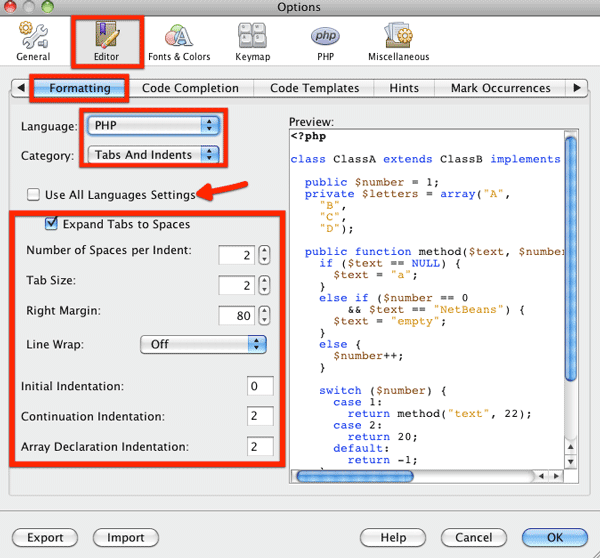
After you have activated the PHP plugin, go to Preferences (or Tools > Options) > Editor > Formatting, choose PHP in the “Language” drop-down, and choose Tabs And Indents from the “Category” drop-down. You should uncheck the "Use All Language Settings" checkbox in order to continue. After that use the following settings:

  • Expand tabs to spaces: (check)
  • Number of Spaces per indent: 2
  • Tab size: 2
  • Right margin: 80
  • Initial Indentation: 0
  • Continuation Indentation: 4 (if a new row is started within a condition)
  • Array Declaration Indentation: 2

NetBeans tabs and indents

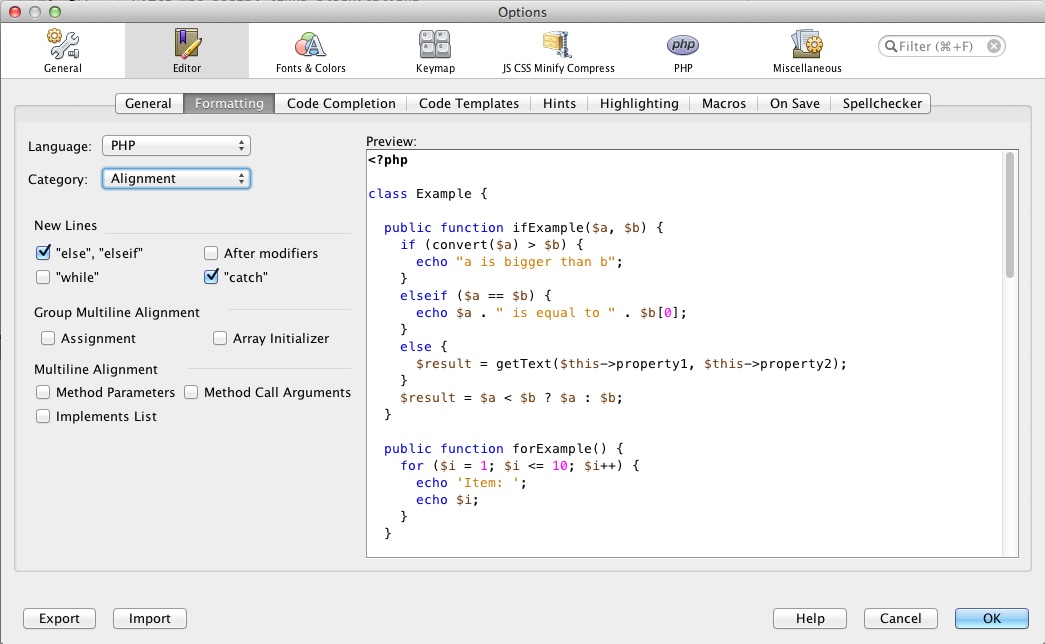
After that, choose Alignment from the category drop-down, and set "else and elseif" to start in a new row:

NetBeans alignment

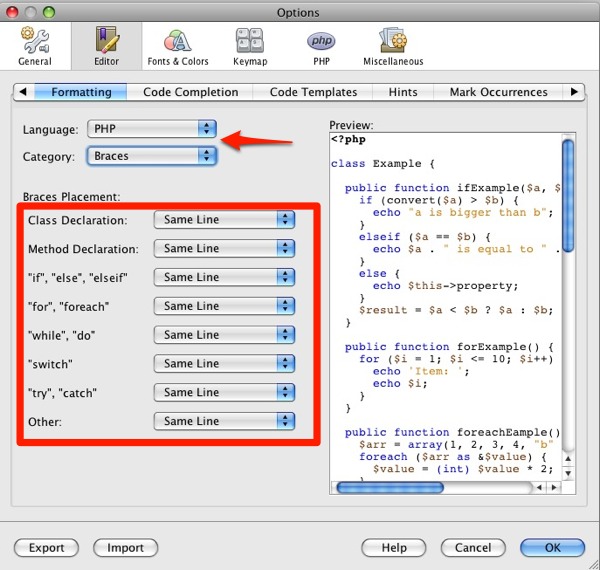
Choose Braces from category drop-down and set everything to "Same line":
NetBeans braces

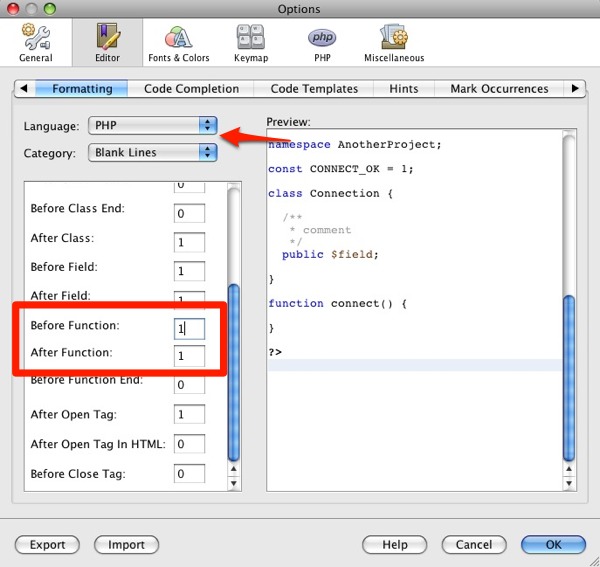
Choose Blank Lines from category drop-down and set 1-1 blank lines to be used before and after functions:
NetBeans blank lines

The last category is "Spaces". You should use the following settings here:

  • Before keywords
    • Check while, else, catch
  • Before parentheses
    • Uncheck Method / Function Declaration, Method / Function Call, Array Declaration
    • Check if, for, while, catch, switch
  • Around operators
    • Uncheck Unary and Object operators
    • Check Binary, Ternary, String concatenation, Key => Value and Assignment operators
  • Check all options in "Before Left Braces"
  • Uncheck all options in "Within parentheses"
  • Other
    • Uncheck “Before Comma” and “Before Semicolon”; check all others

When you have finished these steps, the code formatting will be just as required by the Drupal Coding Standards.

Setting up Drupal-specific file extensions and Drupal core functions

Go to Preferences > Miscellaneous > Files, and click New on the Files tab. Add the following extensions one by one:

  • module
  • install
  • test
  • profile
  • theme
  • engine

Associated file type (MIME) type should be: PHP Files (text/x-php5)
Finally, add the "info" and "po" extensions with MIME type: text/plain.

NetBeans files

Now NetBeans will recognize these filetypes. The next step is to allow it to autocomplete Drupal core functions. For this to happen you need to download Drupal and extract the files to a folder (you don’t need to install it, you just need the files, so that NetBeans can read the functions), go to Preferences > PHP > General, and add the folder to the Global include path list.

If you are also developing Drush-compatible modules, you should add the Drush folder to this list, to be able to use Drush functions.

NetBeans lib

Setting up Drupal hook templates

You just need to download the NetBeans Templates project, and import the extracted [.ZIP] file in Preferences > Editor > Code Templates. Please note that the import process will require a Netbeans IDE restart, so ensure you have saved all your preferences before running the template import.

NetBeans templates

Using version control systems

(Note/Update: Netbeans 7.x includes Git and is active, by default).
NetBeans supports CVS by default, but GIT can also be installed easily. You just need to download the plugin and install it.

Usage

After you have set up localhost, and installed your Drupal, create a new PHP project with File > New Project, PHP, PHP Application with Existing Sources.
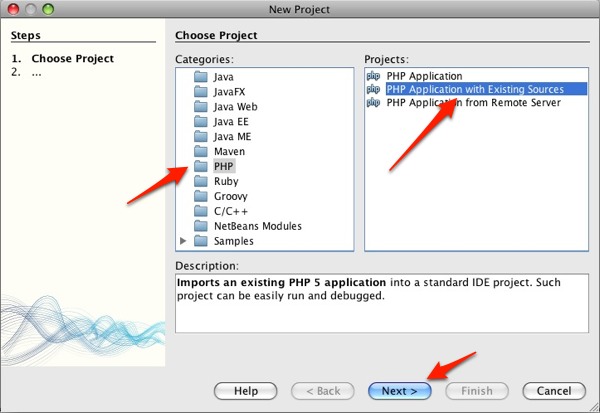
NetBeans new project

After clicking “Next”, you can set your project’s properties. I suggest using the sites folder of your installed Drupal as Sources folder. Select 5.3 for PHP version and UTF-8 for encoding. You don’t need to store Netbeans metadata in a separate directory.
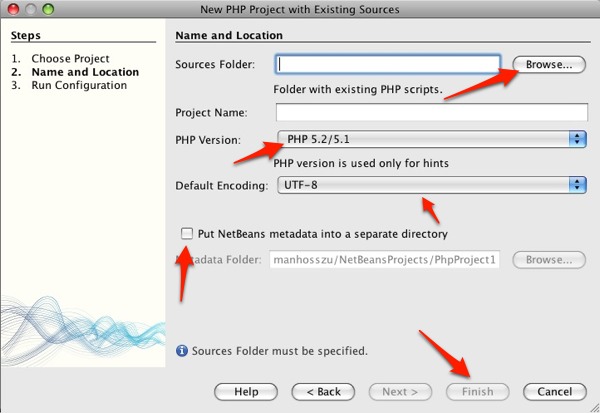
NetBeans project data

Now you can click “Finish”, and you will see your newly-created project. After creating a new file, you can use the autocomplete, and you are ready to use your NetBeans for Drupal development.
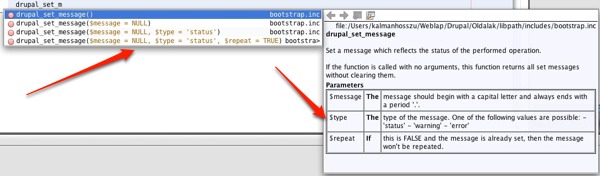
NetBeans autocomplate

The Hungarian version of this page at here

Comments

Great help

Great tutorial thanks,

Preferences however is the wrong description in linux and windows net beans, it should be tools > options

Xdebug problems Netbeans - php 5.3.x and xdebug 2.0.5

Hello,
I have tested this on Ubuntu 10.04 with php 5.3.2 and xdebug 2.0.5. There are several issues like local variables don't correctly display and debugging session terminates prematurely. As explained at:

http://phphints.wordpress.com/2010/06/28/local-variables-dont-display-in...

I have updated xdebug to 2.1.1 and everything works fine.

Hope this helps others.

Regards,

Save Settings BEFORE Import!

Before you import the Netbeans templates project SAVE the settings you already entered. Netbeans may require a restart to import the templates and if it does everything you just entered will be lost.

Use Netbeans7+ if you want GIT checkout

I installed Netbeans 6.8 which was included in my linux distro only to find out that it does not support GIT version control. A GIT plugin is available starting with NetBeans 7.0 beta 2. You can get the latest package at http://netbeans.org/downloads/index.html

Git also works in Netbeans 6.9

At least for me it does

Git also works in Netbeans 6.9

At least for me it does

+1

+1

Paulus Verschuren
www.LaTulipeBlanche.com

502 bad gateway error :-(

502 bad gateway error :-(

nbgit seems abandoned

Was looking at the nbgit plugin, but it seems to be pretty dead as no work have been done for a year. It also doesn't seem to have an Netbeans 7 versions.

http://netbeans.org/projects/versioncontrol/pages/Git_main seems to be the official git support being worked on by developers at Oracle.

Documentation can be found on http://netbeans.org/kb/docs/ide/git.html

--
/thomas
www.tsvenson.com

NBGit works up to 7.0.1. Git

NBGit works up to 7.0.1. Git support is native in Netbeans starting in 7.1, so that's why the project is pretty much abandoned at this point.

---------------------

HollyIT - Grab the Netbeans Drupal Development Tool at GitHub.

Walk through

One rarely sees such a well explained walk through, great job.

Set the right margin to 80

Set the right margin to 80 instead of 120, as per the coding standards.

Netbeans Module For Drupal Development

I've developed a module for doing Drupal development in Netbeans. It's for 7.0+ only. You can grab the NBM here:

https://github.com/HollyIT/NBDrupalDevel/downloads

The project is GNU, so if anyone wants to fork it or help contribute to it, just let me know. Right now it's at version 1.5.2, but I've already started work on the 2.0 release, which will have Drush integration built in.

---------------------

HollyIT - Grab the Netbeans Drupal Development Tool at GitHub.

Don't pass this by!!!!

This is an incredible tool when using Netbeans to develop Drupal code.
You can run Drush commands and reference Drupal hooks right from the IDE.

New Project Homepage

Netbeans built-in Git support

Since 7.1, NetBeans integrates Git.
You can read more at NetBeans Git User Guide

Older versions of Netbeans

Older versions of Netbeans have git support thanks to the NBGit module.

THANKS

GREAT TUTORIAL!!! THANK YOU

Regards,
Subhojit Paul
Web Developer @ Innoraft Solutions

THANKS

GREAT TUTORIAL!!! THANK YOU

its the so far best tutorial i have found in drupal.org

Regards,
Subhojit Paul
Web Developer @ Innoraft Solutions

Great work

Good work. Easy and simple so that I can concentrate further on my own Drupal project!

Thanks a lot

Very useful and easy to follow!

Creating git patch?

Thank you very much. That is something I waited for a looong time, feeling myself useless without such a tool. You just added a new Drupal debugger to the Drupal task force.

I regret I don't manage to create git patch with an anonymous access to modules repositories. First step, if I understand, would be to use git clone. But I got an error doing that: "invalid advertisement of ?xml version="1.0" encoding="utf-8"?>"

If someone has some tips, I think it would help some people wanting to propose patch directly in the issues manager instead of copy/paste code. That would represent less work for the module maintainers who do already a lot.

Finally succedded

As often, I found a solution after posting my issue.
I finally succeeded. I entered a bad url for the git clone.
You have to enter: Per example for taxonomy_menu, it is: http://git.drupal.org/project/taxonomy_menu.git
Found here #1038404: Determine an approach to managing git repositories on disk

Thanks a lot for this

Thanks a lot for this tutorial. Saved me a lot of time!

much appreciation!

mudds

I just installed NetBeans v

I just installed NetBeans v 7.1.2.
As of version 7 (?) the Toolsbar has changed:
Preferences > Editor
now can be found via:
Tools > Options > Editor.

Thanks for this great tutorial.

Do you get some errors?

I'm using 7.1.2 too, but I get many error when I put the drupal into netbeans.
Can you solve the problem?

I didn't get any errors or

I didn't get any errors or problems after installing NetBeans as written above.
Please describe the kind of errors you get to understand these.

Download NB Template

For all lazy people that need a clean coding template for netbeans 7.2 I exported it in :

http://uccio.org/blog/netbeans-drupal-coding-standards-lo-stile-non-acqua

The page it's in italian but the download it's for all countries!

Thanks for these templates

Just a hint: You can feed the downloaded zip file as is to NetBeans - no need to unpack it first ;-)

Quickstart also an option

Just a note to say that there is a Drupal project with a ready-made virtual Ubuntu environment in Quickstart. It has NetBeans already set up as well as having debugging already set up and other tools already configured. It's a nice and easy option to also get these benefits from NetBeans.

nb_templates

It seems the file nb_templates-7.x-1.x-dev.zip contains a file named nb_templates/nb_templates.zip.txt -- I have to rename the file and remove .txt extension before nb will import it..

thanks

**edit -- almost forgot to mention, Thank you so much for this write-up!! It has made the transition to drupal so much smoother!!!!!

New project

File > PHP > PHP Application with Existing Sources

should be

File > New project > PHP > PHP Application with Existing Sources

Otherwise: great page!

Please explain about drush

Please explain about drush folders

I'm not really know what is

I'm not really know what is your question, but if you want to create drush compatible modules, you have to know about drush functions, for example: drush_print(), drush_set_error(), dt() or drush_op(). So if you import your drush folder, the auto complete will work for drush functions too.

Kálmán Hosszu

Finish?

I got all the way up to the end, but when I click finish, nothing happens. I don't see any newly created project. If I try to open project and browse to my sites folder. It reads Error in project.xml: Premature end of file.

Any ideas?
Sharon

About this page

Drupal version
Drupal 4.5.x or older, Drupal 4.6.x, Drupal 4.7.x, Drupal 5.x, Drupal 6.x, Drupal 7.x
Audience
Designers/themers, Programmers
Drupal’s online documentation is © 2000-2013 by the individual contributors and can be used in accordance with the Creative Commons License, Attribution-ShareAlike 2.0. PHP code is distributed under the GNU General Public License. Comments on documentation pages are used to improve content and then deleted.
nobody click here