
On this page
Drupal templates for NetBeans
This documentation is deprecated.
Installation
- Create a zip file of the content in the src directory (do not zip the src directory itself; zip up the content inside the directory).
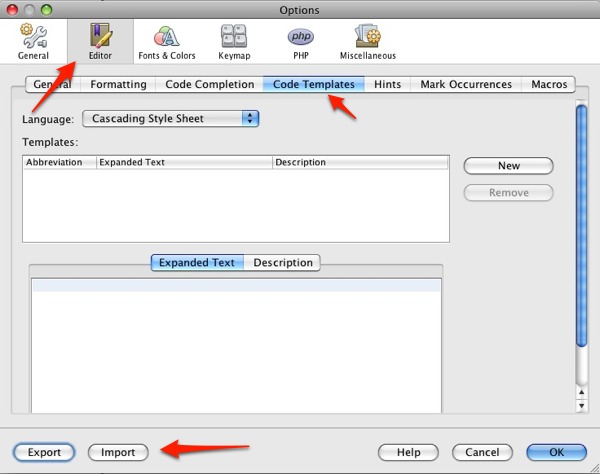
- Go to NetBeans > Preferences > Editor > Code Templates > Import
- Browse the created zip file
- Select Editor > Code Templates
- Press OK
Usage
On the NetBeans Templates project page, you can download a file which you can easily import into NetBeans in Preferences > Editor > Code Templates..
With this template file all of the Drupal hooks can be generated with their base structure and rules.
Using template expressions: type keyword and press TAB. The code template expands. Note: you need to type the keyword after <?php tag.
For example in D7 version
<?php //<---- you need this

 d7_load //<---- type the keyword and press "tab" to expand template.
Note: you can change the way you expand in (Netbeans 7.x) Tools->Options->Code Templates ->Expand Template on
For example in D6 version the "h_block" (d6_block if you use D7 version) word generates the following lines:
<?php
/**
 * Implementation of hook_block().
 *
 * @param $op What kind of information to retrieve about the block. Possible values: list, configure, save, view.
 * @param $delta Which block to return.
 * @param $edit Data from a configuration form, if submitted.
 */
function ${mymodule}_block($op = 'list', $delta = 0, $edit = array()) {
  switch ($op) {
    case 'list':
      $blocks = array();

      $blocks['${delta}'] = array(
        'info' => t('${info}'),
      );

      return $blocks;
      break;

    case 'view':
      $blocks = array();

      switch ($delta) {
        case '${delta}':
          $block['subject'] = t('${subject}');
          break;
      }

      $block['content'] = ${mymodule}_block_content($delta);

      return $block;
      break;
  }
}

/**
 * Generate block contents.
 *
 * @param $delta The block id.
 * @return The generated block content.
 */
function ${mymodule}_block_content($delta) {
  switch ($delta) {
    case '${delta}':
      return;
      break;
  }
}
?>
For "form":
<?php
/**
 * Build ${module_form} form.
 *
 * @param array $form_state
 * @return array The created form.
 */
function ${module_form}($form_state) {
  $form = array();

  return $form;
}
?>
and "form_validate":
<?php
/**
 * Validate ${module_form} form
 *
 * @param $form form to validate
 * @param $form_state A keyed array containing the current state of the form.
 */
function ${module_form}_validate($form, &$form_state) {
  if (${form_field_test}) {
    form_set_error('${form_field_id}', t('${form_field_error}'));
  }
}
?>
I created templates for info files too, so you can use "d6_minf" (for module info) and "tinf" (for template info) abbreviations.
; $Id$
name = ${modulename}
description = ${description}
package = Kalman Hosszu
version = VERSION
core = 6.x

dependencies[] = ${module}
; $Id$
name = ${mytheme}
description = ${description}
core = 6.x
version = VERSION
engine = phptemplate

stylesheets[all][] = ${style}.css

base theme = ${basetheme}
Or "d7_minf" generates:
name = ${modulename}
description = ${description}
package = Custom modules
version = VERSION
core = 7.x

dependencies[] = ${depmodule}

files[] = ${module}.module
files[] = ${module}.test
The annotation is customizable, currently it looks like this:
<?php
// $Id$
/**
 * @file
 * ${cursor}
 *
 *
 * @author Kálmán Hosszu
 */

/* ====================== */
/* ==== DRUPAL HOOKS ==== */
/* ====================== */


/* ====================== */
/* == MODULE FUNCTIONS == */
/* ====================== */
?>
If you are a theme developer, and you find that not much of this is useful to you, i suggest using the Zen plugin , which generates html, using a simple logic:
div#page>div.logo+ul#navigation>li*5>a
this will be generated:
<?php
<div id="page">
	<div class="logo"></div>
	<ul id="navigation">
		<li><a href=""></a></li>
		<li><a href=""></a></li>
		<li><a href=""></a></li>
		<li><a href=""></a></li>
		<li><a href=""></a></li>
	</ul>
</div>
?>
The Hungarian version of this page at here
In Netbeans 7 on Ubuntu use space instead of tab after the keyword to generate the code block template
Product Version: NetBeans IDE 7.0.1 (Build 20121011-unknown-revn)
Java: 1.6.0_27; OpenJDK 64-Bit Server VM 20.0-b12
System: Linux version 3.8.0-19-generic running on amd64; UTF-8; en_US (nb)
Help improve this page
You can:
- Log in, click Edit, and edit this page
- Log in, click Discuss, update the Page status value, and suggest an improvement
- Log in and create a Documentation issue with your suggestion
