Closed (fixed)
Project:
Quickstart: Prebuilt Drupal Development Environment
Component:
Miscellaneous
Priority:
Normal
Category:
Bug report
Assigned:
Unassigned
Reporter:
Created:
10 Jan 2011 at 23:02 UTC
Updated:
31 Jan 2011 at 20:01 UTC


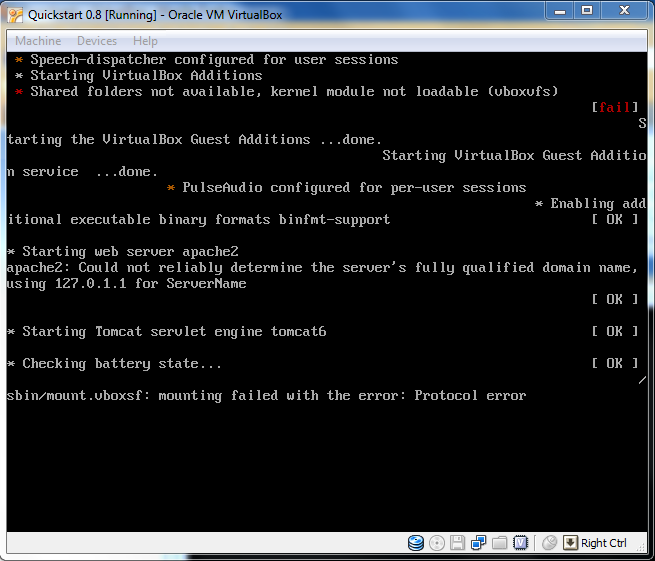
Using VirtualBox on a 64bit machine, i imported Quickstart and Ubuntu prompted an update to its latest kernel. After following the instructions to share files with host, i cannot log back in and the vbox shell displays some text for a split second and i was able to get a screenshot.
After logging in, the vbox shell appears (see the attached screenshot) and redisplays the login screen.
I've removed the shared folder, but still get this error. I'm guessing i should not update the kernel?
Someone mentioned reinstalling the guest additions, but clicking Devices->Install guest additions doesn't do anything. Another mentioned entering a command from a shell to do so but i can't login, and do not have access to a shell.
Any help is appreciated.
| Comment | File | Size | Author |
|---|---|---|---|
| vbox_error.png | 63.81 KB | nymo |

Comments
Comment #1
MichaelCole commentedHi JQTruong,
I havn't seen this behavior before. It is a vbox problem, and you may find the best help looking through vbox's forums.
I upgrade the kernel in my 0.8 VBox all the time. I'm using 3.2.8 which is the stock version for Ubuntu 10.10 (my host).
I'm guessing that either there is a problem with the folder names (check the directions again), or there is an incompatibility between the version of Virtualbox on the Host and the VBox additions in the guest.
If you don't have any data inside the machine, I'd recommend deleting it and starting over. This is probably the fastest way.
If you do have data inside the machine, check the VBox forums and see what you can find. If you resolve it, post back to this bug so I can update the FAQ.
Best luck JQTruong!
Mike
Comment #3
nymo commentedThanks, due to lack of time, i opted to install Ubuntu. But a colleague of mine had the same pc setup and had no problems installing the Quickstart image in VBox a couple of weeks later. Although i did notice that it was an updated version of Quickstart...