Closed (duplicate)
Project:
Administration menu
Version:
7.x-3.0-rc1
Component:
CSS / Browser Support
Priority:
Normal
Category:
Bug report
Assigned:
Unassigned
Reporter:
Created:
11 Jan 2011 at 12:54 UTC
Updated:
26 Jun 2012 at 03:06 UTC


Issue appears in FF3.6.13, Windows vista.
Also testes in Safari 5.0.3, IE8 and Chrome 8.0.552, the issue doesn't appear there.
When using the Administration menu in combination with the Administration menu Toolbar style module. The admin menu is forcing the page out of the screen. See image attached.
Suggestion:
Putting the shadow in the #admin-menu-wrapper and place a bottom-padding and a overflow:hidden on the #admin-menu.
this will fix the problem in FF 3.6.13 ( not tested in other browsers)
| Comment | File | Size | Author |
|---|---|---|---|
| shadow-scrolling.png | 82.8 KB | martijn de wit |

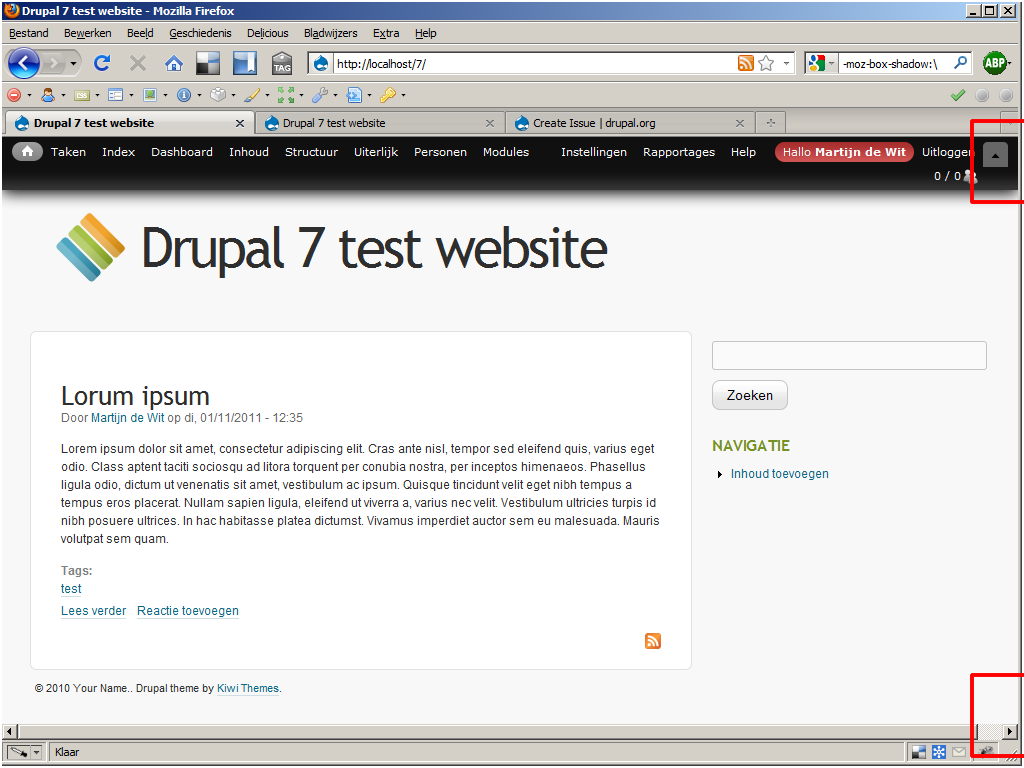
Comments
Comment #1
floole commentedActivating "Keep menu at top of page" also let's you get rid off the horizontal scroll bars (admin/config/administration/admin_menu).
Comment #2
hedley commentedYes this is causing me problems too. I just added:
To one of my theme stylesheets.
Adding overflow: hidden to #admin-menu and shadow to #admin-menu-wrapper causes the drop-downs to be hidden.
Comment #3
aeski commentedThe other solution I found was to offset the shadow to the left an equal distance to the spread of the shadow.
For example the default is 20px
#admin-menu {
box-shadow: 0 3px 20px #000;
}
#admin-menu {
box-shadow: -20px 3px 20px #000
}
This does however fade the strength of the shadow out on the right hand 20px of the menu.
I used this for a while before I completely re-themed the default menu, and disabled the "admin menu toolbar style" module
Comment #4
aeski commentedActually I should think hedley's solution would be the better option, and by changing the overflow: hidden to overflow-x: hidden it may work.
Comment #5
sunMarking as duplicate of #1022902: Align Better Toolbar style with core Toolbar style - please contribute over there!
Comment #6
kmontyI just wanted to note that this is still an issue, despite the issue in comment #5 being closed. An active thread here: #1604950: Admin menu CSS causes horizontal scrollbar