

Closed (outdated)
Project:
Gallery formatter
Version:
7.x-1.x-dev
Component:
User interface
Priority:
Normal
Category:
Task
Assigned:
Unassigned
Issue tags:
Reporter:
Created:
18 Jan 2011 at 13:40 UTC
Updated:
20 Nov 2024 at 11:30 UTC
Jump to comment: Most recent, Most recent file



Comments
Comment #1
mheinke commentedI am having the same issue,
the gallery works great. but the style needs to be adjusted, i will submit a patch once i find the issue.
if someone else could shed some light on this. i would much appreciate it!
Thank you!
Comment #2
manuel garcia commentedThat looks veeery weird asermartinez.
There must be some CSS rules from the theme affecting the arrows. I suggest opening up firebug and try to find out what's going on there.
Unfortunatly I'm in the middle of the final stage of a huge project, and we are against the clock. I hopefuly will have more time in a couple of weeks to give some love to the 7.x branch. I plan on working hard on the module and have a stable release soon for D7.
Until then perhaps you guys can help eachother out?
Comment #3
mheinke commentedhere is a way of fixing this:
now...i will say, i have only tested this with the marinelli theme and the browsers listed below:
Firefox 3.5.16
Chrome 7.0.517
IE - 8
IE - 7 (with ie tester)
Opera 11.0
so...dont quote me on it working :-)
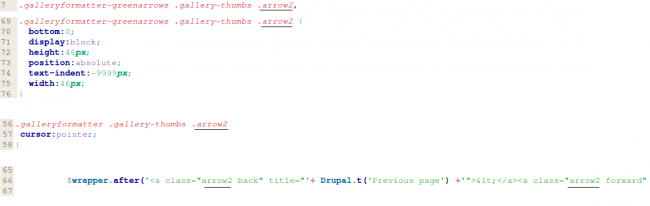
go to the greenarrow.css.
line 80.....
it should look like this:
it needs to look like this:
now....line 87.....
should look like this:
needs to look like this:
Comment #4
mheinke commentedComment #5
mheinke commentedhere is a patch version of my fix.
Comment #6
asermartinez commentedThanks! now it's working properly with marinelli theme.
I edited the arrows css as suggested.
Comment #7
mheinke commentedplease continue to test it.
if you have the ability to, try it with other themes.
i will as well.
Comment #8
mheinke commentedComment #9
asermartinez commentedHi mheinke,
I attached two pictures, after editing the arrows css, one showing marinelli theme.
The other one is the result for danland, bartik and garland themes.
Another thing... can you tell me if found this problem with colorbox? http://drupal.org/node/983316
Thanks
Aser
Comment #10
mheinke commentedi figured this would not be a fix for any other theme, because i am using absolute positioning....
i will try to come up with a more elegant solution.
Comment #11
mheinke commentedComment #12
DRIVE commented** I think this applies here as well (where I meant to post it!) ahaha
http://drupal.org/node/1128384
We could leverage more horsepower out of the drupal_add_css function with the attached patch (sorry, new to GIT... much work to learn proper output settings/etc :) )
1) Renders the default galleryformatter.css as low as possible (things like context and filter seem to take precedence) but the code does make the galleryformatter sink way below system CSS and such. The CSS import is placed quite a number of lines down towards </head>
2) A custom style setting causes the style css, like greenarrows.css, or silverarrows.css to be the last css file to run even after the theme files so it makes it much less likely that anything above it will be causing a confilct, and if it is, it will be a lot easier to find.
The code in the patch makes the custom style css be the last file in the code :)
And it can still be available for core aggregation and other core functions.
Comment #13
mheinke commentedgood thinking!
looks pretty good. i will do an official review tonight...
Thanks!!
Comment #14
Tobion commentedI had the same issue. I investigated and found out that the theme overrides the following properties that can be reverted with the following CSS to make it correctly formatted:
Comment #15
manuel garcia commentedI can tell you guys that pushing our css files to the end is not something I'm willing to do, it would be very hacky, and make themers very angry, with a good reason.
Thanks though for the efforts on this issue, I've reviewed them and have come up with a patch that hopefuly solves these problems. Please do test on as many themes as you can specialy those that you know cause trouble with the gallery.
Comment #16
mheinke commentedI agree that it is a very hacky solution, but it is (was?) the only solution that has kept me up and running :-)
i will test in my sandbox tonight.
Thanks!!
Comment #17
manuel garcia commentedThere was code committed that included some of these fixes a bit ago, can you guys check if this stil happens in the latest dev?
Comment #18
mheinke commented@Manuel,
Seems to be working for me!
Thanks!
Comment #19
manuel garcia commentedgreat mheinke, thanks for reporting back =)
Comment #21
billy_comic commentedI saw that you were able to work through the issue with the gallery formatter displaying the navigation arrows wrong. I am having a similar issue. No navigation arrows at all, just java scroll navigation.
Do you know how I can fix this? Any help is greatly appreciated.
Here is a screenie.
http://screencast.com/t/vDvqZjC39N
Thanks,
Billy
Comment #22
lucamanu commentedSorry, how do I apply the patch 15?
Just copy it?
Where?
Comment #23
manuel garcia commented@lucamanu the patch is already in the latest version, no need to apply it. Just upgrade to version 7.x-1.1 or later.
Comment #24
loconstantin commentedSorry Manuel Garcia, but I don't see this patch in the last version of Gallery formatter...
Comment #25
drupal4u.org commentedAs it seems the problem is caused by a CSS conflict between the themes and the Gallery Formatter module. The variable “arrow” is used by the themes and the module. To solve the problem properly one can change the variable of the Gallery Formatter. For details:
http://www.drumal.net/howtos/how-solve-css-conflict-between-marinelli-th...
Comment #26
mheinke commentedwow this is an old issue :)
haha, i barely remember debugging this
Comment #27
drupal4u.org commentedWell, how can it be an old issue, if the problem is still included in the theme offered for download?
Comment #28
mheinke commentedi just downloaded the latest dev and do not have an issue.
is there another module/style conflict?
Comment #29
jhutar2 commentedHello, I'm on galleryformatter-7.x-1.3 and I still see the issue. When I have manually applyed patch galleryformatter-1031180.patch, it displays arrows correctly.
Comment #30
mheinke commentedthanks for confirming @jhutar2
I don't see the patch in the current release either...
Comment #31
astonvictor commentedI'm closing it because the issue was created a long time ago without any further steps.
if you still need it then raise a new one.
thanks