

 Come together with the global Drupal community in Rotterdam, 28 Sept – 1 Oct 2026. Sessions, contribution, connection, and Early Bird savings until 8 June.
I don't get the 'Availability calendar settings' section on the node edit page of a content type that has availability calendar support enabled in the latest 6.x-1.x-dev (2011-01-18), so I can't set the first day of week etc. Maybe this is related to the user warnings that occurred during updating?
| Comment | File | Size | Author |
|---|---|---|---|
| #7 | devel_variable_availability_calendars_updated.png | 114.29 KB | futurist |
| #3 | devel_variable_availability_calendars.png | 111.97 KB | futurist |


Comments
Comment #1
nicholas.alipaz commentedattempt to resave the content type edit page, but yes this could be related to the user warnings. I fear there could be more issues if you continue without the updates running properly. Can you please install devel and take a screenshot of /devel/variable page so I can see what variables are set in your variable table?
Comment #2
nicholas.alipaz commentedComment #3
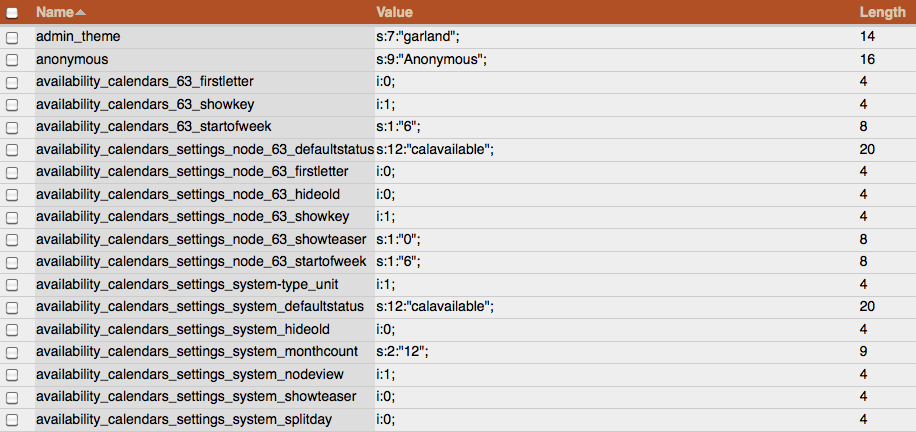
futurist commentedResaving doesn't seem to have any effect. Installed Devel - screenshot attached. Thanks.
Edit: Saved again, both content type edit and node edit page: The settings section is now there. Sorry about the confusion. Still, wondering if the variables are ok...
Comment #4
nicholas.alipaz commentedfrom the looks of it, your node 63 does not seem to have been resaved with the dev version of the module enabled. Otherwise availability_calendars_settings_node_63... would all read with legitimate values. Instead, they seem to be set to NULL. If you don't have a lot of nodes (which doesn't seem to be the case), then you could simply change their values with the devel variable editor or resave each node, to match up to the old variables availability_calendars_XX_... and afterwards delete the old variables.
I am not completely sure why your node 63 does not have the correct values set. It is most likely related to your update not running properly. I have tested the upgrade path multiple times and don't see where the issue is coming from. I am going to give it a few more tries however, and see what I can come up with.
Let me know if you resolve your issue.
Comment #5
nicholas.alipaz commentederrors are now fixed in the cvs repo. grab it there or wait for next dev package to release. I will put out a new official release in a day or so.
Comment #6
nicholas.alipaz commentedComment #7
futurist commentedAfter resaving the content type edit page, the variables now look ok, issue resolved. Thanks very much for your support, Nicholas.