Closed (fixed)
Project:
Openlayers
Version:
6.x-2.0-alpha10
Component:
Miscellaneous
Priority:
Normal
Category:
Bug report
Assigned:
Unassigned
Reporter:
Created:
21 Jan 2011 at 09:51 UTC
Updated:
1 May 2012 at 16:50 UTC


I'm just starting out with OpenLayers and I've been fiddeling with the Getting Started With OpenLayers-tutorial. I get everything to work except the orange pin (or circle) doesn't seem to respond to my Longitude-value. In the node generating the point I've entered long: 11.9479 and lat: 57.6997 which should translate to the western coast of Sweden but instead puts the point in the middle of Russia. The latitude-value (the horizontal one) seems correct, but the longitude value is way off. Further, the pin won't move when I alter the value in the node so it would seem that something isn't processed the way it should be.
My setup:
Drupal 6-2.0
OpenLayers 6.x-2.0-alpha10
CTools 6.x-1.8
Views 6.x-2.12
CCK 6.x-2.9
I've looked through the javascript being outputted on the page in question, and found this:
"field_longitude_value":"11.9479",
"field_longitude_value_rendered":"12"
I haven't figured out exactly what this does, but rounding off the longitude-value would seem to me would render the spot in the wrong place?
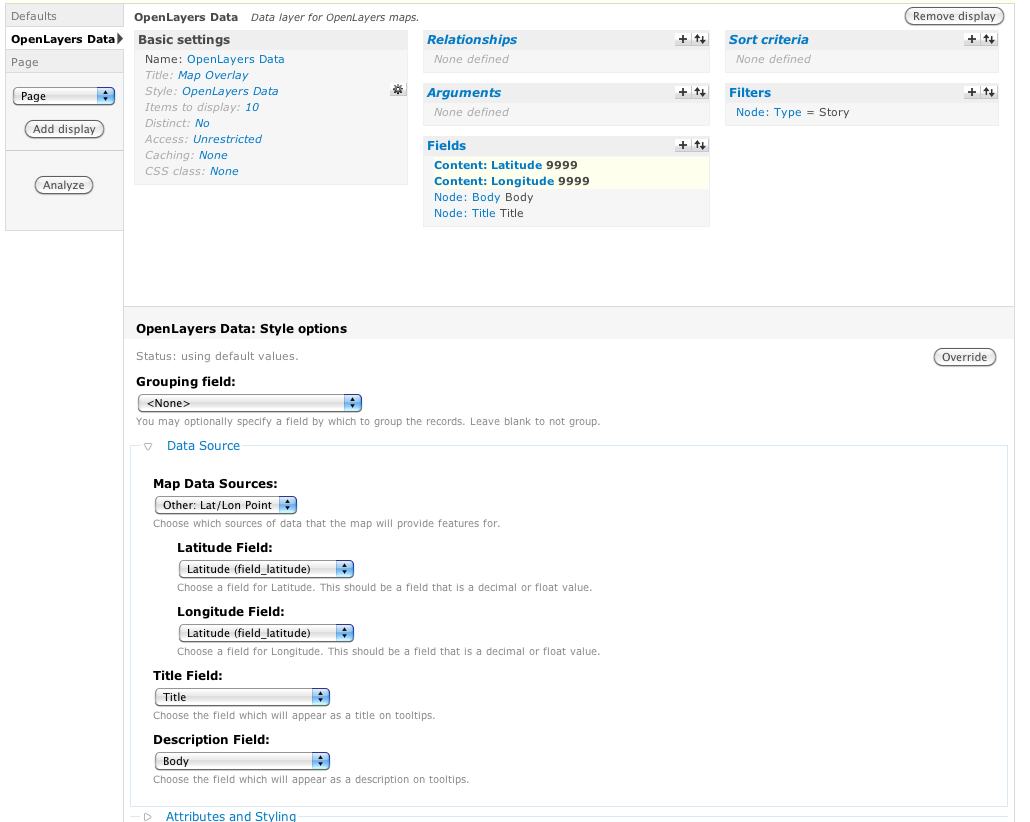
It's worth noting that I've centered the map on the location I mentioned in the beginning of this post and that works well; it's just the position of the pin itself that is off. See the attached image for my Open Layers Data View-settings.
UPDATE:
Viewing the ?q=testing-page (where the map is being rendered) in Firefox or Chrome causes an CCK-error:
Fatal error: Cannot access empty property in drupalroot/sites/all/modules/cck/includes/views/handlers/content_handler_field.inc on line 186

Comments
Comment #1
epavletic commentedComment #2
mike234 commentedDrama,
Did you close this issue because you resolved the issue? Can you share your actions to resolve?
I too have been testing out OpenLayers and have run into the same problems.
1) The points on the map seem to be in the wrong location
2) Am getting a similar fatal error
Thanks for any input you can provide.
Mike
Comment #3
tmcw commentedmike234: I'd assume that Drama closed the issue because the screenshot clearly shows both latitude and longitude being set to latitude.
Comment #4
mike234 commentedtmcw,
Thanks for note. I had the same latitude/longitude issue and missed it when I reviewed the screen shot.
Also, I was able to track down the reason for the fatal error (Fatal error: Cannot access empty property in ...../sites/all/modules/cck/includes/views/handlers/content_handler_field.inc on line 186). I did not have permissions set correctly. Once I provided all roles permission to the latitude and longitude fields everything works fine.
Thanks again for the pointer and a big thank you to the OpenLayers team. What a fantastic module!
Mike
Comment #5
rajmataj commentedAfter building a mapping portion of my site from this tutorial, I wasn't using the Lat/Long settings but instead was using the WKT widget to allow a user to plot a point on a map, but was seeing this error. I am using:
If you are seeing this, it is likely a permissions issue on a particular field but check these three things:
.../sites/all/modules/cck/includes/views/handlers/content_handler_field.inc on line 186error. Once I set the permissions (on the Permissions page, not within Views) to allow particular roles to view these fields, the pages with my map on them rendered without any issues.Basic Settings > Styleand experiment with the checked/uncheckedKeep non-rendered description field attribute.option.