Closed (fixed)
Project:
Drupal core
Component:
theme system
Priority:
Normal
Category:
Bug report
Assigned:
Unassigned
Reporter:
Created:
27 Aug 2004 at 13:54 UTC
Updated:
4 Oct 2004 at 15:20 UTC
Jump to comment: Most recent file


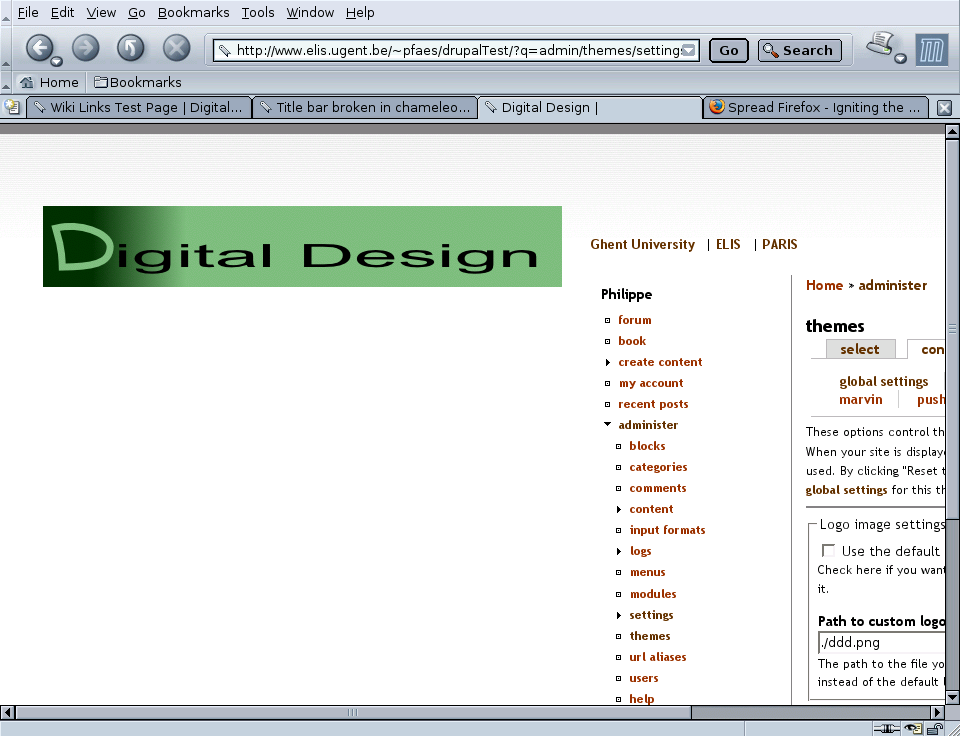
I posted this before, but at the wrong place. Hope I got it right this time. The chameleon theme is not friendly to wide banners (half of the screen width). If the font size is set small enough, the frame with the navigation column and the content are set to the right of the logo, thus wasting almost half of the screen. This behavior is seen on mozilla/linux and explorer/windows.
I've attached a patch that makes the title bar part of the table.
| Comment | File | Size | Author |
|---|---|---|---|
| #2 | shot.png | 133.85 KB | Philippe |
| chameleon.theme_patch | 1.17 KB | Philippe |

Comments
Comment #1
Steven commentedWe should avoid wrapping everything in tables. In fact it would be better if Chameleon went tableless again, though that would bring more browser issues with it.
Your description is vague. What do you mean with 'wide banners'? Where are they positioned? Are you referring to the site logo? Please be more specific.
Comment #2
Philippe commentedI am indeed refering to the site logo. I attached a screenshot to this post to show what I mean. I'm sure there are other ways of fixing this issue, but using tables sure is one of them. Since Chameleon already uses tables, I think it is a reasonably good option. HTML experts may come up with different fixes ;-)
I'm using my patch at the moment and things work nicely. I hope you can either incorporate my patch or come up with a different solution.
Comment #3
dries commentedI witnessed this problem/bug using Mozilla. When your logo image is too wide, Chameleon will screw up the placement of your sidebars. It isn't easy/possible to reproduce this problem with the default logo.
Comment #4
Steven commentedThe problem had nothing to do with the width of the logo, but in fact the height of the logo. The floatyness of the header image pushed the table away if it hadn't cleared at that point.
Fixed in CVS.
Comment #5
(not verified) commented