

 The 2026 Drupal Business Survey is open. Your response will help shape the future of the Drupal business ecosystem.
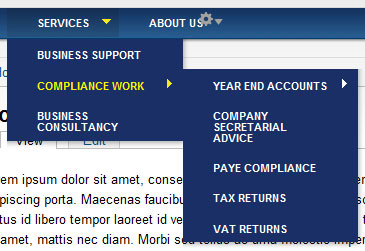
I can't seem to figure out how to get the arrow to display next to the parent item if a child item exists. It seems to be working great on other menus but not superfish.
Thanks in advance for any help on this.
| Comment | File | Size | Author |
|---|---|---|---|
| #6 | menu-1.jpg | 10.71 KB | Tinmantoo |
| #6 | menu-2.jpg | 33.59 KB | Tinmantoo |


Comments
Comment #1
danpros commentedHi,
Are you already setup the superfish properly, read the readme.txt in Danland folder to setup the superfish menu. Do not forget to set the parent menus to expanded.
Dan
Comment #2
hbreardon commentedThanks for the reply.
Yes I have the Superfish menu working with the dropdown too - I'm just missing the arrow or triangle next to the Parent menu item indicating the presence of a child menu item.
Comment #3
hbreardon commentedI figured out why the arrows weren't showing up. I had set up my subtheme the way I always have - following the Zen subtheme setup. Since my subtheme was located outside the Dandland folder I needed to copy the Scripts folder over to my folder. Once I did this it worked great.
Comment #4
Broomheath commentedAn extension of this issue: The arrows appear correctly until either a parent or child is selected then on subsequent pages no arrows are displayed. Back to home and the arrows are visible again. I have made some changes to the colour scheme but given that the arrows display on the front page, why would they be missing on all subsequent pages?
Ah... disregard my ramblings but i'll leave them here for others to see.
The problem is that when one moves scripts to the bottom of the page in page.tpl.php and in page-front.tpl.php one must ensure that they are the same with no typos. Ooops... red face :)
Comment #5
ascii0027 commentedBroomheath...I am having the exact same problem. I have a subtheme of Danland and have created page-nodeX-tpl.php files to allow me to use a different slide show on each of my second level pages. The superfish down-arrows appear fine on the front page, but are not visible on any of my sub pages. I copied the 'scripts' folder over to my subtheme's directory as suggested earlier in this thread, but am still having the problem that you mentioned. Can you elaborate on exactly how you fixed this problem? Thanks!
Comment #6
Tinmantoo commentedAm I Missing something here... I too have tried copying over the scrits folder to the subtheme folder (Posted #3 by hbreardon) and this has made no difference. Most frustrating because everything else works pretty much how it should.
The main menu shows a down arrow indicating the child, but the child menu items dont show arrow if child present (See menu-1.jpg)
NOT until the child is selected though (see menu-2.jpg) - then it shows up fine. Until you change to another child, at which point the first child loses its arrow.
*Banging head against wall* Aarrrggghhhh!
Someone - Anyone, please help.
Comment #7
Deepika.chavan commentedHi,
Sorry but I could not reproduce this bug on my local site. On my local site I used '7.x-1.0' version, it's showing arrow with each parent item, even if it is child of another menu item. So can you please provide the url of your site?
Rgrds,
Deepika Chavan.
Comment #8
Agitaous11-1 commentedHello
Same problem here. The superfish is working, and dropdowns too.
Before the update, there was no problem at all, but after the update (and installing libraries, jquery u modules) the arrows are missing.
Please help.
Any replies are welcome.
Comment #9
Agitaous11-1 commentedI just want to add the report version.
Let's attract attention. This is not critical, by the way.
Comment #10
Agitaous11-1 commentedI realised that, after the update, auto arrows option becomes deactivated. I reactivated them manually, and there is no problem at the moment.
But I don't think that; it is nice to overwrite an active configuration.
Closing the Issue, because of inactivation.
Please open if required or I missed something.
Comment #11
holyVY commentedThanks for the reminder to set parent menu to expanded. Solved my issue!