

Closed (fixed)
Project:
Field Group
Version:
7.x-1.0-rc1
Component:
Code
Priority:
Normal
Category:
Bug report
Assigned:
Unassigned
Reporter:
Created:
28 Jan 2011 at 19:14 UTC
Updated:
24 Jun 2016 at 02:52 UTC
Jump to comment: Most recent, Most recent file


Comments
Comment #1
aanjaneyam commentedAs a further note. I was first using 7.x-beta1 and then changed to 7.x-1.0-dev thinking it may solve the issue.
Comment #2
Stalski commentedi'll check this asap
Comment #3
aanjaneyam commentedThanks a lot for your response. With some further testing I discovered that only the fieldset format/effect is working. No Vertical, horizontal or accordion.
Comment #4
Stalski commentedThis thread has a past that lived in #1006464: field_group not working on user registration and add people form of profile2
Comment #5
aanjaneyam commentedYes I know and that's what I mentioned in the first line of my first post. In my case except fieldset nothing seems to work on either any page (display or editing). In vertical tabs (on edit interface) it even makes fieldgroups invisible (see screenshot). I will now try on content types and content to see if the problem is with profiles 2 only.
Comment #6
Stalski commentedI am reproducing the set of field and groups you have.
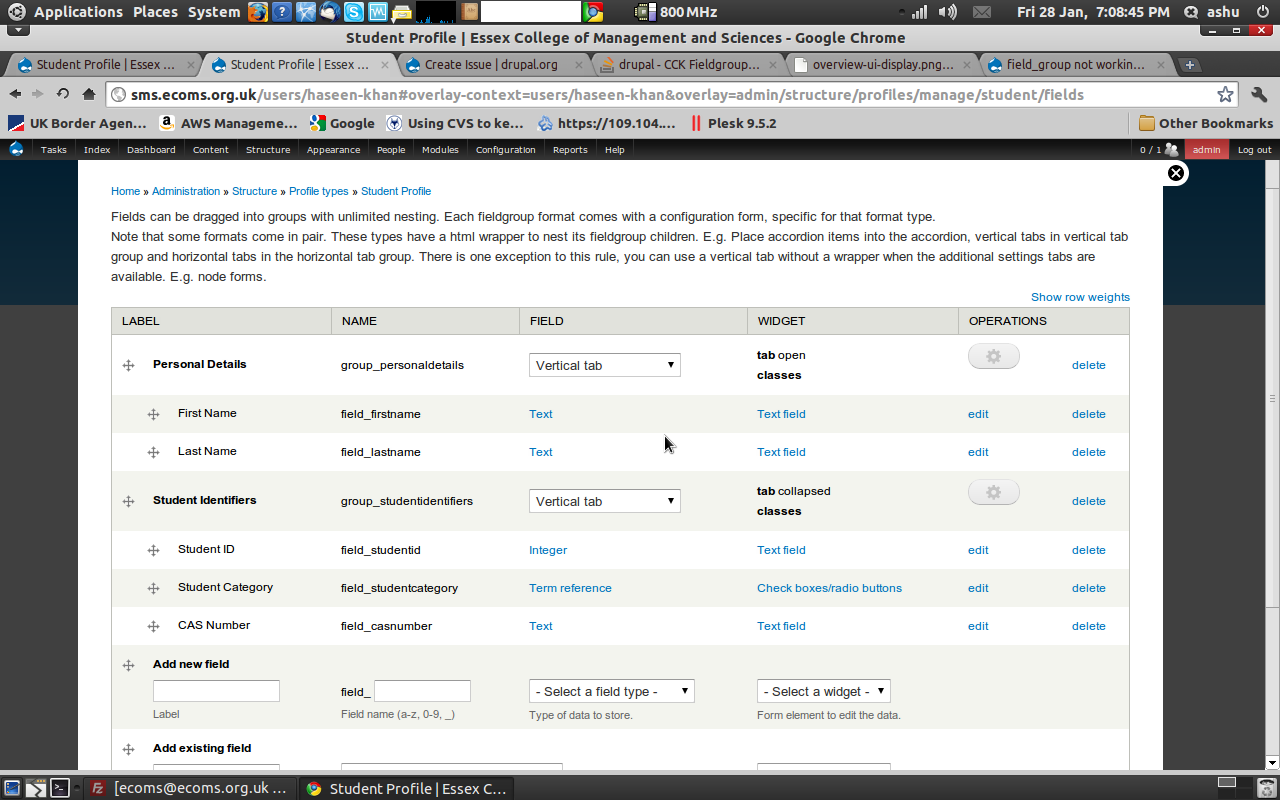
For the first two screenshots, you forgot the vertical tabs group. That's where you nest the vertical tabs itself in, as the description above reads. Try to add it and i think it 'll work just fine.
Comment #7
aanjaneyam commentedCould I request your settings screenshot. Thanks
Comment #8
Stalski commentedI will try to work for a solution that would work if somebody forgets or misunderstand it.
Comment #9
Stalski commentedSo it works for all things, except i put a fallback for forms only, that when you forget (or think the core vtabs for additional settings exists), i will provide a wrapper "additional_settings" myself to make sure at least the form with the fields are displayed correct.
You still need to follow the guidelines above, and create a vertical tabs group to nest your vertical tabs in. This is kind of logic if you realize there could be more vertical tab groups.
conclusion: it works in all cases now, as long as you follow the guidelines. In there is an exception for instance on node forms where you can put the vertical tabs in the core "additional_settings" group. That is also explained in the instructions on the display/ fields UI screen.
Comment #10
aanjaneyam commentedThanks a lot for getting at it so quickly. Finally is it true for horizontal tabs too. If that is the case the I was wrong in my second screenshot too.
Comment #11
Stalski commentedThis is what it reads on the fields UI and display UI screen. That's new in the dev releases. The part FYI is in bold.
Comment #12
jjma commentedI'm experiencing a similar issue using field group 7.x-1.0-rc1 with profile 2 7.x-1.0-beta1 in that I have two profiles, one for members and the other for corporate members. I want to use both during account registration but need to use vertical tabs to reduce page height. When both are enabled I lose the member profile input boxes completely? This is the case for all types of grouping formats.
I did a bit of debugging and found that disabling one of the profiles brings back the vertical tabs for the other profile.
Comment #13
webadpro commentedI'm having almost the same issue.
I have two profile type and the first one I cannot see any of the fieldsets.
If I use vertical tabs it works great but when using fieldset it doesnt.
Comment #14
pvhee commentedThis issue is still open when using 1.x-dev fieldgroup and Profile 1.3. Only vertical_tabs work, all the others (including fieldset) do not show up at the user registration.
Comment #15
deanflory commentedI can't get an accordion to show up at all and I do have them nested in an accordion group. There has to be some conflict somewhere.
Comment #16
simone960 commentedI am facing the same problem here. when having two profiles in profile2, my fieldsets didn't appear in the registration page. I'm using fieldgroup 7.x-1.1 + profile2 7.x-1.3 Any insight?
Comment #17
busla commentedI´m using dev version of both modules and nothing works. The group has a title but is empty.
Comment #18
busla commentedComment #19
busla commentedOops... make sure you check "show during account registration" in the profile type and the " Display on user registration form" checkbox on any fields attached to the user entity.
Comment #20
aanjaneyam commentedComment #21
manoloka commentedHi Bulsa,
I know it'a and old issue but I'm finding this same problem right now.
When you say;
Where is that checkbox supposed to be? I can't find it anywhere :(
Thanks
Comment #22
deanflory commented"Show during user account registration." is available when editing your Profile2 Profile type:
/admin/structure/profiles
"Display on user registration form." is available when editing a field on your User entity:
/admin/config/people/accounts/fields
Required fields automatically are set to "Display on user registration form." when the "Required" checkbox is checked.
Comment #23
manoloka commentedYou don't get the option to edit profile2 fields in /admin/config/people/accounts/fields
Comment #24
deanflory commentedThe User entity or account, and Profile2 profiles are two different things. Fields on User are different settings than any Profile2 profile fields settings. User fields show when looking at your account. Profile2 fields show when you're viewing a profile.
Comment #25
deanflory commented...unless you've somehow set things up so that someone viewing a User account gets sent to a Profile2 profile via redirect or other setting (can't remember where that setting was available, oh yeah, I think in display suite view modes you can choose a Profile2 to have an account display or something like that).