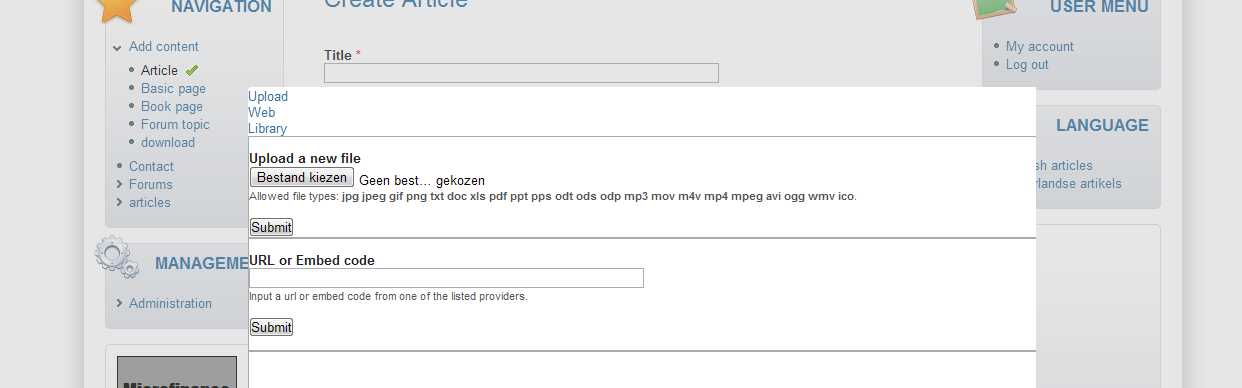
Else then in the picture on the front page there is no style in the media browser. All the possibilities are shown under each other.
But this isn't the only problem. Since the browser works in an overlay, and there isn't a cancel button it's impossible to go back to the edit page. So if you wanted to insert media, but you rethink your tought, it's impossible to go back unless you reload your page and you lose all the work you've already done.
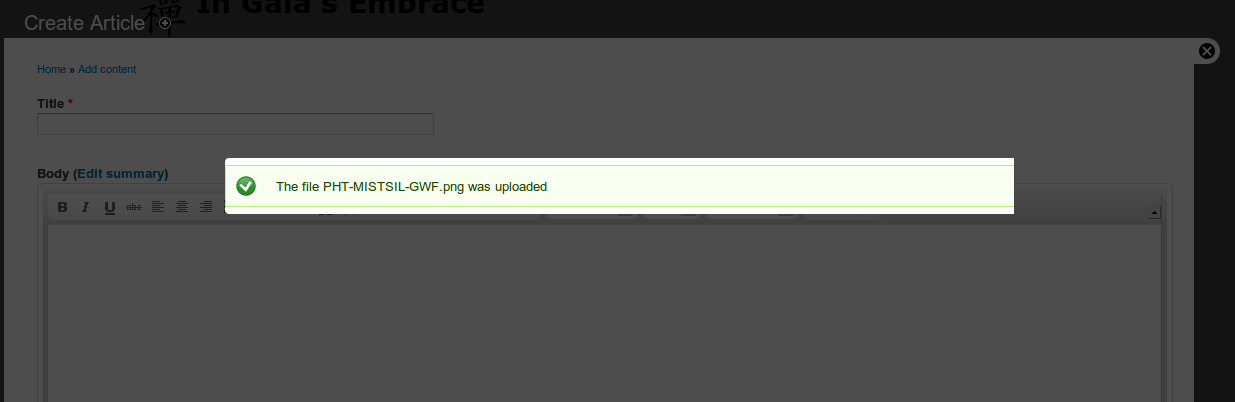
Furthermore after uploading an image (etc) the overlay stays with the "ok" message, wich keeps it impossible to work further.
So in generall, due the lack of a closing option (and an automaticly close option after upload) it's impossible to use the module.
I've added a screenshot.
Tested in chrome and opera, on the dev version and the beta version. All performance options (wich could mess up the css or js files I guess) were set to be not working.



Comments
Comment #1
JacobSingh commentedHmm... I don't understand how this bugs is reproduced... I'm guessing there is something wrong with your setup? Perhaps it is a l10n issue? can you try testing on a fresh install w/ just english and if it works, add Dutch back and see if it still happens?
Comment #2
parasolx commentedi also facing same problem. using -dev version. my drupal was upgrading from 6 to 7. before its still ok. after update to latest dev version, this happen. seems like css doesn't load.
i'm not using overlay. either during submiting new content or under content > media, same problem. CSS not load. clearing cache doesn't help.
Comment #3
parasolx commentedhey.. sorry about this problem.
after i check my settings, actually what happen is i forgot to give permission 777 to default directory especially to css, js and images folder.
after enable CHMOD 777 to all these folder, everything goes correct. JacobSingh, i think you should check the folder permission. maybe this will solve your problem also.
Comment #4
Anonymous (not verified) commentedI had it a bit bussy, but here's a late reply:
-disabling dutch doesn't help, the problem exists
-chmod 777 the mdeia folder doesn't help either
The problem keeps existing with the current dev version.
However: after some playing in the configuration: if i choose bartik as browser theme, the buttons are rounded. But still no cancel option and no javascript to switch the views. So in the earlier screenshot, only the buttons are rounded (so ccs is loaded).
Comment #5
Tor Arne Thune commentedI was able to reproduce this bug after installing the latest dev version. After uploading a file to the media gallery, I get this message on screen, with no way to remove it (other than reloading the page or using the back button). See first attached screenshot.
Also, the Submit button and Cancel button in the media gallery is not working, as in nothing happens (images are selected). This makes it impossible to use the module. Setting this issue to critical, because of this. See second attached screenshot.
These two issues are not an issue in Firefox 3.5, only in Google Chrome 9.
Comment #6
aaron commentedyum, yum. x-browser issues :(
Comment #7
heygabe commentedI am experiencing this exact same issue.
I have traced this issue down to the pulpload module. If I disable pulpload, I get the one-at-a-time file upload box and it works just fine.
But then I can't upload multiple files.
Maybe a red herring? I have no idea.
Comment #8
hawkbreeze commentedI would also like to add my observations with this bug.
Initially I installed the following modules.
Media 7.x-1.0-beta3
Styles 7.x-2.0-alpha5
Wysiwyg 7.x-2.0
tinymce_3.4.1
Bartik 7.0 theme with Seven admin theme.
I then configured Wysiwyg enabling Media browser.
When creating content and clicking on the Media icon, I get the overlay as shown in overlay1-from-wysiwyg.png. There is no Cancel button and clicking on library scrolls the page down a bit but nothing is displayed. Trying to upload a file does not work either and if I try I get an "The connection was reset" error.
Sometimes however I do get a cancel button as show in overlay2-from-wysiwyg.png. I can not work out why I get it on some occasions and not others. When I do get the cancel button, clicking on the library tab brings up a second Submit/Cancel button as shown in Library1.png.
And then again, on the very odd occasion it sort of works and I get what is shown in Library2.png expect that no media files are shown.
I've tried clearing cache and both browser and Drupal etc with no luck.
I then did a fresh install of Drupal 7 with dev versions of media and wysiwyg and still the same bug arises.
Not sure where to go from here? Any suggestions?
Comment #9
JacobSingh commentedThere seems to be multiple issues here. one is missing CSS (the original one). This would look like a permissions issue on the directory holding generated CSS. Clear your cache and chmod -R 777 files. Also disable color module, it can do this in an upgrade in my XP.
The other one about the media browser never returning to the editor, check the JS console in your browser to see if there is anything there.
I'm changing from a bug report to a support request and setting the priority back to normal. That doesn't mean it's not bad, but it seems pretty isolated (most people don't have this issue) and since we are yet to be able to reproduce it and have no steps to generally reproduce it, I'm marking it a support request until we know there is a general issue.
This doesn't mean I'm not going to follow up on it this week, just trying to get the issue queue into a state where it's easier to see what are bugs everyone is facing that are blocking a 1.0 release.
Please provide more information, apache / php logs, check the javascript console, and perhaps try dev versions of all modules.
Thanks for reporting and sorry for being so long in responding!
Comment #10
hawkbreeze commentedHey Jacob,
Which files are you referring to? Should the generated CSS be located in the site files directory or in the media module directory?
Comment #11
JacobSingh commentedIn the sites folder. sites/default/files usually.
Comment #12
hawkbreeze commentedJust to let everyone know, I chased this problem down and it was a mis configured Nginx server configuration.
After looking in the server logs I noticed messages like;
"GET /themes/seven/jquery.ui.theme.css?ljhjnc HTTP/1.1" 444 0A 444 error code is not good.
I removed the nginx server configuration that I was using and created a new config following http://wiki.nginx.org/Drupal as a quick test and inserting media worked! I have not chased down the offending line in the old config but will dig around and see what I can find.
So for others having problems, have a look at your logs and see what HTTP return codes are being raised.
Thanks Jacob, your post got me on the right track to chase this problem down.
Now to get floating images working.....I'm sure I saw that posted in issues....
Dave
Comment #13
hawkbreeze commentedOK tracked this down to a config line for Nginx.
I had used configs from http://github.com/perusio/drupal-with-nginx and the line that was causing problems was in blacklist.conf in which the referer is checked for certain strings.
The referer contains the "video" string. Removing video from the list fixed the problem.
Comment #14
perusio commentedThanks @cannod, it's now fixed. Removed the offending
videopattern from the referer regex.Comment #15
JacobSingh commentedComment #16
Anonymous (not verified) commentedDHTML modules seems to load first.
And in chrome the DHTML module has a javascript error wich seems to block the media javascript (and css) from jquery.ui to run as it should.
Comment #18
Anonymous (not verified) commentedGetting the exact problem identified in issue summary, exact same response, screen captures reflect my setup as well. Removed plupload module, cc, etc, no effect. Problem seems to be the appearance of the media browser overlay, buttons missing, cut off.
Comment #19
ParisLiakos commentedPlease don't hijack a more than a year old issue, open a new one instead
Comment #20
Anonymous (not verified) commentedIt is the same issue and was not solved, merely closed due to inactivity.
There is no value in opening yet another issue, it only further delays and confuses the search for a resolution, and besides, this is hardly "hijacking".
The purpose is to mitigate efforts to trouble shoot what is a serious and as yet unresolved bug. If you have something helpful to add, please do.
Comment #21
ParisLiakos commentedYou changed priority and category. how can it be the same issue closed due to inactivity?
anyway, i wont play around with status
Comment #22
Anonymous (not verified) commentedThe "add media" browser works "best" in IE 9. It is non functional in latest Chrome, and Firefox browsers.
Initial overlay allows user to Browse and select content, which is then uploaded and displayed. However, the overlay is transparent in Chrome and Firefox, making it extremely difficult to use, and the Submit button is non-functional. the Cancel button works, although both Submit and Cancel appear as linked words, not actual buttons.
In IE 9 the overlay appears more or less normal, however the Submit button will not work.
Using the Bartik theme for admin/config/media/browser.
Comment #23
Anonymous (not verified) commentedNot sure if these is relevant but included here for reference:
http://drupal.stackexchange.com/questions/11823/how-to-override-a-js-fun...
Comment #24
Anonymous (not verified) commentedDisabled "media crop" module and am now able to insert image, submit button works in IE and Firefox. Going to change status to closed.