

 Come together with the global Drupal community in Rotterdam, 28 Sept – 1 Oct 2026. Sessions, contribution, connection, and Early Bird savings until 8 June.
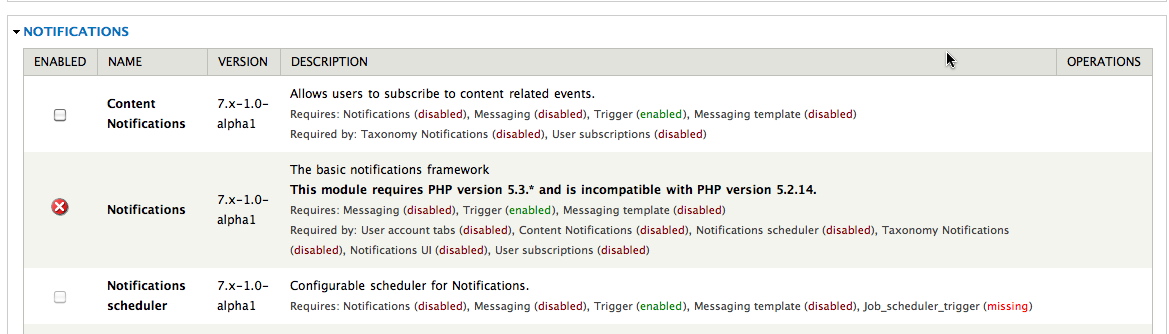
In my Modules list, the Notifications module claims to require PHP 5.3. Is this accurate?
While I support the gesture to press people to use more recent versions of PHP, the fact remains that PHP 5.2 is still the mainstream version in almost all hosting scenarios. Given that PHP 5.2.5 is the minimum PHP version required by Drupal 7 core, should this module not follow those guidelines?
My crappy host is running 5.2.14 (on which Drupal 7 seems to running fine). So, I guess my question is, does Notifications require PHP 5.3+ or 5.2.5?
| Comment | File | Size | Author |
|---|---|---|---|
| php5214.jpg | 135.28 KB | scottrouse |

Comments
Comment #1
NathanM commentedSubscribing.
Comment #2
rublev_green commentedsub
Comment #3
DeweyOxberger commentedSame here - says I need 5.3.
Comment #4
tgriswold commentedThis morning I called the support or sales departments at 7 of the top 10 (off one of the top 10 lists) hosting and PHP hosting services and not a single one supports 5.2.5, little lone 5.3.*. For most, you can buy expensive hosting plans where you can install your own PHP, but that is unaffordable for most small organizations.
I did find a couple hosting services that offer 5.3. Hostek.com is one but when I called support I got a “we are unable to answer your call due to the weather in our area, few available tech …”. I know that the weather in Tulsa has been terrible (early Feb, 2011) and I was able to reach a tech on the chat line, but Tulsa gets tornados as well so how often does this happen? Maybe I am over analyzing it, but I was just not comfortable.
I also found that HostGator.com offers 5.3.4 on their “dual environment” programs. Their Baby Plan has this. Supposedly you don’t have to ask for anything special, it just comes when you buy. They charge $7.95/mo on a 3 year contract but they also offer a $9.95/mo program on a month to month basis. They have a 45 day money back guarantee so, at least in theory, you are safe trying it out or at the worst you would be out $9.95. They have a starter plan that is $8.95/mo on a month to month. The same software may be available on that but I didn’t ask. Anyway I am going to give the Baby Plan a try for a month and I will also try (assuming I am not too busy or lazy) to get back and update you all on my results.
Regarding the online reviews; 100% of the hosting services out there have page after page of complaints, a few are current but many are years out of date (but never go away). The big ones have millions of customers so what may seem like a lot of complaints is really a very small percentage. I have been with GoDaddy for years and have had excellent service and support, but still there are those who have nothing good to say about GoDaddy, other than maybe the Super Bowl commercials. Anyway who knows if the complaints are bogus or if the clients knew what they were doing or were even asking questions that the hosting service could/should answer? For me, most of the complaints were pretty meaningless; if I relied on them I would be so discouraged I would either quit of set up my own webserver.
I am not a reseller, so I have no dog in the hunt, just contributing my research/opinions of the problem, hope this is helpful.
Comment #5
marko42 commentedsubscribing
Comment #6
Shai commentedsubscribe
Comment #7
tgriswold commentedAs promised, here are my Drupal 7 install notes for a HostGator Baby Plan. The short answer is that I was able to get the problem resolved. The “how” answer is below.
1. The new HostGator account creation was easy as you would expect.
2. Their documentation is rather out of date, it talks about mail setup for Outlook 2000 as an example. However, it seems to work correctly in any case. They tell me this is part of the CPanel documentation which they don’t own/control.
a. They have a feature that allows you to setup a remote disk on your desktop. Depending on your firewall settings this may or may not work. I chose not to use this feature as I preferred to use filezilla.
3. I installed a new instance of Drupal 7 so I was not uploading the database. If you are moving an installation from another account you may have other issues.
a. First, you will have to change the PHP settings a little. When you install Drupal and it gets to the Verify Requirements stage it tells you that “PHP register globals” is set on and it needs to be off. You can change this by going to “php.ini QuickConfig” on your CPanel. About half way down a very long list of PHP configuration options you will find register_globals. You can turn it off there.
b. I ran into a bit of a snag when I set up the database (actually when I attached the database during Drupal install). I had changed the password on CPanel and it also changed the password on my database. It took me a while to figure this out. Once I got that combo correct it installed smoothly.
4. There was still an issue with the PHP version as the default is 5.2.*. It took a bit of work with the tech support group to resolve. I found them to be very responsive and, although it took a couple cycles, it was resolved rather quickly.
Here is a brief set of instructions on what you/they need to do to get it to run 5.3.*
a. You will need to add a couple lines to your .htaccess file. You can find the information at http://support.hostgator.com/articles/pre-sales-questions/php-5-3. I added the two lines to the file right after:
# PHP 5, Apache 1 and 2.
Action application/x-hg-php53 /cgi-sys/php53
AddType application/x-hg-php53 .php
Unfortunately this did not resolve the issue as the support post would have you believe.
b. It was necessary to edit the php.ini file to change the extension_dir path:
extension_dir = "/opt/php53/lib/php/extensions/no-debug-non-zts-20090626"
Tech Support had to do this, but they tell me that “this should be uniform across our shared server farm, and if you run into issue with modules not working with PHP 5.3, please contact us and we will update it as needed” (This seems a bit contradictory but ok.)
c. Once these steps are taken, my Drupal7 installation is using PHP 5.3, and I now have access to the proper modules without errors, at least so far.
However, somewhere between steps “a” and “c” the site went down with a Fatal Error that basically said it couldn’t connect to the database. I tried to run update.php and it told me the PHP Data Object (PDO) needed to be enabled. I sent a message to the support folks and they quickly fixed that problem. Like I said, I don’t know if the problem occurred after step “b” or if there was something else that they did, or that they did wrong, that caused the problem. In either case, the problem was quickly resolved and Drupal 7 along with Notifications appears to be happy with the PHP configuration. Hopefully tech support has also learned what needs to be done for Drupal 7 and future installs should be easier.
Again, I am not a reseller or in any way connected with HostGator. I just chose them as they appeared to know what they were doing and a friend recommended them. My experience thus far has been very positive. Good luck and I hope this helps with your own installation.
Comment #8
jose reyero commentedReplying to the original question, yes, this module requires PHP 5.3.
The reason, if you want to know, is heavy use of classes and objects and not proper support for some OOP features (late static binding) in PHP 5.2.
Comment #9
DeweyOxberger commentedPHP 5.3 is not an option for me (not for six months or so), drag...
Is there any way to get this module's functionality without the 5.3 constraint?
Comment #10
rublev_green commentedCould anybody please suggest an alternative that doesn't require 5.3 and works on D7.
For most shared hosting, we are not going to see 5.3 for quite some time. Just spoke with greengeeks.com (recommended by drupal.org), they are not going to upgrade until all apps (joomla,etc) on shared hosting that require php can run on 5.3
current mood: sad
Comment #11
DeweyOxberger commentedI installed Rules and Comment Notify - so far they have been able to do everything I needed (react to content being posted and notify the people involved).
Comment #12
zanoman commentedsub
Comment #13
danepowell commentedThere is some discussion on this topic continuing in #1209932: Notifications / Messaging PHP 5.3 requirement.
Comment #14
raulmuroc commentedComment #15
IWasBornToWin commentedMight be a good idea to type this on your project page in bold - This module requires PHP version 5.3.* and is incompatible with PHP version 5.2.17.
Comment #16
IWasBornToWin commentedStill might be a great idea to do # 15. Got me again :/
Comment #17
cemera commentedSubscribing
Comment #18
valthebaldWhat's the point, people? PHP5.2 is end of life in most major distributions for more than 2 years now.
This module uses some features incompatible with 5.2, can you please stop asking for *not* using advantages of newer versions?
Comment #19
stephen ollmanWhilst I appreciate the work that was put into this module, as I am sure everyone who used the D6 version does, there still exists a fundamental requirement for a great many people who are stuck using 5.2.x version to be able to still use the D7 version.
Its not always a simple matter of upgrading your server, especially for those that have multiple D6 sites hosted.
So far this is the only module I've come across that mandates the use of 5.3.
As #15 at the very least make it known on the Project page that the D7 version required PHP5.3.x
It's a real shame you are unable to make this superb module compatible with 5.2.x
Comment #20
stephen ollmanCan I also confirm that PHP 5.4.x is ok?
Comment #21
raulmuroc commentedHello everybody,
I agree with the community. Instead of being here discussing would not be easier and faster to simply put a statement in the module's project page telling that Notifications is not compatible with PHP 5.2?
Then this topic would be simply closed :-)
Thank you.
Comment #22
damienmckenna