

 The 2026 Drupal Business Survey is open. Your response will help shape the future of the Drupal business ecosystem.
This is true of both the Book module and Printer, e-mail and PDF versions module printer-friendly pages.
Imagefield images display properly on the regular version of the page but are shown as links with a generic file icon on the printer friendly version. I have looked into why this is. It's the CCK module that selects which theming function gets called, line 753 of content.module:
<?php
      $formatter_name = isset($field['display_settings'][$context]) && isset($field['display_settings'][$context]['format']) ? $field['display_settings'][$context]['format'] : 'default';
      if ($formatter = _content_get_formatter($formatter_name, $field['type'])) {
        $theme = $formatter['module'] .'_formatter_'. $formatter_name;
        );
?>
And that value of $theme is added to the node, and it's that theming function that gets called by drupal_render (which itself is called by the Book module). So when $field['display_settings'][$context] is not set, which it is not in the printer friendly case, CCK looks for a default function for that type. But $field['type'] is not equal to "imagefield" but to "filefield", and so the theming function that is called is filefield_formatter_default, not imagefield_formatter_default, which doesn't exist anyway.
Clear as mud? :)
Even if something called imagefield_formatter_default did exist, it would only get called if the field type was set to "imagefield", and doing that might mess up other things, since Imagefield works by being a kind of filefield.
I guess the other possibility is to make sure the context is set in the printer friendly page, if that can be done and I don't currently know how. I'm thinking out loud a little here because I thought I might make a patch... if I can.
By the way, the silence on this issue amazes me. Even when somebody brings it up on the forums, nobody replies. It's totally weird. Do so few people care that their images don't display properly in printer friendly?
CCK version: 6.x-2.9
Public download
| Comment | File | Size | Author |
|---|---|---|---|
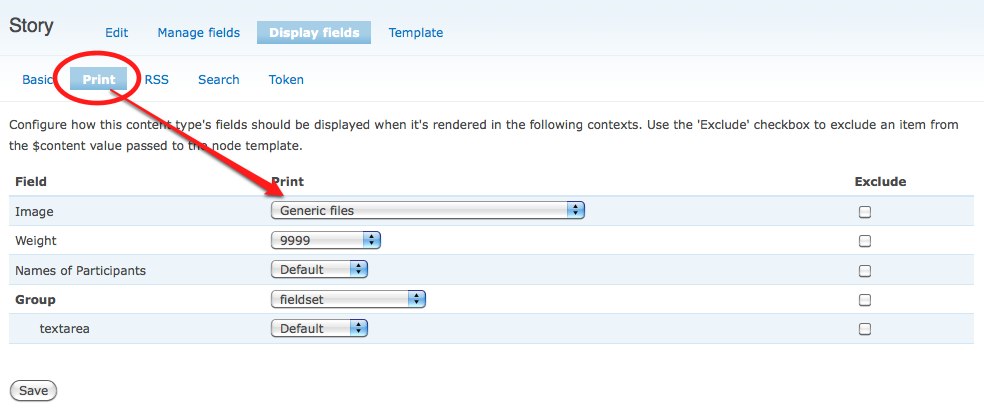
| #2 | print-imagefield.jpg | 59.08 KB | quicksketch |

Comments
Comment #1
vunger commentedAnd the silence continues. :/
Comment #2
quicksketchWhat, you can't wait *two days* for *free* support? Paid support (via consulting and education) is my day-job.
In any case you need to edit the display settings for your ImageField. Visit admin/content/types, click on the type that you want to change, then click on the "Display fields" tab. There are settings for Full and Teaser on that page, if you have installed Print module, there is an additional tab for Print and PDF there. Click and then adjust the setting for your ImageField.
Comment #3
vunger commentedSorry! I should have been more patient.
Goodness gracious, there is indeed a Print tab. Thanks a heap, quicksketch. So that's only if you have the Print module installed? If you're just using the printer-friendly version that comes with Book, there's nothing you can do?
Comment #4
quicksketchThat's right. If using printer-friendly mode that comes with Book module, I think it just prints the "full" node version. Since those displays are provided by CCK and Book predated CCK, it is not aware of multiple display modes besides Full and Teaser. Interestingly hook_nodeapi() actually has a "print" $op, but I don't think many modules (including CCK) utilize that option.