

Closed (fixed)
Project:
Timeline
Version:
6.x-2.x-dev
Component:
Miscellaneous
Priority:
Normal
Category:
Feature request
Assigned:
Reporter:
Created:
23 Dec 2006 at 03:49 UTC
Updated:
30 Nov 2010 at 02:12 UTC
Jump to comment: Most recent file

Comments
Comment #1
Arto commentedThis would indeed be a nice feature to have. No near-term plans for it, but let's keep this open.
Comment #2
Arto commentedJeff or David, feel free to implement this if you consider it a useful feature (patches from external developers welcome, too) - unassigning myself from the issue as I don't personally have time to do anything about it in the foreseaable future.
Comment #3
fm commentedI still think this would be really a really cool feature.
Comment #4
mtraven commentedYes, this would be very cool...another thing to do in addition or instead is to allow the colors of the events to be set somehow. I'd be willing to this myself but I'm a Drupal noob.
Comment #5
highlander78 commentedHi,
I have just requested the help of any developer to create this feature. http://drupal.org/node/215379
We will be rewarding someone $200 for this feature.
If anyone responds with a patch for this (verison 5.x) I will publish it here for possible inclusion in this module.
Lets see if this helps to get this cool feature on board !
Comment #6
highlander78 commentedHi,
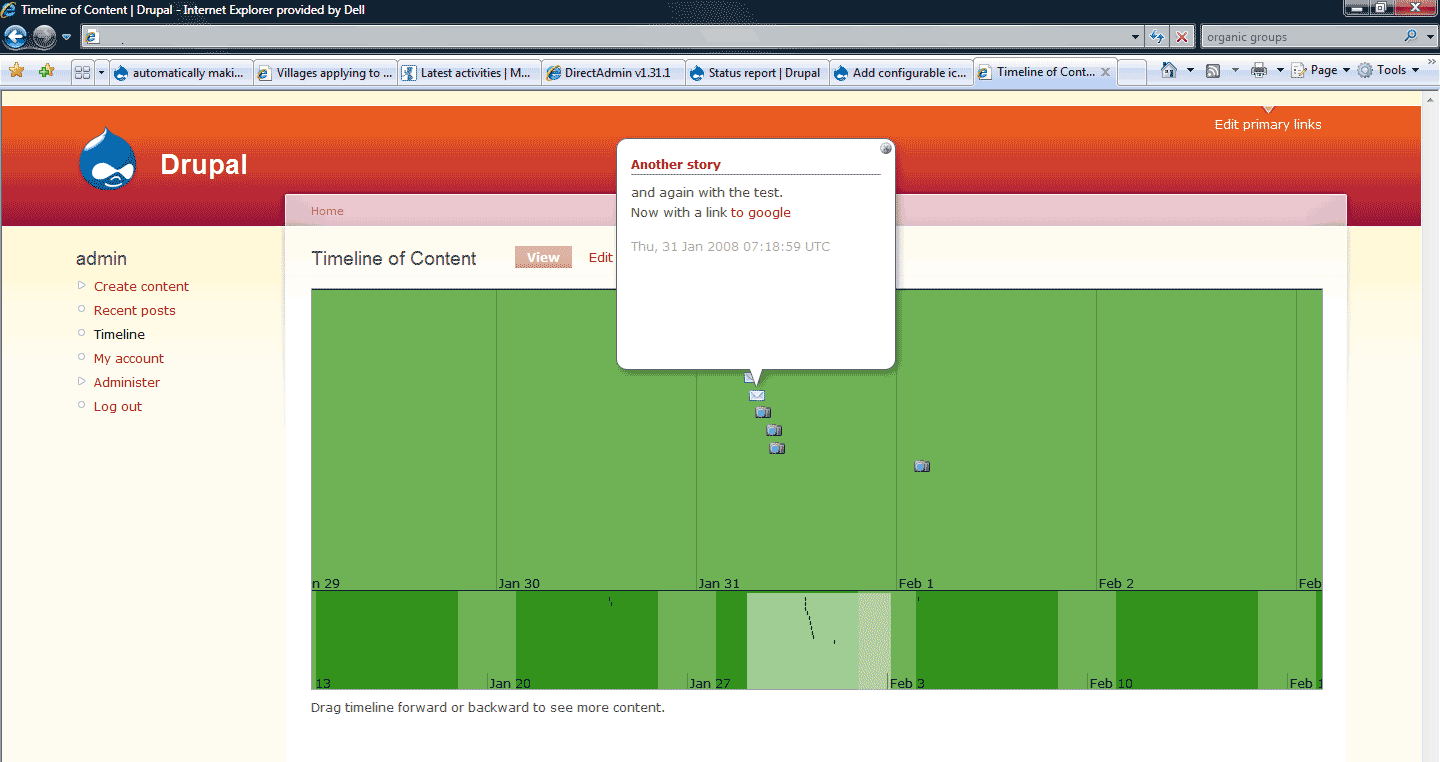
I am attaching a new module called timeline_content which the external drupal developer has been created for us.
It ads a configurable path to each content type so you can specify an image which will be used as the icon on the time line.
You need to use this in conjunction with the original timeline module.
You need to add one row in the original file timeline.module.
It is in the function timeline_data.
I hope others will be able to benefit from this piece of code and be able to use it and improve on it.
I am unsure as to why this could not be a patch on the current module, but did not have the time myself to get stuck into it.
At least it is a step in the right direction.
With kind regards,
James
Comment #7
fm commentedThank you for the new timeline_content module. I've followed your directions, installing the module and modifying the original timeline module (as above). Unfortunately, when I reload the modules page to activate the timeline_content module, the modules page was then blank.
I went back and deleted the modified line in the original timeline module, and successfully reloaded the modules page. I then successfully activated the timeline_content module. However, when I went back to the original timeline module and restored the modification, the site produced a blank page when reloaded.
What other information can I provide you to help move this forward?
Druapl: 5.7
Timeline: 5.x-1.x-dev
MySQL database: 5.0.41
PHP: 5.2.5
Web server Apache: 2.0.59
Oh shoot. I just noticed that this is a Timeline 4.x issue thread. Is there anyway to get your module and hack to work with Timeline 5.x? I believe Drupal v6 will be published very soon, and when it is v4 will probably be depreciated.
Comment #8
fm commentedAlso, the .info file seems fairly sparse.
Comment #9
highlander78 commentedHi fm,
I have this running under 5.7
Did you change the original timline.module file correctly ?
I do not know a lot about drupal yet but I can imagine a syntax error causing a white screen.
I have attached a screenshot of one of my test environments where you can see it working.
I agree that the module is not very big/complicated, which is why I thought it might be a patch instead.
James
Comment #10
fm commentedOkay, I've got it working! Yea! Thanks for your patience. I had copied the code line from this drupal page, and that wasn't working. I retyped the line from scratch and it worked. I guess there were hidden characters, or perhaps the spaces this webpage displays aren't kosher for php coding.
Now, is there a limit to the size of the icons? I tried a jpeg with dimensions of 64 x 64; Timeline displayed the whole width, but only the top 15 (or so) pixels.
I love your mod/hack. It's easy to use, and adds a great deal to the personality of my timelines.
Oh, I just had a thought ... associating the icons with the content_type is workable, but associating the icons with taxonomy (or even with the individual record itself) might make implementation much more flexible and germane. Or perhaps the admin could have the option choose the type of association for the icon.
Comment #11
peterdd commentedTaxonomy image module could be used as source for timeline icons.
Haven't found a module for term colors that can be managed by users too.
A first approach for Taxonomy color: http://drupal.org/node/219596
Comment #12
bomarmonk commentedCould the icon or image for the timeline entry also be a thumbnail from a CCK image? That would offer a heck of a lot of flexibility, as you could set a default image, but customize it per node (I'm thinking specifically of an image of an author's face for his place on a literary timeline). I know that this might be a bit complicated, but wow, it would be good!
Comment #13
jorgeegomez commentedThis patch could provide taxonomy image icons (if that module is installed) to the timeline
Comment #14
emersonlenon commentedI applied the patch in conjunction with taxonomy_image and have the taxonomy images showing up for my posts, but the icons don't show on the timeline.
Any guidelines on how this should be configured?
Comment #15
bomarmonk commentedI tried updating the timeline_content module with Deadwood. It seems to work, but I can't figure out where to set the icon path (so maybe it isn't working). I'll see if someone else can take this and make it happen (attaching converted 6.x version). I also didn't get lucky with the one line trick for editing the timeline.module. It looks a bit more complicated now. I tried the following, but this doesn't seem right. Any help?
I placed the above code in the same function (timeline_data) mentioned above:
Comment #16
bomarmonk commentedWhat would be even better: to get the icon path to work with each timeline node, independently. As I understand this, it sets different icons for content types, but not individual nodes.... (still this is great)!
Comment #17
Kripsy commentedI don't have the time or knowledge to write a patch but I got Taxonomy Image working with Timeline to produce icons based on a taxonomy for D6 based off of comment #13. In the timeline.module I inserted
right after 'foreach ($set as $item) {' on line 270 and then changed line 280 from
$event = array('link' => url('node/'. $item->nid), 'description' => '');to
$event = array('link' => url('node/'. $item->nid), 'description' => '', 'icon' => $icon );and finally inserted
if (is_null($event['icon'])) unset($event['icon']);on line 311 afterunset($event['end']);Maybe someone else can make the patch. I'll attach a copy of the module as well.
Comment #18
diodata commentedI just posted a support request for custom thumbnails/icons in the Timeline view over in the Exhibit module issue queue. http://drupal.org/node/375753. Same topic as here, especially comment #12. That's really where this should go.
I'm not quite sure where is the proper place for this support request. You would think any bug fixes or enhancements to the Timeline module would also be relevant to the Timeline extension of the Exhibit module.
Comment #19
wayne57 commentedDoes anyone know how the dinosaur example was themed with the icon?
I have followed the thread and it seems there is a growing interest in being able to customise the icon shown in the timeline.
In have only just started playing with this module but have created a content type of history_event and it would be useful to have some taxonomy terms to choose from and if they could be represented by an icon in the timeline that would be awsome!
Subscribing.
Comment #20
xamanu commentedtargeting 6.x-2.x branch.
I think either taxonomy images and imagefield should be supported. Since both of them have support for imagecache I would rely on it completely for now for resizing. This would provide a simple and integrated picture handling for the user.
Comment #21
xamanu commentedAdded feature request for icons on events with commit: #252396. Please test it!
Support for:
* CCK Imagefields
* Taxonomy_image
* Imagecache
Instructions:
Add a CCK imagefield or taxonomy_image field to your view. Go to the views timeline settings and define under "Field usage" -> "Advanced visualization settings" the field for "icon" and a preset of imagecache (if imagecache is installed).
The 2.x branch of the timeline module allows you to build own themes (look at the theme folder).
You might want to change some configuration in the theme:
* Copy one of the existing folders and rename the folder and both files in it (ThemeName.js and ThemeName.css).
* Make a search and replace on both files: OldThemeName -> NewThemeName
* Within the ThemeName.js you can alter (and probably unset) "iconWidth" and "iconHeight" to fit your needs.
* You can also change "icon" variable in order to define a different standard icon.
Comment #22
xamanu commentedfixed.
Comment #24
Metus commentedNevermind, got it. Thanks for all of your hard work guys.