

Needs work
Project:
CKEditor 4 - WYSIWYG HTML editor
Version:
7.x-1.x-dev
Component:
User interface
Priority:
Normal
Category:
Bug report
Assigned:
Unassigned
Issue tags:
Reporter:
Created:
7 Feb 2011 at 00:41 UTC
Updated:
13 Aug 2013 at 23:17 UTC
Jump to comment: Most recent file



Comments
Comment #1
droplet commentedComment #2
dczepierga commentedCould u attach screenshot again? Do u use CKEditor module or WYSIWYG module?
Greetings
Comment #3
martinliu commentedAttached again.
I am using CKEditor with IMCE.
Thanks,
Martin
Comment #4
markshust commentedSame problem here, I don't have IMCE installed.
Comment #5
markshust commentedComment #6
martinliu commentedAfter I disabled IMCE, drupal is having same strange issue.
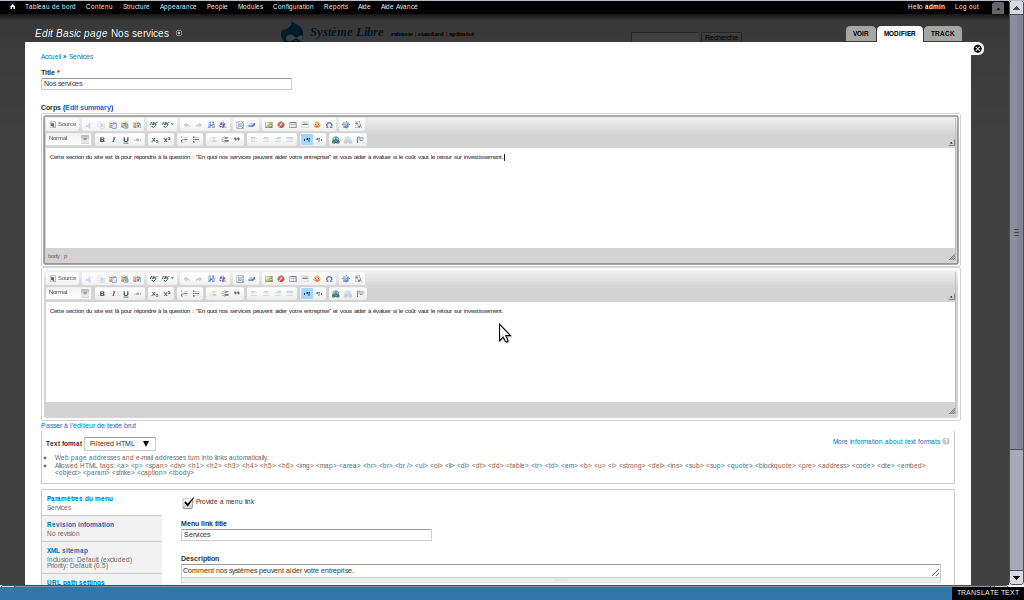
Those 2 text editor areas show same content...
Thanks,
Martin
Comment #7
badbuta commentedSame problem here, I have installed and enabled IMCE.
Comment #8
teodoro commentedsame problem to me:
I have the last release of Drupal 7, CKeditor drupal module and CKeditor with CKFinder software at this time (10 feb 2011)
I had disabled WYSIWYG module and installed CKeditor as single module
Comment #9
gramoun_kal commentedSame issue here. Screenshots included. One with focus on the duplicate, one with whole page.
Drupal 7.0, CKeditor 7.x-1.0, freshly installed, no WYSIWYG module, no CKfinder, nothing fancy.
Editing the top one differently than the bottom one results in only the top one being saved.
Editing only the bottom one results in no effect.
Conclusion:
Both fields are not synchronised.
Editing will only work in the top one. The bottom one is purely cosmetic, though functional.
Toggling "rich text" on and off only affects the top one.
The same behavior applies to the summary. Toggling it on will add 2 rich text fields with the same content. Turning the rich text off will affect the top "body" field and the top "summary" field only.
I'll update as I find out more about the issue. Can someone with firefox/firebug send more insight?
Comment #10
badbuta commentedI may find the temporary solution:
I find that the text editor area become normal if I disable "Aggregate JavaScript files." (Home » Configuration » Development » Performance -- BANDWIDTH OPTIMIZATION).
I may suggest to disable the "Aggregate and compress CSS files" as well.
I wish next version will fix this bug.
Thanks.
Comment #11
dczepierga commentedI fix attach and detach behavior in CKEditor module and fix aggregate bug. Now everything should work good.
All changes are commited to CVS.
Please check the latest dev release and let me know if you notice any poblems with it. Remember to clear Drupal cache and browsers cache before testing.
Comment #13
claar commentedI had this problem as well -- can we get a release with this bugfix? It's a very confusing and critical problem.
Comment #14
borazslo commentedWidth 7.x-1.0 (2011-Jan-13) I had this bug, but using the 7.x-1.x-dev (2011-Feb-25) there is no problem. :) Thx!
Comment #15
vinoth.3v commentedSame here.
Duplicate Editor Area appears with latest dev version feb 2013 :(
any idea?
Comment #16
vinoth.3v commentedTo whoever facing this duplicate error
it works here if I disable the ckeditor default state.
Comment #17
japo32 commentedI fixed the problem by editing the "Default". I just enabled my admin role in "Roles allowed to use this profile:".
It initially had no boxes checked. When I checked the option for my admin, the duplicate box went away.
This might be a problem with the rolechecking functions in the ckeditor module.