

By misty3 on
I apologize if this option is there somewhere already but *searching both forums and handbook* I did not find the way to enable short date format for the core forum module.
I will also like to know if this short date format can be anbled for tracker also, as otherwise
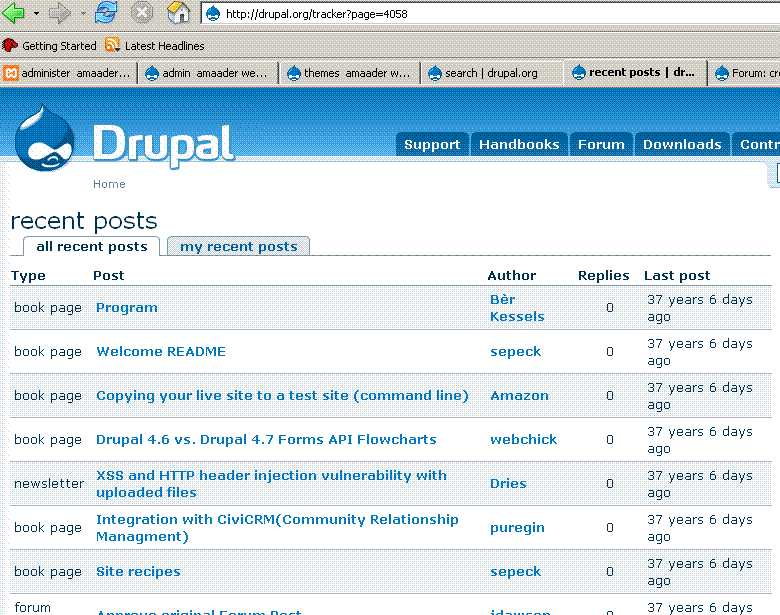
the current date format seem to throw erroneous results once the dats are old - PLEASE see the screenshot here : http://drupal.org/node/105715 or http://drupal.org/files/issues/drupal-date-format.GIF
Thanks a lot for understanding the problem.

Comments
I'm not sure offhand how to
I'm not sure offhand how to enable short date on the forum module or the tracker module. However, I would like to point out that those nodes were more than likely created prior to a change in drupal core, or a change in php with regards to date. you shouldn't ever run across this on your own site. your nodes should age properly and not just one day be 37 years old.
With change of core it may happen again ?
Thanks a lot VeryMisunderstood.
In future there will be many more 'Cores' of Drupal as it have been in the past,
as well as there will be newer versions of php.
Having absolute dates ( rather than calculative as the only option ) like
short date format ( or similar ) can help us to be *futureproof*
Please let know your view on this, and if possible to which forum or person
this query can get guided.
With regards
I disagree with the
I disagree with the assessment based on the fact that some of the information that is 37 years old , dates back to when drupal was called drop.org. That being said drupal was in its infancy. I will let someone more "in the loop" step in here, but I don't believe it can "happen again" regardless of changes to php or drupal core.
I also noticed that the bulk of 37 year old content, is book pages and not forum topics.
However:
I"ve taken a look at the forum.module but I don't see an easy ability to switch to short date format for the aging process of nodes. It very well could be in the node.module too I suppose. If you wanted to have a look see while awaiting someone with more direct knowledge to confirm or deny my assessment of the situation.
Thanks a lot for your
Thanks a lot for your feedback.
Thanks a lot again for looking into the forum module. Apparently there is no clue on how to switch to the site-default of date display. And to draw attention to this fact, I gave the above example, as many end-user concern goes unanswered ( like one here http://drupal.org/node/105717 ) . These are not fancy bell -whistle type things but some basic ones. With a project of this magnitude ( and considering it is free service by volunteers ) it is only expected .... Though this forum is of GREAT help always, sometimes it is very :( :( NOT to fond solutions to situations like this ( or this -> http://drupal.org/node/105717 for example ) which goes unresponded and end-user like us have nowhere to go !
Thanks very much for taking the time. With best regards
Change date format in Tracker
This nonsense has been going on forever. If you don't want a calculated 'time since last update' in days - hrs - min - sec (and who really does!), just change the following code:
t('%time ago', array('%time' => format_interval(time() - node->last_post)))to:
t('%time', array('%time' => format_date($node->last_post - $node->timestamp), 'small'))It may be nice to know that the last post was 29 minutes ago but who really wants to know that one was 53 days 6 hrs 14 min 22 sec ago! I'd rather know the actual date.
You can also change it in the Forum module and in other modules that use this type of elapsed time calculation.
Perhaps there should be an option to choose to display elapsed time in either format.
Thanks a lot for the tip. To
Thanks a lot for the tip.
To change it for the forum can you kindly guide where this is to be done ?
( In the meanwhile I am trying also )
"'Perhaps' there should be an option to choose to display elapsed time in either format."
The 'perhaps' canbe omiited - it should be actually there.
in windows open the forum
in windows open the forum module
then use CTRL-F to open the search tool
paste:
t('%time ago<br />by %author', array('%time' => format_interval(time() - $topic->timestamp), '%author' => theme('username', $topic)));Should be around line 672. in Drupal 4.7.5change to what is prescribed in previous post.
>
Thanks a lot ... so ultimately we found the answer :)
Thanks all - very best wishes and regards
Changed date format in module tracker - format OK, date wrong
Thanks for this, but when I tried to change it in the Forum module, I got the right format, but the wrong date - once as 1969, and once as 1932 I think it was.
Could you post the exact code for the Forum module?
Thanks much.
this is the exact code for
FIND:
t('%time ago<br />by %author', array('%time' => format_interval(time() - $topic->timestamp), '%author' => theme('username', $topic)));change to:
t('%time', array('%time' => format_date($node->last_post - $node->timestamp), 'small'))If it screws up the tracker.module then i wouldn't use it. I've never implemented it myself. I'm fine with the way drupal handles it natively.
i guess it must be screwing up the tracker.module
All of my dates come out as 31 December 1969, but thanks anyway.
It would be nice if this was a settable option.
This change to code gets the
This change to code gets the date right:
t('%time, array('%time' => format_date($topic->timestamp,'small')));The function
format_date()is quite versatile (in 'includes/common.inc') and can handle many date/time formats (although I am not learned enough to explain the formating here).Date format still doesn't work
Thanks Frazzlebottom, but it didn't work; in fact it actually broke the whole site! Replaced with the standard module and all was well.
missing apostrophe
Should be:
t('%time', array('%time' => format_date($topic->timestamp,'small')));I’m not a fan of the “Time
I’m not a fan of the “Time Ago” format. Rather, I would like to see actual dates and times. I’ve been playing around with the Tracker module to do something like this because I don’t like how “3 days, 4 hours ago” looks like in users’ track pages. I used some of the code in this thread but got dates that made no sense at all like what saltspringer said, “All of my dates come out as 31 December 1969.” If someone can help with the display of the dates that are actually valid, I’d be grateful.