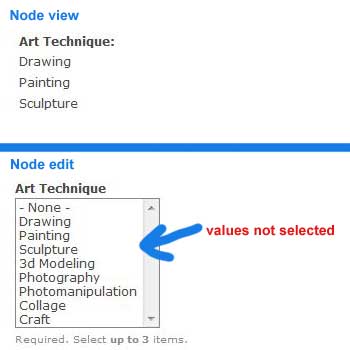
When I migrate CCK fields, the value of some of those fields does not show up when EDITING the node. However, the values for those fields are displayed when VIEWING the node.
Example:
I have a text_list field called field_art_mediums, with a list of art mediums as choices (paint, clay, glass, etc.)
Before migrating, my node has "paint" and "clay" selected.
After migrating, the node still has those same values, but they are not highlighted/selected in the art_mediums field when editing the node.
If I edit the node and submit it (without making any selections from the art mediums list) the data retains it's previous value - paint and clay.
Now, if I edit the field and change the art mediums to "glass", the value becomes "glass" as expected, and is now properly highlighted/selected when editing the node.
Also, this may just be a UI thing, but when I run the Migrate tool, it only ever shows that it processes 2 nodes (different nodes, for each field). All the nodes appear to have the associated field data, though. And yes, I've looked at the nodes that appear to have processed, and the same behavior described above holds true.
I've tried re-saving the content type and fields as some mentioned in other threads to no avail. Used the latest dev release.


Comments
Comment #1
TrevorG commentedI am having this same issue, coming here for advice and hopefully a fix.
It is migrating all of my fields, and they all display correctly, but the data from some of the fields is not editable in the edit form. Please help!
What's notable is that the Title, tags, and link fields all show correctly in editor but not any of my long text or regular text fields are not. So that must be where the problem is.
I should add I have tried the following:
- resave fields
- resave content types
Comment #2
TrevorG commentedOK, I've solved the problem.
The language fields in the field tables in the database are wrong, they are set to 'und' and they should be set to 'en'. When you change each record to 'en' it becomes editable. I don't know whether this is related to i18n or not, I do know there is a field in the field_config table that is called 'translatable'. Not surprisingly, the records marked '1' are the ones we are having trouble with. The ones marked '0' show up in the edit form.
Sorry I don't know how to fix things in PHP so the module maintainer or other angel of drupal will need to make the patch.
But a quick and dirty fix is to issue a SQL Query:
UPDATE table_name SET language = 'en'obviously replace table_name with field_data_field_xxx whatever your field table name is
assuming all your imported content is meant to be in English.
By the way, so I can eliminate it as a possibility, my nodes were brought into drupal by way of a csv in node_import. Did you create your nodes from scratch or did you use node_import?
Comment #3
eigentor commentedI can confirm the bug, and also the fix.
The language has to be set to your default language, which was german in my case, so I had to set the language column to "de".
Just as with TrevorG, the language was set to "und".
Comment #4
karens commentedSounds like a duplicate of #1063852: D6 > D7 non-english migration bug