

Closed (cannot reproduce)
Project:
Facebook Connect
Version:
6.x-2.0-beta1
Component:
Code
Priority:
Critical
Category:
Bug report
Assigned:
Unassigned
Issue tags:
Reporter:
Created:
13 Feb 2011 at 11:43 UTC
Updated:
20 Jul 2011 at 22:31 UTC
Jump to comment: Most recent file


Comments
Comment #1
vectoroc commentedtry last dev from github. also look at readme.txt (in last dev)
Comment #2
coderama commentedGithub? Where exactly? Can you please provide a link?
Comment #3
coderama commentedOk, I saw this is what you are referring to: https://github.com/vectoroc/fbconnect
Comment #4
coderama commentedIt still doesn't work. I set my application secret and ID correctly, yet I still get:
fbconnect_autoconnect_form_submit has been called without valid facebook session. Check your Application Secret on fbconnect settings page
I detailed my issue on StackOverflow here: http://stackoverflow.com/questions/4989924/fbconnect-on-drupal-not-working
Comment #5
breitner commentedSame problem. The dev-module does not work.
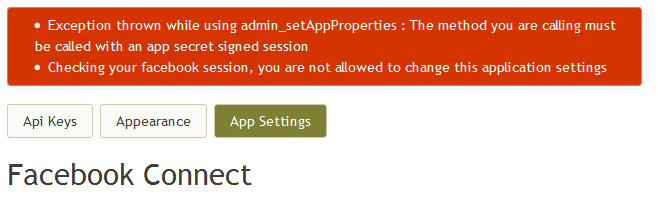
Error:
* Exception thrown while using admin_setAppProperties : The method you are calling must be called with an app secret signed session
* Checking your facebook session, you are not allowed to change this application settings
Comment #6
coderama commentedHow did you get that error? Does it show up in Watchdog?
Comment #7
breitner commentedThe error is on the "Facebook Connect" -> "App Setting" page.
And if I post an new node there is an other error.
Comment #8
coderama commentedThis doesn't seem like it's the same error I am getting. :-/
Comment #9
breitner commentedOK, but it is from the latest dev-version from http://github.org/vectoroc/fbconnect.
Comment #10
coderama commentedI am also using that version. And I don't get that error. I am using that version with the latest facebook sdk. It only bails when someone clicks on the fbconnect icon. It tries to connect, can't, and displays:
fbconnect_autoconnect_form_submit has been called without valid facebook session. Check your Application Secret on fbconnect settings page
Is anyone even using this module on a live site?!
Comment #11
vectoroc commented@breitner: afaik, readme says that you should'nt use App Settings tab unless you understand what you're doing
@ardi: also
try to disable other facebook* modules
look at admin/reports/status page
show your facebook settings (from facebook.com app settings tab, I don't need your secret key)
read carefully README from last dev (especially FAQ section)
Comment #12
coderama commentedThanks Vecto Roc. I did everything. I promise you I followed the instructions EXACTLY. I got no errors in status report and values are entered EXACTLY. I honestly can't see how anyone has been able to make this code work?
Can you perhaps tell me if this module will work on my local machine? or does it HAVE to be on a live site?
Comment #13
coderama commentedThanks to the stack overflow post, a user has made it pretty clear that it won't work unless Facebook can access your site from the net. So a local machine setup WONT work. This should confirm it: http://drupal.org/node/949248
I will confirm it after I've tested it. *cross fingers*
Comment #14
coderama commentedI can officially confirm that that is in fact the issue. You can't use localhost without something like Dynahost.
Comment #15
vectoroc commentedardi: it works on my local site (or at least worked, may be the facebook has changed something). I use it on localhost. What do I do wrong ?
also, no familiarity pls
Comment #16
vectoroc commentedafair facebook does not allow to use localhost as domain in app settings tab
I use domain mylocalsite.loc instead (and one record in my /etc/hosts 127.0.0.1 mylocalsite.loc)
Comment #17
e5sego commentedPossible solution:
I had the same problem, but just on Firefox 3.6.13 with CookiePie extension. After deinstalling ths CookiePie it works fine.
Comment #18
vectoroc commentedComment #19
Desi Raaj commentedI had the same problem, i solved my problem by editing my facebook application
go to ur fb application, click on edit settings, advanced, and clear out anything in the server whilelist and set everything else to default if u changed it in the advanced settings.
Comment #20
venusrising commentedAny for anyone using Mobile Tools and Mobile Connect you must add the base URL to the application before it will save in the Admin Drupal settings without throwing an error.
Comment #21
krneely commentedI am having the same issue with the error log saying the Secret is wrong. I don't have anything in the whitelist, and I didn't change any advanced settings.
When I check /facebook-php-sdk/src/facebook.php I get a blank white page. Could this be the problem? Thanks!
Comment #22
Jerimee commentedI am working with krneely on this. The issue was, in our case, that we had a trailing space in our Application Secret - so the password was just wrong.
Once we removed the trailing space we began to get some functionality.
Our current configuration doesn't allow for user to actually login or finish the registration via facebook connect, but, if you users attempt to register with facebook connect and manually complete the registration form the resulting created user will be associated with facebook, and from there they will be able to login via facebook.
We hope to adjust the configuration to improve upon this.