

Closed (duplicate)
Project:
Drupal core
Version:
7.x-dev
Component:
path.module
Priority:
Normal
Category:
Task
Assigned:
Reporter:
Created:
31 Dec 2006 at 15:51 UTC
Updated:
28 Jan 2009 at 21:58 UTC
Jump to comment: Most recent, Most recent file


Comments
Comment #1
chx commentedAnd the code.
Comment #2
chx commentedalter table url_alias add column active tinyint not null default 0;
Comment #3
Frando commentedI like the idea a lot!
Just did a quick review. Not all features are implented yet, if you want to test it anyway you have to run
alter table url_alias add column active tinyint not null default 0;in advance. The interface works as expected for the 'official' paths (node/20/paths) and looks already very clean.I'll review again when the missing features (mainly sending out 301s for inactive paths) are implented.
Comment #4
chx commentedLife is boring at the airport... so what could I do? I coded more, of course. Some code is moved into path.inc from common.inc a little from filter.module so drupal_goto can happen.
Comment #5
chx commentedThe empty path was not handled.
Comment #6
RobRoy commentedKick ass chx! This is another step in the right direction, I'll give her a spin later on.
Comment #7
chx commentedLots of fixes, code simplificications, doxygen and stuff.
Comment #8
chx commentedI fixed the home page, rerolled against HEAD and moved the interface into a block. Find a nice, wide region for her and all will be well. I think this fits more Drupal than hacking a new path for every page -- a block is something that appears on every page.
Comment #9
m3avrck commentedSubscribing, more thoughts later.
Comment #10
chx commentedReroll.
Comment #11
chx commentedBetter reroll.
Comment #12
webchickFor folks following along at home...
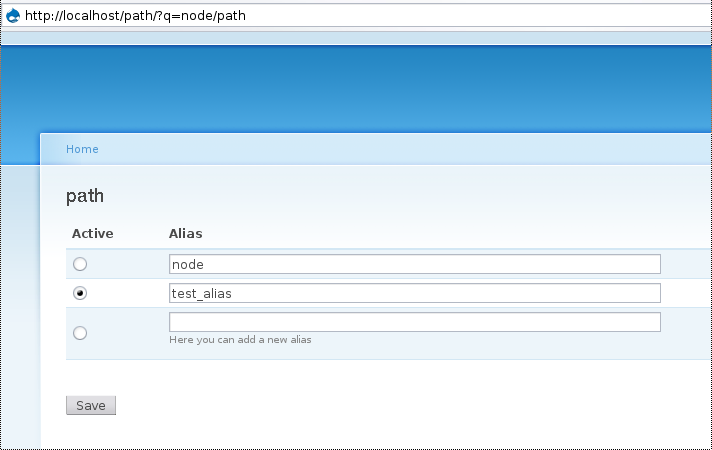
This patch removes the "administer url aliases" menu item altogether, and replaces it with a block that can be placed in one of your regions, which adds the UI shown in the initial post.
The idea is, when I'm looking at a post, I can specify the single path that should point to a given page, rather than break the workflow and go somewhere else entirely to have to edit it.
However, I'm not sure I like the particular approach...
a) The block is very wide, so can't fit into a right sidebar or something without scrolling (in Garland, anyway, at 1024x768ish browser window size
b) Because the block is collapsed by default, it's an extra click on each page.
c) The idea was to do the same type of things that wikis do, but if that's what we're trying to emulate, we should actually do it that way: let people with the correct permissions (create path?) type random urls in, and on 404 error put a button/link that says "Create page at this address"
d) Rather than removing the administer interface altogether, I think we should make it more like the admin/node interface with the shift+click/operation stuff.
Comment #13
chx commentedIt's not just wikis, it's SEO as well. This is not wiki itself, just a faciility that wikis and SEO find useful.
Next, as some earlier post says 'find a nice, wide region' -- I suggest the footer, not a sidebar.
There is no point in the current path admin interface. If you have 150 000 aliases (yay pathauto!) then how will you find the one you want? On the other hand, the site is rich with tools for this: you have navigation, search, inter-page links. And what mass operations make sense for paths? (Delete is a very rare operation, kept only for experimenting/error correcting reasons, but it should be avoided so that links do not rot.)
Comment #14
webchickHere are a couple code-related suggestions:
1. Include the db change in an update
2. Auto-expand the Administer URL alises fieldset when there is an alias defined.
Comment #15
webchickOk. After further discussion with chx on IRC, this is what this patch does:
Go here: http://en.wikipedia.org/wiki/Racoon (notice raccoon is misspelled)
It will redirect you to: http://en.wikipedia.org/wiki/Raccoon automatically
So whatever path is defined as "Active" is the one that the other paths that are _not_ defined as active will redirect to.
Comment #16
dries commentedI'm not convinced that moving administration functionality to a block is a good thing. It's not what we usually do so I think it makes for a bad precedent. I'd prefer to keep things like that on separate configuration pages, or on the main content area. Plus, it requires that the theme supports blocks/sidebars.
Comment #17
chx commentedAgain, I ask for consideration -- just because a mass interface is used for nodes/comments/users it does not make it's always good.
I am not married to the block. In the beginning I tried a separate page. Would that be better? Adding a tab to every page? That will need the menu patch but otherwise, that's certainly possible.
Comment #18
dfletcher commentedWhat I think should happen here is that we have an admin page with groupings similar to the way admin/build/block looks. It would of course need to be paged. Here's the kicker: at the top it has a search filter. Bonus points for making it autocomplete.
Then, keep your block and simply link to a search from there, keeping the nice in-page context if the site owner wants it. Also, a link would solve the width problem.
Comment #19
RobRoy commented@chx - I like the initial shot with an Alias tab on each page as opposed to the block. IMO that's more consistent with the rest of the interface. Good stuff!
Comment #20
chx commentedUnless someone has a good reason why the path alias admin overview page should exist, I am not willing to keep it.
I will get back to one tab for every page when the menu patch hits core.
Comment #21
webchickOne reason: mass edits.
Example: I create a few pages like "faq" and "company_profile"
I decide that these really make more sense in an entire "about" section of our site.
In order to make these "about/faq" and "about/company_profile" I need to go and visit each page, expand the block, edit the path, and then save. Repeat for each page.
Vs. an admin panel with all paths, I can quickly select the ones I want to edit, check them off using the same stuff from the admin content page, and be taken to an interface that shows several of those UIs in a row that I can edit at once.
Comment #22
RobRoy commentedI agree. Although the admin page right now pretty much sucks, we can deal with separate issues to allow for mass operations like users/comments/nodes do now.
Comment #23
Bevan commentedWhere's the right place for the UI to choose the default/active alias?
In a block?
-- definately not
On a new page or tab like node/25/path?
-- neither.
To find the right place for it, we need to consider what it does:
Sounds a bit like the path module doesn't it. Only this way is much better. In fact, this code would replace, or at least extend the path.module, wouldn't it?
So, the right places for the UI(s) for this feature are:
This allows for individual path editing 'per page' as an author, and mass editing as an admin.
Comment #24
chx commentedYou are wrong, the patch is not just about node aliases and also the mass edit interface does not make any sense because there are no mass operations to be performed on aliases and you can't find anything on that screen. I wanted something anchored to the current page because then you have the full plethora of your sites navigation (menu, primary links, node links, various searches etc) helping to find the page and its alias edit.
Comment #25
pasqualleI had a little problem to understand the attached picture (snapshot.png), about what should this form do. It is confusing what active-inactive alias means, and why the system path is displayed between aliases. Maybe I am missing something, maybe some new features I am not aware of, I don't know..
So I quickly drew a different form. What can be understund at the first look, but I am not sure, if it is the same feature what is described in this issue..
I know this would be slower on changing the active (primary) alias..
Comment #26
chx commentedwrong again because there is nothing special about the system path, that's just one path that leads to the page. Every paths are equal, there is one that's active, links to node/123 will lead to the active path and inactive paths will redirect to the active path. This can easily be clarified with a little help text.
Now tabs are done in the new menu system, so probably this can be resurrected. we shall see.
Comment #27
BioALIEN commentedThen now is a good time to subscribe.
For the record, I see this patch as an extension to the path settings/overview pages as well as a replacement to the path fieldset box in the Edit node section? Then it only makes sense to keep using those areas and just plug in the new functionality!
Comment #28
chx commented*yawn* I will still remove the current admin interface unless someone counters my arguments that it's a pointless interface. saying 'it only makes sense' does not say 'why' therefore it has no weight.
Comment #29
Bevan commentedchx, where do you propose is the best place for the ui for this? And why?
Comment #30
chx commentedRead #20 . (This is the last time I am repeating myself.)
Comment #31
m3avrck commentedThe path alias admin page sucks -- I agree with chx. It's totally unusable on *every* single site I manage. The only useful thing on that page is to add a new alias.
It would be significantly better to visit a page to see what, if any, alias is for the page and change it there.
Any other time I need to work with aliases I hop into the database where I can use MySQL LIKE matching to find patterns.
+1
Comment #32
BioALIEN commentedTo answer chx's question, and to carry forward webchick's argument, we can use the admin > path settings overview page for editing multiple paths. At the moment the current page just returns an overview of all the paths on your site in case you wish to scan for paths and make informed decisions with regards to SEO. What it doesn't support is mass editing/deleting of paths. This renders the page useless for people who can carry out the existing functionality through other means (look at the footnote). For D6 we can easily have a checkbox column to the overview page with Edit & Delete buttons for mass editing and deleting of selected paths. This will:
1) Add further needed functionality in order to make the page more useful (even for the skilled admins).
2) Improves the workflow and efficiency of admins, faster management of the site paths.
Generally, I view the Amin section as a tool to consolidate all the site's administration as well as enabling them to carry out mass tasks efficiently. Editing each node's path individually is OK if it's only a few pages. However, it gets more troublesome if you had to carry out this exact task on a daily basis.
Note: I didn't mention sql, phpmyadmin etc in this post - this was intentional.
Comment #33
moshe weitzman commentedsubscribe
Comment #34
Bevan commentedI'm beginning to understand chx's point of view now. However I think BioAlien makes a good point. Additionally mass editing of URL aliases would be really useful.
I still think a whole tab for URL aliases is perhaps a bit much. I don't see why the new interface can't replace the existing colapsable fieldset on the 'edit' tab. Unless a page has more than 10 aliases, which I think would be very exceptional, then it's going to be a small tab anyway.
Comment #35
chx commentedI begin to get fed up and that's not nice.
This is bleating. You managed to say nothing. What mass edit you are talking of? What operation exists there that can be applied to more than alias? If you say delete, then you not just missed the target but the target range, too -- originally I wanted to remove deleting capability, but Dries insisted on it, so I left it in so experiments can be removed.
Comment #36
Bevan commentedchx,
I'm sorry If I seem whiney, not understanding, sheep-like, or simply a nuisance. I'm not trying to be any of those things, or any other negative thing. I'm just trying to get my head around your objective, perspective and plan for this feature, which is obviously much more advanced than my understanding and perspective. I think you're being much more objective about than I am. I suspect that a few others that seem to be opposed to 'your way' are, like me, not quite getting the idea -- perhaps they're not even conscious yet that they don't get it.
Every time you post however, it makes more and more sense to me. I agree (now) that an admin page for url aliases serves little/no purpose. In my own words; the only really useful mass task is delete, which is against the whole idea of maintaining one active path per node, and redirecting all other paths / aliases for that node to the active path. 'All other paths / aliases' includes any old alias that is no longer active. If you delete an inactive/old alias, then any bookmarks, search indexes, or links to that URL will lose the active URL and just get 404s on the old path. Hence deleting aliases is just bad practice.
Deleting paths would possibly be useful when you want to reset all of a site's paths after or during testing a site -- before publishing for the first time on the internet (probably in combination with pathauto). However this is probably best achieved differently -- i.e. not through an admin paths interface.
I still don't understand why you think a tab is necessary and/or better than a fieldset in the edit tab.
B/ :)
Comment #37
chx commentedbecause a ton of pages do not have an edit tab. the Drupal world is a much wider place than users and nodes.
Comment #38
Bevan commentedAha! Damn good point!
Comment #39
chx commentedRerolled against HEAD as a separate page. Steve McKenzie will add some JS magic dust so it'll become a JS popup instead of a whole different page. We might want to take apart
path_initlater to see what needs to be moved to a menu API from there.Comment #40
chx commentedOn a second thought, I could move the breadcrumb code to the page callback which actually simplifies matters.
Comment #41
chx commentedA screenshot. The breadcrumb leads you back to the page you came from. But again, I have intentions to make this a JS popup.
Comment #42
chx commentedReroll.
Comment #43
Anonymous (not verified) commentedas requested by chx.
I couldn't make this into a patch file because you cant fake add a folder with cvsdo :S
So attached is a zip file that has 2 folders..
- path - is path.module so that can be simply dumped in /modules
- popup - is my new jquery thickbox like plugin that is more aimed towards being an application window vs a photo window (i will add the image handling stuff like thickbox at a later date) and this needs to be dumped in the misc/ folder like farbtastic.
currently the window will not do the ajax alias save yet but its all ready up to that part.
in path/ there is a path_window.js which initializes the popup and adds the callback() to run once the form is displayed so it can attach the appropriate events to the form to handle the ajax call. This is all setup but it just returns false; and alert() to say it would happen for now until chx handle's more of the menu stuff.
I tested the popup on
- IE 6
- Safari
- Firefox 2 (os x /xp)
oh apparently you can't upload zips?
this is a zip but .txt .. rename to zip.
Comment #44
yched commentedGreat ! A popup.js library would be a nice thing to have.
Wouldn't it be best in a separate thread, so it can be reviewed in itself ?
Comment #45
Anonymous (not verified) commentedyes but for now.. this is its only test case and i just listened to chx and posted.
Comment #46
chx commentedI rolled a patch.
Comment #47
yched commentedCall to undefined function: _path_get_path() in modules\path\path.module on line 95 :-)
Comment #48
boris mann commentedUrgh. JS popup? We don't have this anywhere else. How does this degrade gracefully with no JS?
Adding / extending the alias form directly on the edit page (ie. if you administer path, you see all paths) is one way. I actually do like the edit tab for all aliases, tool, but that gets to be too many tabs...
Search on the URL alias with simple patch at http://drupal.org/node/141526 seems like it should go in, too.
Comment #49
catchout of my league, but I like the look of this on first glance.
couple questions
1. will redirects from non-active paths to active paths work with aggressive caching?
2. I'm guessing it's easy to add non-active urls straight in? (say I want to add a legacy url I've been getting a 404 for to redirect to the main one.) That'd remove any need for path_redirect
3. Does the 'active path' functionality also redirect from node/123? In which case that covers global redirect as well.
One more vote for mass-deletion - I get a lot of paths with something-0 at the end due to duplicate titles/terms. pathauto can easily make identical appended aliases for free-tagging vocabularies. I want to delete all of the aliases with similar paths so I don't have the system telling me I'm trying to make duplicates when I change /tags/feedback-0 to tags/feedback . Then I can add more sensible ones back in from scratch.
Having said that, if you had a "this alias is already used by node/12, setting this alias will remove the old one, are you sure?" - which'd delete the old alias before the new one is committed" as an error message, that'd cover situations like that.
Another use case for mass deletion would be replacing something like the blog module with views - to clear out thousands of user/blog and user/blog/feed aliases out so they can be views arguments instead. I'd still want to keep user/blog/node-title-alias though so the sql for that would get complicated.
*ducks*
Comment #50
chx commentedWell, the page headers will contain a redirect so the aggressive caching I believe yes. Straight in, what? You can add any number of path aliases and one is active. Whether this is straight for you or not, I have no idea. There is a screenshot, though. node/123 is just a Drupal path as any other. If there is an active alias then it will redirect. You can't delete thousands of aliases from an UI anyways, so your argument is moot. Code it if you want to. But I can't fathom why it's a problem to not have link rot. But your call.
Comment #51
catchVery nice!
Ok that sounds great, it wasn't immediately obvious how to set one as active from the screenshot, that's all.
Now that is lovely.
If I can check all on a screen of 50, and do that 20 times, I've deleted 1,000 aliases. That's potentially quicker than learning how to distinguish with blog/user-name blog/user-name/feed and blog/user-name/some-title with regular expressions.
If I delete all aliases like blog/user-name for blog/[uid] and replace them views arguments like blog/user-name (blog/$arg) - then I've got no link rot. If I can't delete them, then I've got duplicate path nastiness. The existing ui doesn't have mass-delete though so nothing lost, and I could go learn regular expressions. I think it's a valid use case though. Another would be if I wanted to replace all the individual forum indexes with tabe views and arguments - that could easily be 100 aliases to delete.
Another question:
There's no blocks on rss pages, so how would you alias them with this system?
Also I think it's feasible (although I've never done it) to alias files, same question again.
Comment #52
dries commentedNot a fan of the popup, and neither am I a fan of a separate tab. I think it should be done in a jQuery powered fieldset. However, I do like the functionality that is being proposed.
Ideally, I'd like to combine URL aliases and menu handling. Rough overview:
Advantages:
1. Can manage multiple path aliases from one screen.
2. Can manage URL aliases from the same screen -- compresses the form.
3. Groups related functionality.
Comment #53
chx commentedI have better things to do. Because Boris addressed webchick's comment I will answer that as a parting shot.
It's not a block any more.
No it was just one source to get the ideas from, I am trying to address Google's needs.
Noone convinced me that there is a viable mass operation, but, not my problem any more.
Comment #54
chx commentedWell, can't stop myself. What's a "jQuery powered fieldset"? I do not understand Dries' proposal at all. If I have a menu item which points to node/32 but I realize it's a typo and correct it to node/321 then what would happen with path aliases?? Just because they are both related to a page, they are not the same by far. Oh, and I have a menu patch under testing which lets you have more than one link to the same page , mixing then menu and path module screen would lead to chaos.
Comment #55
chx commentedOK, let's keep the current interface. Just smarten it up a bit... here is a preliminary patch.
Comment #56
moshe weitzman commented@chx - did you mean to set this to 'needs review'? you might want to fork into a new issue if yourpatch is much different from what was discussed earlier.
Comment #57
Bevan commented@chx I believe dries comment about a "jQuery powered fieldset" refers to a collapsible fieldset -- one that can be shrunk/collapsed into one line, and/or expanded to show fully it's contents.
I agree with dries that it is the ideal solution for nodes, however not necessarily for other pages such as taxonomy/term/123, views, contact, and other non-node pages. A tab or a collapsible fieldset could work in some cases. A fieldset works for views, but not for admin or user pages. To make an alias for user/login, admin/content/node, node/add/node_type, gallery, gallery/123 or contact, a tab in each module's settings page could work. However I'm not sure that providing a new tab in every module is appropriate as there are modules that provide no pages and therefore an 'alias' tab is not necessary. There are also potentially modules that don't provide settings pages, but still have pages.
I wonder if this is the problem that caused the admin/build/path interface to be created in the first place? I agree that edit and delete serve no purpose on this interface, but if there is no 'right' place for alias adding/editing in non-node pages, or if we are unable to generically provide tabs / fieldsets without changing module code, perhaps a centralized interface like admin/build/path/add is necessary?
Comment #58
Gurpartap Singh commentedi opened another issue( http://drupal.org/node/147143 ) for active alias interface and redirecting to active one. It should probably have gone over here, but i missed to see this issue's updates, so forgive about that..
now, should probably take up code from chx's last patch above and add features to redirect to active aliases. Let's see..
Comment #59
Gurpartap Singh commentedThis one includes a working interface, only. User is not redirected to active alias. I believe this patch is ready as RTBC, but just needs the pending work, to accomplish the feature. :) Please try to review this much before the next one comes in.
Comment #60
Gurpartap Singh commentedan update.
Comment #61
Gurpartap Singh commentedFinally, this is with complete proposed features. Please review!!! :D
Comment #62
ChrisKennedy commentedI only have time for a visual review unfortunately, although hopefully I can test it soon. Anyway here are a few very minor things:
$options += array(-> the closing ");" is misspaced.$attributes= array(-> needs an extra space.Remove a space of indentation after
$form['alias'][-1] = array(.!empty($data->language)-> extra space before the semicolon.system_update_6022()- no need to use a switch statement if it's the same for all databases.Comment #63
Gurpartap Singh commentedMoving to http://drupal.org/node/147143 as the most of discussion above, like tab or pop-up, doesn't apply to this patch.
Comment #64
catchI still think an active column in URL alias would be useful, bumping this back to CNW. See #358315: drupal_lookup_path() not respects alias' order for another problem from not having one.
Comment #65
Gurpartap Singh commentedof #147143: Add new URL aliases UI