I have a comments box under my node which works fine in Chrome but not Firefox or IE and I just get the following error displayed where the comment box should be
The comments plugin requires an application id to properly namespace the provided xid.
On the Facebook Comments Plugin page it suggest the code should be
<div id="fb-root"></div><script src="http://connect.facebook.net/en_US/all.js#appId=APPID&xfbml=1"></script><fb:comments xid="xxxxxxxx" numposts="10" width="425" publish_feed="true"></fb:comments>
which suggests you now have to add your APPID into the url of all.js
I'm using $conf['fb_js_channel'] in settings.php so in my xd_receiver.html I have tried putting in
<script src="http://connect.facebook.net/en_US/all.js#appId=APPID&xfbml=1"></script>
but this made no difference
Has anyone else come accross this?



Comments
Comment #1
marcus178 commentedJust to elaborate further, in Firefox it only happens the first time the page is loaded, if you refresh the problem goes away, and in IE in happens most of the time but sometimes after a few refreshes it will display correctly.
I guessing it's something to do with have the all.js is loaded, maybe since it's changed to asynchronous, but not had chance to try an old version.
Comment #2
gheimburg commentedMake sure that your script and the code on your page complies with FaceBook's requirements. For instance, they are now requiring that
<div id="fb-root"></div>be somewhere on the page for comments to work.Their other script requirements are listed on this page: http://developers.facebook.com/docs/reference/javascript/
Hope that helps!
Comment #3
marcus178 commentedis already on the page just before the async all.js
Comment #4
marcus178 commentedOk I've created a very simple html page with just comments using the same xid etc as one of my nodes and it works fine in all browsers so it got to be some to do with the DFF setup.
Comment #5
Dave Cohen commentedDo not add this:
Because it will be added to the page automatically.
Only add this:
Comment #6
marcus178 commentedThat's exactly what I have but still get the error message.
It will load correctly sometimes, for example if I refresh the screen a few times the comments will load correctly on the odd occasion.
Comment #7
nonoan commentedConfirmed the same problem in Chrome as well.
The fact that loads ok sometimes and someother not, might be a problem related to script load?
Comment #8
Dave Cohen commentedI've never used the fb:comments tag with xid attribute, so personally I have not seen the problem, but I looked at http://developers.facebook.com/docs/reference/fbml/comments/ and I see fb:comments listed as "legacy FBML", meaning deprecated.
Facebook's MO is "hack", and not "test". It's quite possible the problem is on their end.
Comment #9
nonoan commentedWell, actually if you generate the code from the http://developers.facebook.com/docs/reference/plugins/comments/ it generates this which is XFBML (the new ML), it look like the AppID is inserted even without using a xid...
Maybe now fb_app.mod is need to specify the APP_ID?
I'll keep researching...
Comment #10
Dave Cohen commentedmodules/fb will provide the app id. Don't put the
<div>or<script>tags in there. Only add the<fb:comments>.Comment #11
nonoan commentedI can't get it to work... :-(
This is what I've done:
- I have enabled fb.module, fb_devel.module and fb_app.module (7.x-3.x-dev versions)
- I have provided fb_app with my app data (key, secret, etc.)
I have inserted
<fb:comments xid="static1" numposts="10" width="425"></fb:comments>on a page without text filtering, but when viewing the page I get "The comments plugin requires an application id to properly namespace the provided xid." instead of the comment box.Things like
<fb:activity site="http://www.drupalforfacebook.org/"></fb:activity>work perfectly.Could you please post a fb:comments on www.drupalforfacebook.org, so I can look at the html source generated and compare with mine?
Thanks a lot for your time, and for this great set of modules.
Comment #12
jason ruyle commentedWe get the same error when we add the code to our node-*.tpl.php
It only happens in firefox.
Comment #13
marcus178 commentedI am also only using
but getting the error, seen it a couple of time in chrome, as well as IE and firefox
Comment #14
nonoan commentedHi. I think I've found the problem and maybe the solution, at least for my needs (7.x-3.x-dev).
The problem seems to be two sided:
1) Facebook needs appId in
FB.initforfb:commentsto work, and that is not being set properly.2) In fb.js there is a second
FB.XFBML.parsecall that seems to break Facebook.DISCLAIMER: to be honest… I haven’t programmed in the last few years and I'm new to Drupal, so the patch I've uploaded is just so someone who knows what is doing (I’m not) can have a look at it…
At least it fixes the problem in my site which uses
fb:comments, with just the fb.module and the fb_app.module.Comment #15
marcus178 commentedI can confirm that this also seems to work in the Drupal 6 version, not come across any problems as yet. Thanks for the patch
Comment #16
Dave Cohen commentednonoan, instead of that patch, enable fb_connect.module and make your application the "primary" app. That way, it will be initialized on all pages.
Comment #17
marcus178 commentedI have fb_connect enabled and my app is the primary app, but this patch is the only thing that will make comments work.
Comment #18
Dave Cohen commentedI don't consider that patch a real solution. If FB javascript is being initialized without an apikey, it would be better to determine exactly where and why that happens.
Comment #19
nonoan commentedHi Dave
Adding fb_connect (although needed) was not enough as it was not setting appId for fb_init_settings. Maybe FB changed something but it seems that apiKey it's not enough so you need appId (at least for fb:comments).
Here is a patch that replaces the other one. I think this patch might be a proper solution, although it needs your review...as I said before, I'm new to Drupal :-)
thanks a lot.
Comment #20
Marko B commentedSeems that FB has changed something. So far i had perfectly good working comments. with this code.
but now i get same error message. Also i used this on image gallery to have same comments for all images
but this also doesnt work anymore. Something has changed, this is in D6, but seems similar thing.
You can see it here, sometimes it works, sometimes i get error. I refresh page a few times and then comments appear. Strange?
http://www.izlasci.net/galerije/05-03-2011/maskirani-garcon-bar?slika=1
Comment #21
Anonymous (not verified) commentedError message is only on the first visit of a page. After refreshing once everything is fine.
Also, the error does also seem to not occur when a user is logged into the site.
Has someone tested the patch?
Comment #22
mannejkumar commentedi used contemplates to insert facebook comments.i installed contemplate module and in content types i selected one content type then selected edit template in that i entered .its working fine. now before posting those comments i want to enable admin permission. and how can i change latest comments to latest reviews? any help ?
Thanks
jagadeesh
www.eprlabs.com
Comment #23
mannejkumar commentedComment #24
Dave Cohen commentedmannejkumar, I don't know the answer but sounds not related to this thread. Please submit another issue.
Comment #25
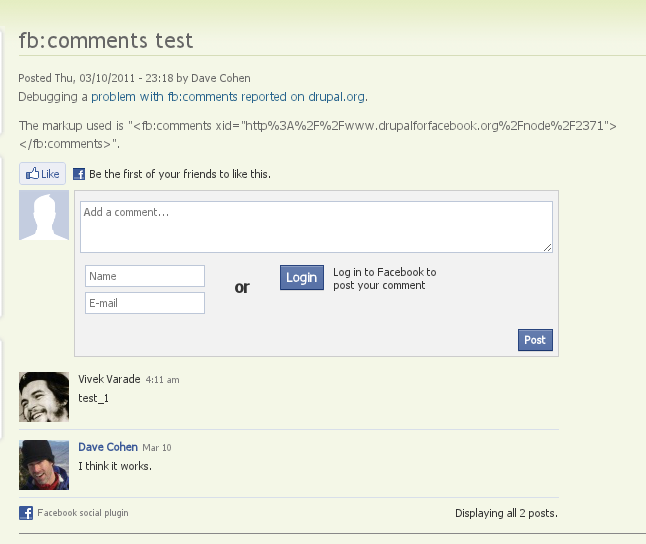
Dave Cohen commentedI can't reproduce this problem. I have an example page here: http://www.drupalforfacebook.org/node/2371 It uses regular modules/fb without any patches. It shows the markup used. Although at the moment when I enter a comment it displays a "database down" error, I suspect that is only a temporary problem on the facebook side.
It seems the cause of the original report was the extra
<script>tag. I suspect everyone seeing the "The comments plugin requires an application id to properly namespace the provided xid" error is because of that same reason.So can anyone tell me how to reproduce this?
Comment #26
derekwebb1 commentedI can confirm that it happens even on the drupalforfacebook.com site:
I am using Ubuntu 10.04 and FFox 3.6.14
Comment #27
Marko B commentedyes, this is what i get too all the time and seems Dave gets it also but was unaware :-)
Comment #28
Dave Cohen commentedInteresting. It works for me every time.
Its worth noting that facebook's platform is not known for its reliability. ;)
Comment #29
Dave Cohen commentedI apologize, I missed that detail about working fine in some browsers but not others. I also see the problem in firefox. hmmm....
Comment #30
Dave Cohen commentedI've reported the problem to facebook, http://bugs.developers.facebook.net/show_bug.cgi?id=15794, where we can rest assured it will be ignored.
Comment #31
Dave Cohen commentedI think there has been confusion because of multiple causes of this problem. Here's a patch based on nonoan's earlier idea. Solved it for my quick test. I'd appreciate having that confirmed.
Comment #32
Marko B commentedWhat is/was the casue? some FB changes in api?
Comment #33
Dave Cohen commentedCause was a change in facebook api. All plugins work fine when you initialize JS with APIKEY, except this plugin which on some browsers apparently you must initialize with APP ID instead.
The above patch is not complete. I have some more changes pending which replace APIKEY with APP ID in several places.
Comment #34
Dave Cohen commentedI didn't update this thread, but several changes to use the appId instead of apikey have been committed to the dev release.