Hi all.
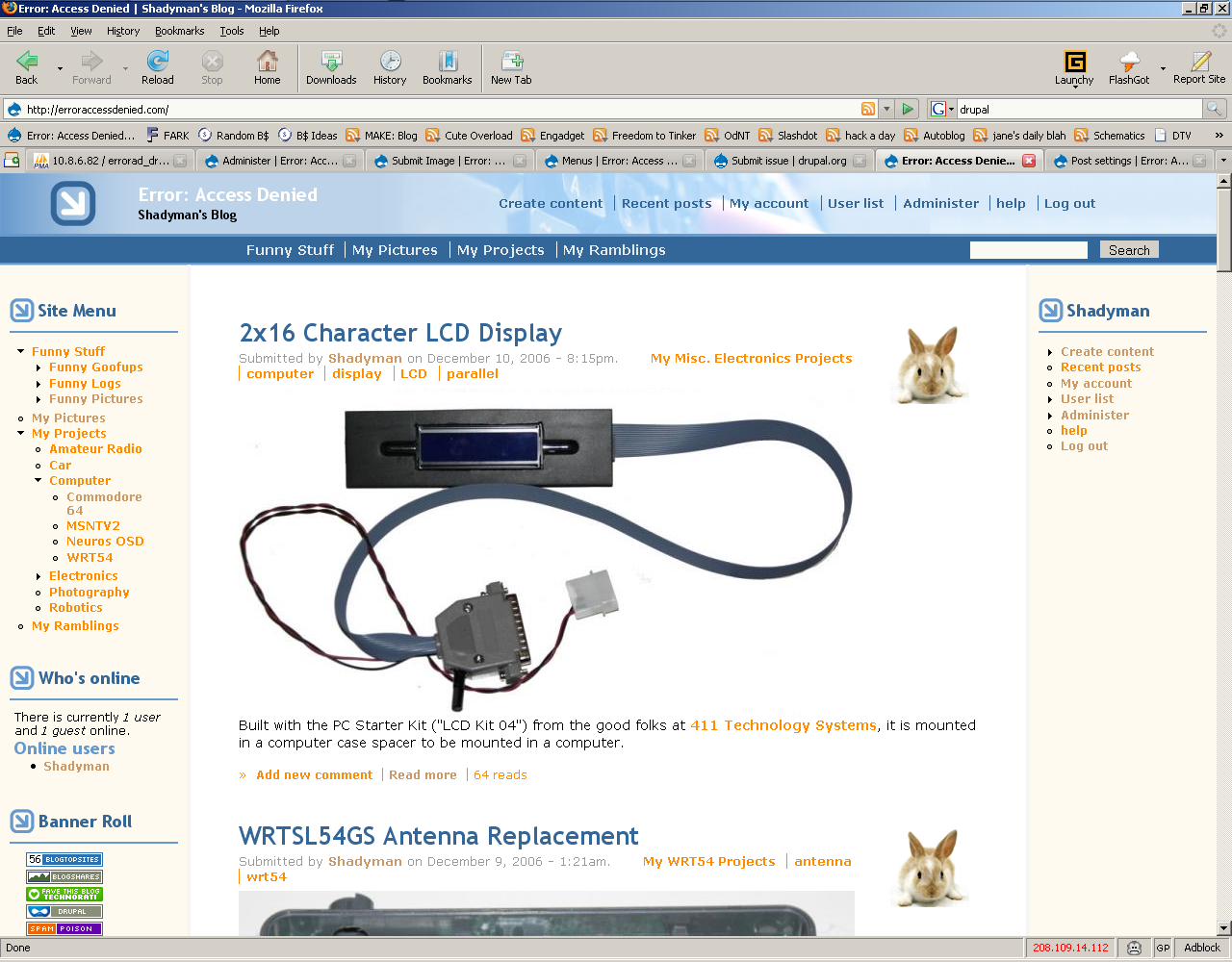
I upgraded from 4.7.4 to 5.0 RC1 on Apache running PHP5. When browsing /node/ (or any /views or /taxonomy), the image nodes display full-sized pictures, instead of the thumbnails like it used to, and in my opinion, should.
I marked this as 'critical' because this affects bandwidth usage, and also takes up a lot of space on the screen.
Any newly-created image also shows up full-sized like this.
Attached: Picture of my website, (on /node/) with large images where there used to be thumbnail-sized pictures.
Cheers,
Shadyman@erroraccessdenied.com


Comments
Comment #1
robbiethegeek commentedI am also having this issue works fine in drupal 4.7x but in drupal 5 both RC1 & RC2 the block of images is in preview sized not thumbnails, I have been trying to think about whether this is an image module issue or a views module issue
Comment #2
drewish commentedhttp://drupal.org/node/99395
Comment #3
peter chen commentedNo, this isn't a duplicate: the previous thread talks about thumbnail images disappearing, in this case its an issue of the display of images (original not thumbs) in a taxonomy view, see for example: http://www.peterjohnchen.com/taxonomy/term/15/feed on a 5.0 install + image.module
Comment #4
drewish commentedsorry about that my bad, i'd grabbed the wrong issue.
Comment #5
shadyman@erroraccessdenied.com commentedAlso as seen on any page on http://erroraccessdenied.com.
Comment #6
vatoloco commentedI was having the same problem so I edited the module to correct it.
The file can be found here
Hope this helps.
-E
Comment #7
drewish commentedhere's vatoloco's changes as a patch. i haven't tested it yet.
Comment #8
drewish commentedhere's a cleaner version.
Comment #9
shadyman@erroraccessdenied.com commentedThe patch makes the teaser text appear twice. See screenshot.
Comment #10
Spacoli commenteddrewish - THanks for the patch. However - I am seeing the double teaser as well.
Comment #11
vatoloco commentedI have created a patch that hopefully fixes the problem with the large images in the teasers and the duplicates with the teaser text.
I tried to make the patch around the clean code of drewish but it just wouldn't work.
- E
Comment #12
shadyman@erroraccessdenied.com commentedOk, the latest patch works for me. Anyone else?
Comment #13
doughnut commentedLatest patch also works for me.
Comment #14
Gianfilippo commentedI open the vatoloco_image_teaser.patch in my text editor but it doesn't recognize the text as PHP code. The patch code lines start with "-" and "+" characters.
I'm a newbie, could someone help me please?
Thanks a lot.
Comment #15
drewish commentedGianfilippo, see: http://drupal.org/node/60108
Comment #16
shadyman@erroraccessdenied.com commentedComment #17
robbiethegeek commentedI can confirm that it has resolved the issue that I was having.
Comment #18
sscooterguy commenteddoes any one have the previous version of image.module? This patch is not working for me with the latest dev release of image, as it was written for the previous version. If anyone could direct me to the one version previous, or an already patched file that is currently working, that would be great. Thanks.
sscooterguy
Comment #19
drewish commentedsscooterguy, everything is in CVS take a look at:
http://cvs.drupal.org/viewcvs/drupal/contributions/modules/image/image.m...
it'll have every version. the patch should identify which version of the file it was rolled against.
Comment #20
airblaster commentedModified the patch to use LF instead of CR/LF line ending characters. Should apply to current CVS version now.
Comment #21
drewish commentedi've committed my patch to HEAD and 5
Comment #22
(not verified) commented