Closed (fixed)
Project:
Path redirect
Version:
6.x-1.0-rc2
Component:
Code
Priority:
Normal
Category:
Bug report
Assigned:
Unassigned
Reporter:
Created:
18 Feb 2011 at 17:30 UTC
Updated:
4 Mar 2011 at 21:51 UTC


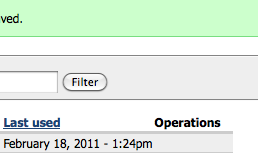
I have been working on upgrading Path Redirect and tried installing both beta6 and RC2 - on both versions, /admin/build/path-redirect shows up fine, but the Operations links are missing for a new redirect. This is a completely fresh installation - I dropped the existing path_redirect table, uninstalled the module at admin/build/modules, and then installed RC2. See attached screenshot.
Thank you for your help.
| Comment | File | Size | Author |
|---|---|---|---|
| path-redirect.png | 13.67 KB | pmlodzik |

Comments
Comment #1
dave reidCheck to see if the HTML in that cell is there in the source code and is getting hidden somehow.
Comment #2
pmlodzik commentedHi Dave,
I thought of the same thing, that some CSS might be hiding the links, so I checked in Firebug at /admin/build/path-redirect on RC2 and all it shows me is an empty table data element,
<td></td>Thanks for any help you can provide.
Best,
Peter
Comment #3
dave reidThis may be a problem with your theme since the code uses
theme('links', $operations, array('class' => 'links inline nowrap')). Try switching to Garland temporarily as your admin theme to see if they show up then.Comment #4
pmlodzik commentedDave,
That fixed the problem, thank you! Any suggestions about ways I could modify the theme code to rectify this situation?
Thanks again,
Peter
Comment #5
dave reidIs it a contrib theme? If it is, then you should transfer this issue to that theme's issue queue. Otherwise, looking at anything with theme_links() or link-related should be investigated in your theme's template.php.
Comment #6
pmlodzik commentedThanks, will do.
Comment #7
pmlodzik commented