

Closed (fixed)
Project:
Dynamic display block
Version:
6.x-1.0-rc6
Component:
User interface
Priority:
Normal
Category:
Support request
Assigned:
Unassigned
Reporter:
Created:
20 Feb 2011 at 07:55 UTC
Updated:
11 Jul 2011 at 23:29 UTC
Jump to comment: Most recent file



Comments
Comment #1
ppblaauw commentedCan you uncomment the drupal_set_message debug lines in the preprocess functions
// drupal_set_message('
');
// drupal_set_message('
');
and attach the result?
Do you have a link to the slideshow on your Internet site?
Comment #2
nokyoong commentedThanks for your quick response.Here is the result after uncomment as you suggested. (.zip is screen recording to show how the ddblock behave)
Many thanks !!!
Comment #3
ppblaauw commentedThe variables in the preprocess functions seem ok.
Can you clear the cache at administer > site configuration > performance?
When you look in the page_source of the page do you see the images in the slideshow.
Do you use imagecache?
Maybe its a permission issue on the server, drupal can not read or generate the imagecache images
Do you have a link to your Internet site?
Comment #4
nokyoong commentedOh. Thanks a lot !!! One issue solved. The images do not appear because of imagecache doesn't allow to generate images.
Btw, I still saw some bugs on the slideshow (I draw red circles around them, in the attach file). How can I fix them ?
Many thanks !!!
Comment #5
ppblaauw commentedThe other issues has to do with the css of your overall theme interfering with the slideshow theme.
For the number pager probably a float is different.
For the vertical lines there is probably css for the class border.
You can remove the border class from the template files of the slideshow
or override the border class for the slideshow
Hope this helps you further, please let me know.
Comment #6
nokyoong commentedOh.. Thanks a lot for your quick response. Another thing, how can I change the image slideshow size (Width x Height) ?
Many thanks !!
Comment #7
ppblaauw commentedSlideshow sizes are changed in CSS
Comment #8
nokyoong commentedIf I use upright40, do I have to edit size at ddblock-cycle-upright40.css file ?
Thanks !
Comment #9
delibob commentedi am having the same issues
'news_items'
stdClass::__set_state(array(
'nid' => '222',
'node_title' => 'xxxxxxxx',
'node_data_field_pager_item_text_field_pager_item_text_value' => 'Bob and Karen',
'node_type' => 'ddblock_news_item',
'node_vid' => '223',
'node_data_field_pager_item_text_field_slide_text_value' => 'www.xxxxxxxx.biz',
'node_data_field_image_field_image_fid' => '53',
'node_data_field_image_field_image_list' => '1',
'node_data_field_image_field_image_data' => 'a:2:{s:3:"alt";s:0:"";s:5:"title";s:0:"";}',
'node_revisions_body' => 'xxxxxxxxx',
'node_revisions_format' => '1',
'node_created' => '1298150855',
))
Comment #10
delibob commentedComment #11
ppblaauw commented@delibob
In your case you need to change in the preprocess functions for the ddblock slideshow:
into
You probably use the field for the image in more content types, that is why CCK generates another name for the field.
Hope this helps you further, please let me know.
Comment #12
delibob commentedthank you, it works.
thank you agian.
Comment #13
grateful commentedSorry but I am at a loss. The slideshow is fine. But when I click on image the next page as the image and slide text and page text. I do not want that and can't find an answer. Please help?
Comment #14
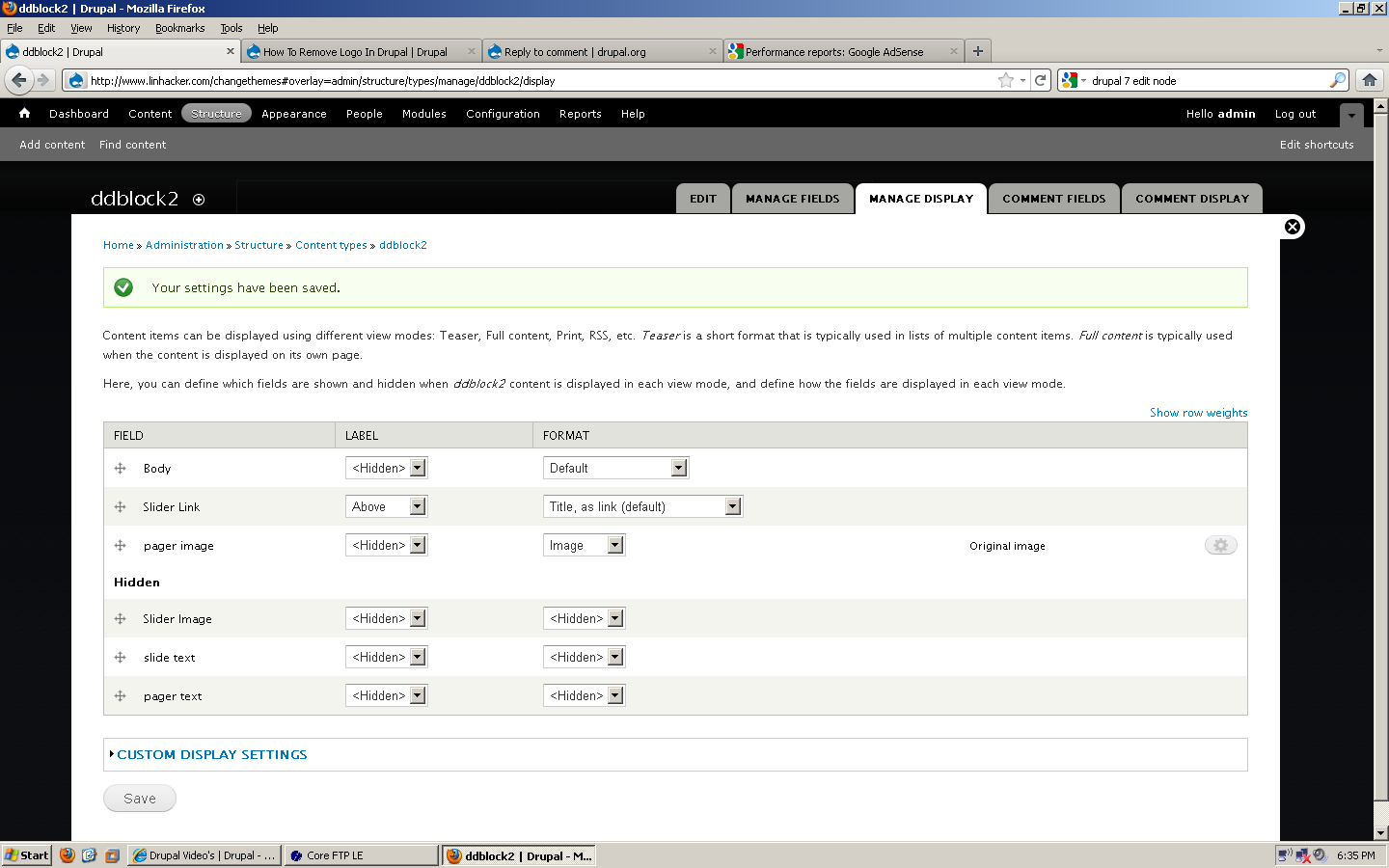
grateful commentedChange field label and format to Hidden in Content Type ! By the way I am below a newbie. I am totally lost. It took me 14 hours to fix this one issue.
Comment #15
ppblaauw commented#13
Great it works now!!!
Drupal has a steep learning curve, we all experienced it when starting with Drupal. But what can you expect, it has a lot of functionality. With experience you find out where and how you can customize Drupal. Expect it will take time and a lot of reading.
Set version back to 6.x-1.0-rc6.
Please create separate issues for different versions of the module, or better create a separate issue for each issue if the same issue is not posted yet. This way issues are and stay useful for other users.