
On this page
- Disclaimer
- What cPanel does
- The "Wildcard" solution
- create a wildcard subdomain
- when it doesn't work
- Complications
- spaghetti code revisited
- details retained from prior version of this document
- Adding Top Level Domains
- Adding Subdomains
- DirectAdmin
- Aegir (version 1.0 and up)
- settings.php
- Configuring Domains
Special instructions for shared hosting
This is documentation for Drupal 7, which is no longer supported. Learn more and find resources for Drupal 7 sites
Domain Access (DA) and related modules provide the capability to host multiple domains and sub-domains from a single Drupal installation. With such capability complex hosting and content-management scenarios are enabled within Drupal. These special instructions deal with setup required between your Drupal installation (site) and the underlying web server system (host) to enable shared hosting to work under control of the DA module.
Audience: primarily the Drupal administrator with little knowledge of the underlying networking and server technology.
Scenarios: DA can handle complex hosting scenarios. This instruction deals only with those things required to enable sub-domains within a single base domain, delivered from a single drupal installation. The details might be sufficient to help you configure a multi-domain and/or multi-server (multi-installation) scenario, but that is beyond the primary objective of this special instruction. Here, it is taken that:
- you are running your site with a "virtual private server" (VPS) hosted account, ie. you have a fully qualified domain name with it's own unique ip address (this is normally the case with hosted VPS).
- all your sub-domains are served from one site.
- you have a running Drupal with DA module/s installed and enabled.
- you want a "sensible" arrangement with the base domain of your site operating as the "default" domain in drupal.
- you are using the cPanel web administration front-end, or otherwise, can apply these instructions to whatever admin front-end you use.
- you are happy to edit this document to make it more clear, coherent, concise, correct, critical, creative or any combination thereof.
- you have read INSTALL.txt, INSTALL_QUICKSTART.txt and README.txt located in your DA installation folder sites/all/modules/domain
Disclaimer
When you have full control of your own back-end server all this is easy® whereas on shared hosts your mileage will vary. You may have to configure specific options depending upon the features provided by your hosting service. Please note:
- Shared hosting (VPS) providers limit by contract the number of domains/sub-domains allowed per account. The cPanel is "VPS Optimized" which means the features available on your 'virtual private server' represent that subset of server capabilities provided in your contract.
- Your ISP (host) disables particular features of the backend machine as well as the web server running on it for different account types, thus solutions offered here might work or not for you (since drupal 'asks' the back-end server to do stuff).
- technical standards specify your domain is, how can one put it, your domain, as your home is your castle and technically at least, all 'things' (sub-domains, content, etc) are your property. This having been said, the contract between yourself (or the organization you work for) and your (or their) internet service provider (ISP), may specify additional charges to the client (you) for registration and use of sub-domains. The DA module can respond to requests and deliver content through either DNS registered (active) or on-the-fly (virtual) sub-domains. This instruction is not legal advice. It is your responsibility to resolve between yourself and your service provider, any contract violations you might commit by implementing it. The editors of this document, individually and collectively take no responsibility for devious drupal deployment arising from this instruction.
What cPanel does
You will get a better understanding of the solutions presented here if you know what cPanel does and how it fits into the big picture of running your drupalized site, so lets presume:
- you know that your site has three basic levels of configuration , that include global settings at the level of your domain name server (DNS) records; local settings at the level of your webserver records; and content settings at the level of your frontend (drupal) content management system, but are not clear on how to get it all working together.
- you know that with cPanel you can create sub-domains, as active and/or parked, but might not know what difference it makes to a running drupal site, nor that DA can deliver 'virtual' sub-domains without any DNS records.
- you know what document root means - the specific directory on a machine the server 'looks into' for the right files: such as the backend server document root, typically called something like /htdocs or /public_html or the front-end content management system document root such as a sub-directory "/public_html/drupal" for drupal, but might not be clear on how this can make the server point sub-domain requests to your drupal installation.
- you know the difference between an active and parked sub-domain record is that an active sub-domain record will point (the server) to a document root and a parked sub-domain record makes the server redirect the user to another web address, but you don't know which one will work best for you.
- you know you can manually redirect an active sub-domain, as cPanel puts those settings to the local filesystem (written to a dotfile named ".htaccess" in the relevant document root of the local filesystem), but you're not sure when to use this option and are not aware that drupal has its own .htaccess file that you really don't want to mess up.
The "Wildcard" solution
The solution relies on your host server 'resolving' (sub-domain) names to your Drupal installation. With a wildcard name resolver, DA can deliver content for active sub-domains created through cPanel as well as deliver content for virtual sub-domains created and handled on-the-fly entirely within your drupalized site.
In brief, your website is found by machines via a domain name server (DNS) holding records that match your base domain name to an ip address. By creating a "wildcard" sub-domain with it's document root set to the directory of your drupal installation, you tell the server to "ask" drupal to deliver content for arbitrary sub-domains (all names separated by dot "." to the left of your domain name, such as this.example.edu or why.this.example.edu).
create a wildcard subdomain
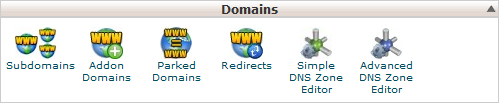
To get "wildcard" name resolution for your site, using cPanel, click on the "subdomains" icon in your main admin screen (the "home" screen in cPanel).
You will now be at the cPanel subdomain management screen where you can create a new sub-domain named with an asterix "*" and with it's document root set to your drupal installation:
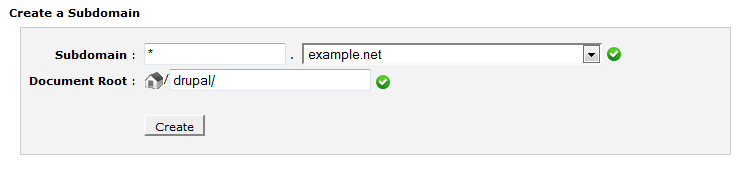
note: set "example.net" to your own base domain name and "drupal" to the actual directory name of your drupal installation.
click the "Create" button and let cPanel create the wildcard name resolver.

You have now created a wildcard "name resolver" entry in the DNS record for your site that should make the backend server look by default to drupal for all sub-domains not specified elsewhere.
At this point, all things being equal, DA can get on with it's job and you now have capability to serve content through drupal both for 'virtual' sub-domains defined entirely within drupal. The "index.html" or "index.php" file in the server document root (above the drupal installation sub-directory) will be largely ignored. If 'virtual' sub-domains are sufficient, then you have successfully completed your configuration (congratulations).
when it doesn't work
The most likely reason this might not be sufficient to get everything working as expected, is that your hosting provider has locked particular webserver settings (in the file httpd.conf) to force all visitors for hosted sites to their own site document root (/public_html). This seems to be the case with my ISP. The result is that drupal works as expected for all sub-domains (test.mysite.org) but the visitor to the site base domain (mysite.org sees an error message or a view of the directory contents at /public_html.
Furthermore, the cPanel domain management tools might or might not allow one to create a redirection from the base domain (server document root) to a sub-folder or sub-domain. This was the case with my provider. However, the work-around is quite easy if you know that those redirection instructions are put by cPanel in .htaccess files and this subject is covered in detail the discussion of Drupal installed in subdirectory but made to appear in root at the Support: Installing Drupal forums.
You , or with a bit more fiddling, 'active' and/or 'parked' domains and sub-domains (defined in cPanel).
.
To instruct the server to look *only* in the drupal installation for all content at your site, manually edit the .htaccess file in your server document root public_html/.htaccess and insert this code (or another variation from the discussion noted above that suits your scenario):
Options -Indexes
RewriteEngine on
Options +FollowSymLinks

# redirect all hits to www.mysite.com
RewriteCond %{HTTP_HOST} !^www\.mysite\.com$ [NC]
RewriteRule .* http://www.mysite.com/	[L,R=301]
RewriteRule ^$ drupal/index.php	[L]

# clean the "/drupal" from the url
# needed to make navigation between domain and
# sub-domain work properly
RewriteCond %{DOCUMENT_ROOT}/drupal%{REQUEST_URI} -f
RewriteRule .* drupal/$0 [L]
RewriteCond %{REQUEST_FILENAME} !-f
RewriteCond %{REQUEST_FILENAME} !-d
RewriteRule .* drupal/index.php?q=$0 [QSA]
f you want to only rewrite hits to www.mysite.com, and leave everything else alone, you would need to replace the rewrite rules with something like this:
RewriteCond %{HTTP_HOST} ^www\.mysite\.com$ [NC]
RewriteRule ^$ drupal/index.php [L]
RewriteCond %{HTTP_HOST} ^www\.mysite\.com$ [NC]
RewriteCond %{DOCUMENT_ROOT}/drupal%{REQUEST_URI} -f
RewriteRule .* drupal/$0 [L]
RewriteCond %{HTTP_HOST} ^www\.mysite\.com$ [NC]
RewriteCond %{REQUEST_FILENAME} !-f
RewriteCond %{REQUEST_FILENAME} !-d
RewriteRule .* drupal/index.php?q=$0 [QSA]
With specific details my site written in to my/public_html/.htaccess file, and un-winding all the drupal configuration settings I changed trying to work it out, I now have DA serving up the site front page as well as any parked domains and sub-domains in an orderly manner.
One more bit more fiddling is needed to have DA serve content for 'active' domains and sub-domains (defined in cPanel).
This simply involves going to the sub-domain management panel and setting the document root of each sub-domain you want within drupal, to your server document root (the .htaccess file will tell the server where to get the files from) or to the drupal installation root (if you already have all the SSH stuff set up and running from that location). Note that this solution does not affect the operation of active domains and sub-domains with document root (and content managed) outside of drupal.
Complications
The advantage of 'active' sub-domains (created in cPanel) is the added availability of back-end services such as email accounts, SMS, SSH, FTP, etc. for users (also registered at the backend) for each sub-domain.
On 'Virtual' sub-domains (served by DA without being defined in cPanel) the services available are those coming from within your site (Drupal) which might or might not, for example, enable users on your drupalsite to access sub-domain email using a desktop email client. At the moment I am not aware of any module offering the capability within drupal to automatically register drupalsite users to the back-end (VPS) server.
To get pages at your active sub-domains delivered through Drupal, you can (from cPanel domain management) create it as parked at your main address (http://mysite.net); or, if already created as an active domain, set it's document root to that of your drupal installation.
spaghetti code revisited
You might have one or more "sites" spread across one or more domains with none or many sub-domains, serving content only from drupal or working with one or more other systems, to one or more user groups and sub-groups, all handled by one or more web servers, running on one or more 'bare metal' machines or 'virtual machines' delivered by a 'cloud' or other system you might or might not control (etc).
If you are dealing with multiple primary domains, sites hosted on different provider networks, etc. more complex solutions are necessary. The expanded set of scenarios is outside the scope of this instruction and probably has more to do with setting up roles and permissions on content inside your domains than getting them accessible at your site.
details retained from prior version of this document
The following material has yet to be incorporated into the main document above.
Adding Top Level Domains
There are 2 ways to setup your other domains to base domain, allowing you to use Domain Access module in shared hosting.
- In cPanel administration panel, go to Parked Domains section and type your top level domain or select an unassigned domain. Then, select "Parked Domain". click Save.
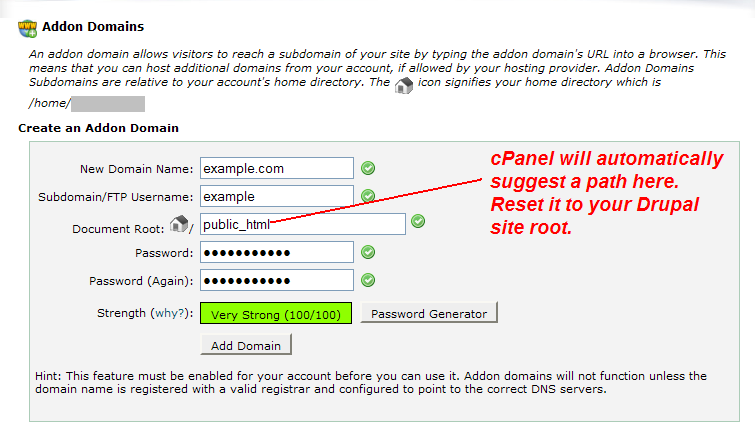
This will add the new domain as a parked domain, pointing to the hosting account main domain - If your Drupal installation that you need to install Domain Access is different from the main hosting domain, go to the Addon domains section and type the domain name. cPanel will suggest a folder using the domain name you enter. Delete the suggested location and type the location where your base domain is pointed to.
If you add top level domains as parked domains in your cPanel hosting, those parked domains will "act" as same as the primary domain. But when using Domain Access, your Drupal installation delivers different content to those parked domains -- the core goal of Domain Access.
Some hosting companies/accounts does not let you point more than one domain to a single folder.
Adding Subdomains
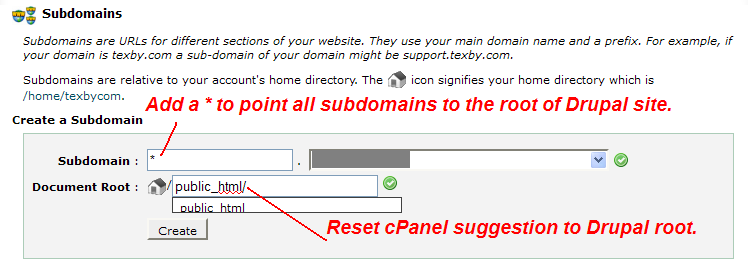
Go to "Subdomains" in your cPanel interface. Then, type the subdomain you want to use in DA.
The tricky part: delete the text after public_html text. By default, when you add foo.example.com to the system, the document root text field is public_html/foo. Delete the foo text and click Create.
DirectAdmin
In DirectAdmin shared hosting, you can't use Domain Access for subdomains or ports (assuming that your shared host doesn't allow you to setup virtual hosts).
To add a top level domain, login to your DirectAdmin interface and go to Domain Pointers under Advanced Features category.
Then, type the new top level domain and check "Create as an Alias" (important!). Then click Add.

Aegir (version 1.0 and up)
settings.php
Because Aegir overrides settings.php, any changes you need to make, like including settings.inc, should be done in a new file, local.settings.php.
$cookie_domain is already set by aegir to omit the www prefix, but it is still practical to explicitly set the cookie domain in local.settings.php for subdomain use cases.
Configuring Domains
The best and safest way to configure additional domains for a site is via Aegir's Site Alias feature.
Help improve this page
You can:
- Log in, click Edit, and edit this page
- Log in, click Discuss, update the Page status value, and suggest an improvement
- Log in and create a Documentation issue with your suggestion
