

 The 2026 Drupal Business Survey is open. Your response will help shape the future of the Drupal business ecosystem.
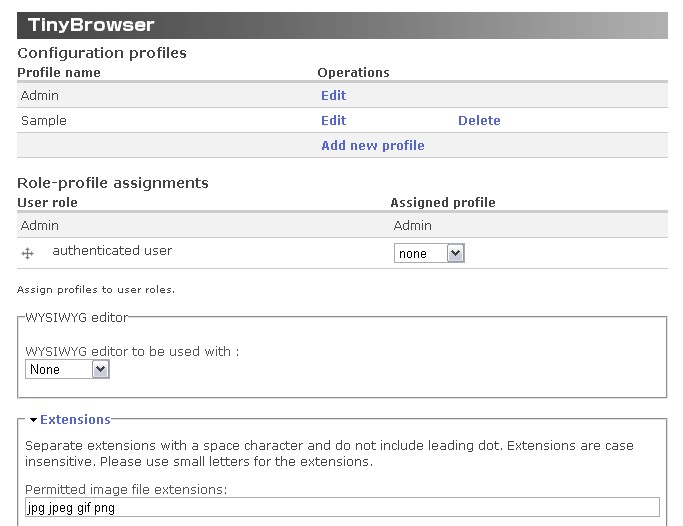
I am using TinyBrowser for the first time in Drupal 7. This may be a user error, but I can't figure out how I associate a profile to a user role. As you can see on the screenshot, I have 3 different profiles created, but the only one assigned to a role was the default admin profile. Shouldn't there be a link down where it says Assign profiles to user roles? It shouldn't be a permissions issue, as I'm logged in as admin.
Any help is greatly appreciated.
| Comment | File | Size | Author |
|---|---|---|---|
| #2 | tinybrowser.module-2011-02-22.patch | 656 bytes | pixture |
| #1 | ss-tinybrowser-settings.jpg | 60.25 KB | pixture |
| tinybrowser_settings.png | 150.04 KB | webchuck |


Comments
Comment #1
pixture commentedThis is a bug and need to be fixed. I will look into it and fix ASAP. Sorry for the inconveniences.
As you can see in the attached image, UI is supposed to be added to the Role-Profile assignment section.
Comment #2
pixture commentedPlease apply the attached patch to fix the issue until the new version is released.
Only one line change. If you are not sure how to use patch, please change the code as follows.
Before (tinybrowser.module line #1130)
After
I will release the new version with this fix sometime this weekend.
Comment #3
numskull commentedI have the same problem on my Drupal 7 site, and the posted fix worked. Thanks! Awesome module! NOTE: I still get the array_merge() warning on the "Add new profile" page, even after updating to 7.x-1.1.
Comment #4
pixture commented> @numskull
I will look into the warning thing.