

Postponed (maintainer needs more info)
Project:
SPIP to Drupal
Version:
6.x-1.x-dev
Component:
Documentation
Priority:
Normal
Category:
Support request
Assigned:
Unassigned
Reporter:
Created:
27 Feb 2011 at 21:32 UTC
Updated:
3 Nov 2011 at 18:34 UTC
Jump to comment: Most recent file


Comments
Comment #1
jonhattanI've tested with spip 2.0. Don't know differences with 2.1. Please report what error you're getting, if any.
Comment #2
psykotik commentedActually, no error is displayed.
At the end of the import process, data which have been imported are reported. Data imported are mainly the taxonomies; no nodes (no pages, no news, no comments), no documents have been imported. This data used to be imported when using SPIP 1.9.
Which complementary information can I transmit you?
Comment #3
jonhattanIt is hard to track errors when in batch mode. Ensure you have error logging to a file enabled in php.ini and see if there's an error there.
btw I suppose a table name has changed in spip 2.1 or the json plugin needs some adjustment. You can test json is working for articles with a url of this form:
http://spip-site.com/spip.php?page=json&id_article=4565Comment #4
sa_phira commentedHello
I have the same problem. I'm triying to migrate from spip 2.1.8 to drupal (6.20) , only Keywords , users and sections(rubriques) are imported(no articles, no comments), no documents.
But in my case it display at first "Empty result http://mydomain?page=json&id_rubrique=365" dump = NULL ".
And when i retry the process , i have no error
thanks
Comment #5
psykotik commentedHi jonhattan,
I run the import process again, logging it to a file (included to my message).
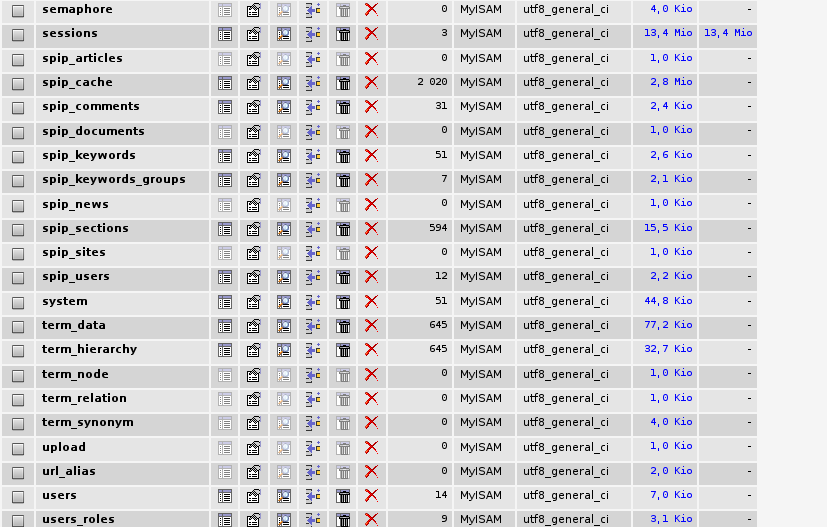
I also add three screenshots : the first depicting the top display from step 3 or 4, the second one showing the end of the process, and the last one displaying the result into the mysql database. Please also note except the first article (shown in the first screenshot), no more article is shown as imported during the process: a long, long blank space is displayed between first and second article.
Also, json plugin seems to work; when calling http://spip-site.com/spip.php?page=json&id_article=XXX, data is displayed.
Don't hesitate to ask for more tests or more information from my own.
Comment #6
jonhattanHi again.
First of all: sometimes, under some circumstances I've been unable to determine, a call to json fails. Perhaps it works the second time perhaps it doesn't work never.
When such a failure is detected you obtain the error "Empty result for ....." followed by "Dump:.. ". This is an attempt to obtain as much info as possible about the failure. I see a weird thing: whitespaces and the json result after. Normally on such failure I only get NULL or whitespaces. Do you obtain the same when visiting
page=json&id_rubrique=57?Also I see you get
0 sections imported(sections == rubriques). You have a failure for each rubrique?btw the phpmyadmin screenshot is useless and the errors in php5.log are on the spip side. I can't say anything on them.
Comment #7
psykotik commentedWell, it could be easier if I send you my website address, couldn't? Since it is a private website containing data not meant to be publicly availabe, if you agree, I'll send the address using the drupal contact form.
Regarding your questions:
1/ Yes, the json's call "page=json&id_rubrique=57" answers exactly the same way.
2/ No, I don't have more failures for other rubriques... they're not mentionned at all during import process! At the top of the import, the text from screenshot1 is displayed. At the end, the text from screenshot2 is displayed. Nothing is found between theses texts :(
I also tried calling a buch of pages from the model "page=json&id_rubrique=57", replacing "57" with other rubrique numbers. It works, even though the same way that regarding "page=json&id_rubrique=57".
Comment #8
jonhattanok feel free to send me the url
Comment #9
sa_phira commentedHello i retried the process with the version 6x-1.x and spip 2.1 and now it's work !!???. i have all my spips articles in my drupal site.
Comment #10
anarchic teapot commentededit - posted in wrong place
Comment #11
psykotik commentedNever heard about you after my proposition, but here is how I have been able to partly fix my issue:
1/ No plugin activation
2/ Empty cache folder /SPIP/tmp/cache
3/ Activate json's plugin
I am still unable to import news ("breves"), which seems pretty normal since visiting /SPIP/?page=json&id_breve=XXX always returns "null" text.
Beside that (not so small) issue, I can confirm spip2drupal works together with spip 2.1.
Comment #12
anarchic teapot commentedSorry about my silence. I'd tried your solution already, but it didn't work.
I've moved my blog to Wordpress, merging it with the one I had one Blogger, and copied my posts across by hand. I have another site using Spip which I may have another go at migrating later, but unfortunately my hosting service only accepts Drupal 6. I'm wondering if this isn't part of the problem.