Closed (fixed)
Project:
Deco
Version:
7.x-1.x-dev
Component:
Code
Priority:
Normal
Category:
Task
Assigned:
Unassigned
Reporter:
Created:
2 Mar 2011 at 05:46 UTC
Updated:
13 Jun 2011 at 23:02 UTC
Jump to comment: Most recent file


Hello,
I have upgraded the Drupal 6.x-1.1 version of Deco theme to Drupal 7.
Can anyone please try this theme and provide the issues for this so that I can work on them.
You can download it from here : http://174.143.242.54/deco-7.x-dev.tar.gz
Thanks,
Komal
| Comment | File | Size | Author |
|---|---|---|---|
| #12 | deco-fix-ver2.zip | 11.95 KB | komal.savla |
| #8 | deco-fix.zip | 9.01 KB | komal.savla |
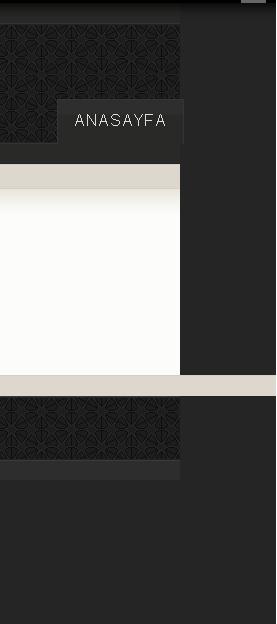
| #4 | deco 7-dev gap problem.JPG | 11.42 KB | metality |

Comments
Comment #1
xmacinfoLooks very nice. Thanks Komal.
Problem one (same problem as in D6 I believe): when a block does not have a title set, the background of the block title is still shown and taking space.
Problem two: the Drupal 7 toolbar items uses the Deco theme bullets. We need a way to remove the bullets from the toolbar.
I have not tested all combinations of the theme layout, but it's working as expected for my tests.
Will you apply to be a maintainer or co-maintainer for this theme?
Comment #2
komal.savla commentedThank you for testing the theme.
I have worked on the problems that you have suggested and also have fixed them.
You can download it again and check : http://174.143.242.54/deco-7.x-dev.tar.gz
Thanks,
Komal
Comment #3
xmacinfoProblem one and two are fixed, thank you very much.
I would suggest you to apply to be the maintainer of this theme. Currently no one is an active maintainer, although a few people still have permission to maintain this module, a fresh maintainer would be great.
You would be able to commit the Drupal 7 version of the theme and work in the issue queue with the help of other users of this theme.
Will you consider being a maintainer?
Comment #4
metality commentedi tried it and realized that there is a gap on the right side. maybe it's a css problem. Opera,Chrome,Firefox and IE is the same. i attached a picture.
can you take a look at this problem?
Comment #5
xmacinfo@metality: I cannot reproduce your problem. Which browser are you using? Also, did you have the same problem with Drupal 6 and Deco 6.x-1.1?
The idea is to see if the problem you are experiencing was there in D6 or if it came up while doing the D7 version.
Comment #6
metality commented@xmacinfo thank you for your answer. my browser is opera but i tried firefox,chrome and ie. it is the same gap. but in Drupal 6 and Deco 6.x-1.1 there were no problem.
can you try it:
http://www.ozgurhayal.com
Comment #7
xmacinfo@metality: OK, now I see it. There is a an horizontal scroll bar larger than the viewscreen. When scrolling to the right, we see the gap. If we don't scroll, there is no gap, but the horizontal bar is annoying.
I have the same problem here.
This is indeed a CSS issue, but I was not able to pinpoint the problem with Firebug yet.
Comment #8
komal.savla commentedHi
Thank you xmacinfo and metality for testing the theme.
I have fixed the horizontal scroll bar issue for all the browsers. I have modified the following files :
deco.css
style.css
layout.css
page.tpl.php
Here I am attaching zip folder for all the modified files so please replace the older ones with these new files.
@xmacinfo: Thank you for your suggestion for being a co-maintainer. I will soon apply for it.
Thanks,
Komal
Comment #9
xmacinfo@komal.savla: Working perfectly without any horizontal scrollbar.
Good luck on co-maintainership.
Comment #10
metality commented@komal.savla thank you for fixing but there is still a gap on the right. it became smaller(maybe 2 or 3 px) but still there. i tried it in opera,chrome,firefox and ie. but maybe i can try to fix it myself and inform you.
Comment #11
xmacinfo@komal.savla: A few more problems.
Navigation menu items in the right sidebar are not using the correct font colors, margin and various list bullet images. For example the right pointing arrow is black instead of using the subtle Deco gray one.
Primary menu items are using ALL CAPS instead of all lowercase letters. Also, the menu is flushed to the right of the viewport instead of vertically aligning with the right side of the right sidebar. Looks like margin is missing to the right of it's displayed in the wrong div.
The highlighted item block looks like using to much margin or padding compared with D6 version. I migrated a simple mission block using a simple text line.
Comment #12
komal.savla commentedHi,
@metality: I could not reproduce your issue. If you could provide more information that would be great
@xmacinfo: I have fixed all the issues that you have mentioned.
But for the last one, Can you please clarify what do you mean by highlighted item block ? If it means featured region then I have checked the padding and margin, they are same as D6 version. (If you could attach a screenshot that would be great)
For other two issues (i.e for the navigation menu items and primary links), I have made changes in the following files :
template.php
page.tpl.php
deco.css
layout.css
style.css
I am attaching zip folder for all the modified files so please replace the older ones with these new files.
Thank you.
Comment #13
xmacinfo@komal.savla: Thanks for the quick fixes.
Navigations menus are now displayed correctly.
Primary menu is now showing with the correct fonts and proper position, which, by the way, should correct metality issues with the theme (when the last menu item was active, a gap of a few pixels was created).
As for Featured regions and some other small display issues in the footer, I will double check and come back with a better explanation. But it's very minor.
Thank you for the hard work!
Comment #14
xmacinfo@komal.savla: Here are the explanations for the few fixes still needed.
Feature region
The features sections have the text too large and padding/margin in extra. When upgrading from D6 to D7, the mission is moved to that region.
Obviously, since Featured is now a region, you might choose to leave the Featured region as is.
Footer region
In the footer, the footer message should float to the right, making both menu and message on the same line.
So the “div.region.region-footer” should float to the right. :-)
Comment #15
komal.savla commentedHi,
In D6 the css for the mission and the other blocks in the featured region is different but in D7 as there is no mission the css only remains for the other blocks, So we cannot remove the margin and the padding for the #featured .block because it will pick up for all the other blocks too that will be enabled in the featured region. So in order to differentiate between mission block and other blocks, we can add a new region called Mission and then the block for the mission can be enabled in the mission region so that it can pick up the correct css for mission block.
Similarly we can add a new region for Footer message because in D6 the footer message is displayed in the right side and all the other blocks are on the left side , so we cannot give float right to div.region.region-footer since there is no seperate footer message in D7.
Please provide your feedback.
Thanks,
Komal
Comment #16
xmacinfo@komal.savla: This is interesting and that make sense. I will play more with the theme and add other blocks in both regions and see what can be done.
Comment #17
xmacinfoMoving to Fixed for now.
Comment #18
xmacinfoActually it's better RTBC until the maintainer creates the release.
Comment #19
xmacinfoThis is fixed since komal.savla created the 7.x-1.x-dev version.
Followups have their own issues.
Comment #20
sillygwailo