

Closed (fixed)
Project:
Rules
Version:
7.x-2.x-dev
Component:
Rules Core
Priority:
Normal
Category:
Support request
Assigned:
Unassigned
Reporter:
Created:
2 Mar 2011 at 18:20 UTC
Updated:
2 Nov 2017 at 12:15 UTC
Jump to comment: Most recent, Most recent file


Comments
Comment #1
fagoYep doing so with rules makes much sense to me, however I'd not add a separate event for that as this should be fine with conditions. It should be possible to determine the first login by checking the last-login value I guess. But maybe, we want to add a separate condition for it to improve UX for this commonly useful feature?
Comment #2
mitchell commented>>It should be possible to determine the first login by checking the last-login value I guess.
Cool!.. If we could do a text comparison to see if the last-login value was empty when a user logs in, then I think that would be a very graceful solution. That would be possible through entity integration with user variables. Yea?
>>...I'd not add a separate event for that as this should be fine with conditions ...maybe ...add a separate condition for ['user logs in for the first time'].
I agree with the principle, but not the implementation. I think that using the data comparison condition would be the more generic way.
Two other methods came to mind. One is a flag on the user itself, eg. when a user is created flag them as 'un-informed about profile fields' (as per scor's usage scenario). Then, when they log in, if they are flagged, then display the message & unflag them.
The next way would be to use a set of variables that are associated with that user account, like using fields on a content-profile, profile 2, or using amitaibu's recommendation on Create quota to have a single profile 'page' to house user specific preferences/settings/variables.
Overall, I think reading user variables is a more direct way to get the same data.
Comment #3
scor commentedI tried using the last-login value in my use case but it does not work (at least in the scenario where email check and admin approval are required), the last-login value is set as soon as you use your first login link, so when the user saves the password form, you don't know if it's a first login or not (the last-login value is already set). I had to use a custom flag in the old fashion user->data storage like opensanta described.
Comment #4
mitchell commentedscor, did you get the last-login value using a custom condition? If so, fago, is this the next logical step?
________
>> the last-login value is set as soon as you use your first login link
Maybe this can be another improvement to be made in user.module so the overall integration will work as expected.
Comment #5
fagoIndeed, the last-login value is already set. :(
Ok, so I guess it should work by checking 'access' which should be still unset. However, it won't work for logins via external authentication services, as for that 'access' is set to REQUEST_TIME during the very first time. But just returning TRUE in that case too should work, as else 'access' is written only later on when the session is persisted.
Comment #6
scor commentedas far as I remember, there was nothing in the user object which could be used to detect a first login, access, last-login were all set. I didn't use rules but some custom code to act and inspect the user object upon user profile form validation.
Comment #7
mitchell commentedA major question here is whether or not it's necessary to store that a first login happened or not, in a role, flag, profile, or other table.
I think the condition logic of, "is the login timestamp the same as the creation date, plus or minus a few seconds," might be worth something. To me it illustrates that it may be possible to come up with some logical way to determine if it is likely the first login, but it still might fail if it is the second.
This brings me to an interesting point: if you were to change up the logic to checking whether or not the user has filled out their profile, then you would know for sure whether it was necessary to display that message. Then, it's a simple question of, for how long you want to send that message between their account creation date and login date, and you could even change the message over time, if you wanted to.
In this way, I don't think you need to store anything more. There are only calculations whether or not they filled out the profile or not, and how long it is between account creation and/or logins.
Comment #8
mitchell commentedComment #9
sunThat sounds like a bug (in core?) to me. We fixed the access value for users created by administrators for D7 already. However, I didn't even think of looking at the external auth code when working on that patch. (#171117: Regression: users without administer users permission can not access user profiles of users that never logged in )
Comment #10
scor commentedThat's a hack which will fail for users who save their account form twice with a few seconds interval.
There might be something we can check if we can determine what original password hash was stored, if it is deterministic.
Comment #11
fagoad #9: I see, so let's fix it. See #1095892: wrong default for the user access time in case of external authentications.
Having that fixed, we would have a simple way to check for the first login.
Comment #12
dddbbb commentedSub. Would also like to properly detect a user's first login with Rules.
Comment #13
held69 commentedhttp://www.slurpitup.com/drupal/redirect-users-on-first-login-using-rule...
hope this helps...
Comment #14
shadowdknight commentedheld69
I tried your solution but doesnt work for me, Im using Drupal 7:
*Event: User has logged in
*Condition
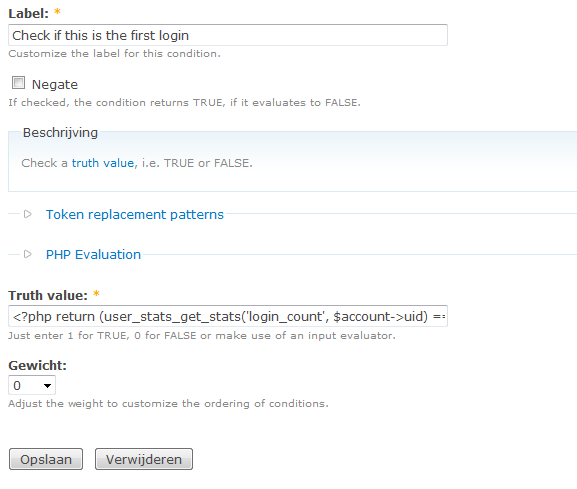
<?php return (user_stats_get_stats('login_count', $account->uid) == 1); ?>Any ideas what I missed?
Thanks
Comment #15
held69 commentedStrange the same code seems to be working for me just fine.
Did you placed the code under truth value?
Comment #16
shadowdknight commentedheld69,
Thanks for your response, Im using D7.
Attached is my screenshot.
Thanks!
Comment #17
shadowdknight commentedMy bad, its working now.
Thanks
Comment #18
mitchell commentedLooks like people are having most success with User Stats. Does a condition for this exist for first time login or login_count = #?
Comment #19
akalam commented#16 worked for me. just be care that the loged in user has to have the "user_stats > view statistics" permission. Otherwise, the function will return FALSE
Comment #20
aaronbaumanCan't we get a simple condition in Rules core (or Rules User Integration or whatever) to deal with this?
I don't need any more bulk (no offense, User Stats) on my site.
Comment #21
mitchell commented@aaronbauman: This worked for me. Is this fixed for you?
Comment #22
aaronbaumanoh thanks mitchell, i guess i breezed right past that suggestion.
Comment #24
HJulien commentedI've got that code working for one use case but how can it be adjusted for 2 cases?
I've got the rule for first time working fine and I need another rule for all of the other times. I tried the code with negate, with >1, !(...), ? '0' and a couple of other variations but no luck.
Comment #25
Anonymous (not verified) commentedHi there,
the "last-login" didn't work for me. By debugging my drupal intsallation i found out that the "last-login" value is set to the actual time, when my action function is triggered. But if you use "last-access", it will work . If you are interessted i wrote an article about rules module and described it using first-time logging as example. The article is in German, but i hope it helps anyway.
Regards, Edin
Comment #26
jetwodru commented#25, thanks, your solution works, also thanks google for translating your article
http://www.google.com/translate?hl=en&ie=UTF8&sl=auto&tl=en&u=http%3A%2F...
Comment #27
densolis commentedAll,
This is actually very simple in D7 using the Rules module. All you have to do is see if the value of the user's Last Access field is empty. When an account is created, the initial value of the Last Access field is empty.
The value of this field is not set until sometime AFTER the rules have been run. So, all you have to do is setup a conditions in rules that check:
Data value is empty
site:current-user:last-access
Here is an export of my rule and it has been working fine. If anyone finds any issues, please let me know. You should be able to import this rule into your site.
{ "rules_first_time_login" : {
"LABEL" : "first time login",
"PLUGIN" : "reaction rule",
"WEIGHT" : "1",
"OWNER" : "rules",
"REQUIRES" : [ "rules" ],
"ON" : { "user_login" : [] },
"IF" : [
{ "data_is_empty" : { "data" : [ "site:current-user:last-access" ] } },
{ "user_has_role" : { "account" : [ "account" ], "roles" : { "value" : { "16" : "16" } } } }
],
"DO" : [
{ "drupal_message" : { "message" : "Welcome to Drupal Camp Florida. Please submit your session proposal below." } },
{ "redirect" : { "url" : "node\/add\/sess?destination=\/admin\/dashboard" } }
]
}
}
The role with a value of "16" is a role of "Speaker".
Comment #28
andersi commented#27 has helped me wonderfully! Thank you for the concise instructions!
:-)
Comment #29
psthomson commentedTo get the desired effect created a boolean variable in user profile site:current-user:field-has-logged-in-before then setup rule to set it to true after the first login, if it was false a rule to redirect to a welcome page is triggered if true then redirect to the dashboard, that worked first time.