

 The 2026 Drupal Business Survey is open. Your response will help shape the future of the Drupal business ecosystem.
Hi,
I'm using the standard primary menu that came with my Acquia prosper theme.
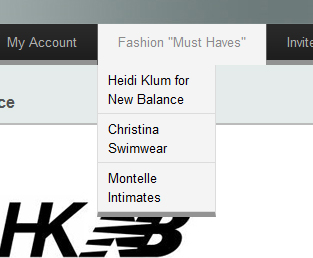
For expanded menus, the expanded items appear more narrow than the top level.
See image attached.
I thought this would be an easy adjustment with css but I can't find the stylesheet where this is defined and also I'm concerned about changing the right css since my menu is likely to change often and I don't want to be editing a dynamic css.
If this is not fixed with css, any other instructions would also be appreciated!
Thanks,
Note: I'm also using the Special menu items module so that my parent item didn't have to be linked to a node but this was an issue before I was using the module but thought I'd present all my facts.
| Comment | File | Size | Author |
|---|---|---|---|
| #3 | menu_modified.jpg | 57.97 KB | sonyasab |
| menu_issue.jpg | 58.25 KB | sonyasab |


Comments
Comment #1
sonyasab commentedI'm still hoping someone can help me with this!!
Comment #2
komal.savla commentedHi,
For expanded menus, the expanded items are appearing narrow than the top level because it is picking up the width from the superfish.css (i.e in the fusion/fusion_core/css/superfish.css )
In superfish.css
By Removing
width: 10em;from the above css will fix the issue.But as we are modifying directly in the css of the base theme (i.e fusion theme ) so i guess this is not an ideal solution.
Thanks,
Komal
Comment #3
sonyasab commentedAhh! You are so cool, thank you.
Modifying those lines in superfish.css worked for me. (Note: I could only see it after clearing the cached data though).
In the end though, I decided I wanted it wider than the parent item so I changed it from 10em to 20em. Also, since you pointed out that modifying the superfish.css was probably not ideal, I just copied the 3 lines from superfish.css that have that 10em reference in my local.css and it worked just perfectly!
Sonya
Comment #4
komal.savla commented