

 The 2026 Drupal Business Survey is open. Your response will help shape the future of the Drupal business ecosystem.
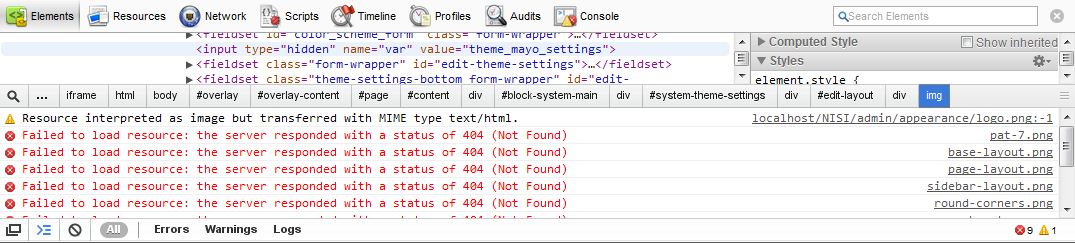
Hello, i found a bug in the theme. If the site is located at http://localhost/name site/ and not in the root http://localhost/ part of the images are not displayed!
base-layout.png Failed to load resource: the server responded with a status of 404 (Not Found)
sidebar-layout.png Failed to load resource: the server responded with a status of 404 (Not Found)
page-layout.png Failed to load resource: the server responded with a status of 404 (Not Found)
round-corners.png Failed to load resource: the server responded with a status of 404 (Not Found)
menubar-type.png Failed to load resource: the server responded with a status of 404 (Not Found)
header-layout.png Failed to load resource: the server responded with a status of 404 (Not Found)
I have the path to the image http://localhost/themes/mayo/images/header-layout.png and should be
http://localhost/site name/themes/mayo/images/header-layout.png
Tried to use the fix from this Issue, has not helped http://drupal.org/node/1055228
| Comment | File | Size | Author |
|---|---|---|---|
| #12 | Header watermark.png | 2.4 KB | mjross |
| #2 | Image path incorrect.png | 68.73 KB | tanitani |
| 223.JPG | 43.47 KB | rubaka | |
| 2.JPG | 88.92 KB | rubaka |


Comments
Comment #1
mermentau commented@rubaka, Are you still having this problem? I have all my installs in the root directory so really can't test easily. If you could give a little more detail I'll try to check further. Would you feel like trying the latest 7.x-1.x-dev release fresh out today? I'm surprised there are not more reporting this if it's not a config problem on your end.
Comment #2
tanitani commentedHi bumpaw,
Thank you for your work.
I do have the same issue (using both the latest dev version as well as the production one) using chrome of FF7.
http://localhost/crossroad/sites/all/themes/mayo/images/header-layout.png--- this path in address bar shows the image.Line 208 in theme-settings.php
'#prefix' => '<img src="/' . drupal_get_path('theme', 'mayo') . '/images/header-layout.png" /><br />',causes the following HTML:
<img src="/sites/all/themes/mayo/images/header-layout.png">resolving to:
http://localhost/sites/all/themes/mayo/images/header-layout.pngI tried to play around with the php code, with no luck.
HTH,
Gábor
Comment #3
mermentau commented@tanitani, Could you check your Base URL setting around line 234 in your settings.php?
Comment #4
tanitani commentedI uncommented the line with site specific info:
$base_url = 'http://localhost/crossroad'; // NO trailing slash!in the
/sites/default/settings.phpfile.To no avail. I sort of hoped the header image would show up as well, when I read your reply.
Nevertheless: thanks - I have never actually looked at this file, so now I have.
Gábor
Comment #5
mermentau commented@tanitani, I have at times edited settings.php by download and upload via ftp and forgot to change the permissions which meant my change didn't make it to the server. I would forget to change the permission on the server so it would write over. Could you verify via cpanel or similar that the change actually made it to the server as you intended? Remember that it's a protected file. Sorry for assuming that you make mistakes like I do. :)
Comment #6
tanitani commentedNo need to apologize, it is perfectly fine, especially since I am a newbie in Drupal. ;-o
The server is localhost, so... I think, I can be certain that the change was made. Restarted the Apache service and flushed the caches as well.
Thank you for your help.
Gábor
Comment #7
mermentau commentedI created a fresh install in localhost/foo with Mayo and I can see all the images in the Mayo settings area fine. No 404's of any kind. I have to believe that it's a problem in your localhost setup or Drupal install and not a bug with Mayo. I'm changing this to support request. If it was a bug it seems to me with over 3000 users of Mayo we would have heard more reports. I'm still interested in helping, but can't recreate the problem as of now.
Comment #8
tanitani commentedThank you.
Where would you begin looking?
How can I help you helping me? What info should I give you?
In any case I made it work by adding 'crossroad/':
Gábor
Comment #9
mermentau commentedComment #10
tanitani commentedWhat info do you need from me?
Comment #12
mjross commentedUsing clean installs of D7 and MAYO, I'm getting the same error messages in the browser console (FF and Chrome) for the MAYO settings page (admin/appearance/settings/mayo). The problem also manifests as missing images in the ADVANCED HEADER SETTINGS fieldset, above the Header height field, and below the Header watermark field (see attached image), even though the images are present in sites/all/themes/mayo/images/.
Secondly, changing the Header watermark listbox value to any pattern, results in no change in the header watermark that is displayed when the page is rendered (after the caches are cleared); the default image remains.
In sites/all/themes/mayo/color/preview.js, line 148 uses '/sites/all/themes/mayo/images/pat-'. This code assumes that the theme is installed in sites/all/themes/, which is not always the case. Also, it assumes that the site is installed in the root directory of the server (the leading '/'), which is certainly not always the case, e.g., the original post, all of my own dev sites on localhost, and those of many other developers. The code should programmatically obtain the theme's directory, and use that -- in this line of code, and anywhere else the code is trying to access those image files.
Comment #13
mermentau commentedAs I posted in #7 I can't replicate this issue on my own localhosts and I have several of them. I also have Mayo on several production installs. I can't work on what I can't see and there are several ways your site may be configured. When I posted #7 there were 3,000 users and now there are over 6,000. A few people are having trouble with their local installs, but since I can't get into those I'm a little lost.
I will leave this as a bug report to give you time to offer steps to replicate the problem. It seems to work on common localhost set ups. I really don't have time to adjust it too a few minority localhost configurations, but if you can come up with a patch that embraces all possibilities I will gladly test it and commit it.
Comment #14
mjross commentedThe fact that the theme works on web sites whose root directories are in the localhost root, as well as web sites where the theme is installed in sites/all/themes/, does not imply that the theme works in other situations. The steps to replicate these problems are:
The location of the theme should not be hardcoded ("sites/all/themes/"), especially assuming the location of the Drupal install ("/sites/all/themes/").
Comment #15
mermentau commentedIf you will look at #7 you will see I tried that and didn't see any problems. Made a special install in localhost/foo and it worked fine.
Can you help me on this one to understand why you would want to put your theme elsewhere. I know it is probably obvious, but I slept little last night and can't think of a reason. Remember I didn't write this code, but picked Mayo up to maintain because it was abandoned and I hated to see that happen to a great theme.
Comment #16
mjross commented1) I hadn't noticed your earlier mention of localhost/foo/. I don't see how that could work, because the leading '/' (in '/sites/all/themes/mayo/images/pat-') begins the file path in the root of the localhost server. I have a similar set up, and the theme code is looking for the images and other theme files in http://localhost/, but the directory is instead in http://localhost/test/, so it's not finding the images. Why are you making it an absolute path? If anything, a relative path, with no leading '/', would make the theme more portable.
2) Typically people put their modules and themes in sites/all, but there are several situations when someone would want to do something differently. For instance, for a multisite setup (e.g. site1 and site2), someone might want to add one version of a theme to the first site (he would use sites/site1/themes/), and a different version of the same theme for the second site (he would use sites/site2/themes/). The 'all' shouldn't be hardcoded.
Comment #17
SharonD214@aol.com commentedI have the same issue with my mayo as I also have a multisite setup and can see no images in the settings page for the theme until I go live, to a non-multisite site setup.
Sharon
Comment #18
mermentau commentedComment #19
joachim commentedConfirming this in the 2.x branch. All URLs should be run through url(), so Drupal can add the full base path.
Comment #20
mermentau commentedThis should be fixed in 7.x-2.x now. See https://www.drupal.org/node/2324885
Comment #21
mermentau commentedFix is in 7.x-2.3 now.