

 Come together with the global Drupal community in Rotterdam, 28 Sept – 1 Oct 2026. Sessions, contribution, connection, and Early Bird savings until 8 June.
I tried to install the module but I get the following message:
"elFinder library was not found. Please download it from http://sourceforge.net/projects/elfinder/files/ and install to sites/all/libraries/elfinder. (Currently using elFinder Not found)"
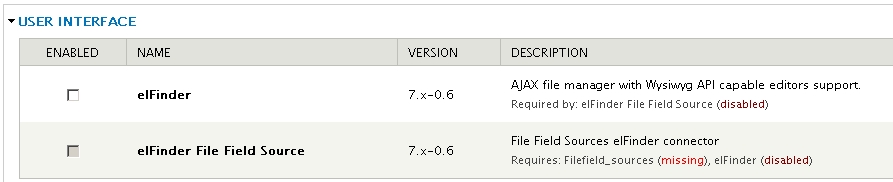
I downloaded the file but still receive this message, plus a library is missing, see attached image.
| Comment | File | Size | Author |
|---|---|---|---|
| #7 | elfinder-fix_for_elfinder_lib_not_found_installation-1084348-5.patch | 680 bytes | cloudbull |
| Filefield_sources missing.JPG | 62.11 KB | Kikky |

Comments
Comment #1
ph0enix commentedelFinder Filefield Source is a optional module for use elFinder with filefield. This feature depending on filefield_sources module which didn't ported to Drupal 7 yet. Basically when it will be ported this feature will be available. Currently it is working on Drupal 6.
Are you still see error message about missing elFinder library? Did you downloaded and extracted library files as required? Please provide sites/all/libraries/elfinder directory listing.
Comment #2
Kikky commentedI'm testing elFinder on Drupal 6 and its working fine, thanks for the reply.
Comment #3
davmorr commentedThe directory structure of the elFinder JS library has apparently changed recently, at least as of version 2.0 rc1. The elFinder Drupal module installer function is looking for the file 'elFinder.class.php' in the directory 'sites/all/libraries/elfinder/connectors/php/'. The 'connectors' directory is no longer present in the library directory tree. The easiest fix for this is to either use the dev version of this module (as of 4/15/12) where this is fixed, or edit line 25 of the module file 'elfinder.install' from:
if ( !(is_readable($libpath . '/connectors/php/elFinder.class.php') && is_readable($libpath . '/js/elfinder.min.js')) ) {to
if ( !(is_readable($libpath . '/php/elFinder.class.php') && is_readable($libpath . '/js/elfinder.min.js')) ) {*Note: This is referencing the current recommended release version of this module - 7.x-0.7
Comment #4
davmorr commentedUpdate:
Actually, there are a few other issues with this version of the module, caused by the library's dir tree changes. You are probably just better off disablinge and uninstalling the module and installing the dev release.
If you go this route, see the following issue: http://drupal.org/node/1534344
There is a minor tweak in the elfinder_init() function that needs to be resolved for it to work properly.
Comment #5
anurasn commentedJust Replace the elfinder.install file's 24th line:
to
Then the installation problem will solve and the another problem will see in file browsing. I will add it's patch also.
Comment #6
gghh2 commentedHi !
Thanks for the #5 patch.
But do you have the patch when we are in file browsing since 30 April ?
Thanks !
Comment #7
cloudbull commented