My system setting
Debian squeeze
Drupal 7.0 and Kaltura CE 3.0.0 located on the same server (differentiated by different virtual host server name)
modules: CKK 7.x-2.x-dev, Ctools 7.x-1.x-dev, jQuery Update 7.x-2.x-dev, Views 7.x-3.x-dev, Kaltura 7.x-2.x-dev.
After precisely following instruction of installing drupal 7 and all relevant modules, the drupal and all relevent modules were installed successfully.
For kaltura module, I have edited kaltura-setting.php that reflect the location of KalturaCE server and place crossdomain.xml in the right place. I can generate the partner information like partner id from kaltura CE and the setting was shown in my kaltura CE server too.
Going into the administration page of kaltura module, the three ticks like Drupal to Kaltura Session Test, Cron-job status and Crossdomain.xml status were seen.
However, I keep seeing such error in the same admin page:
* Notice: Undefined variable: error_status in kaltura_settings_form() (line 271 of /var/www/drupal-7.0/modules/kaltura/includes/kaltura.admin.inc).
* Notice: Undefined property: DatabaseStatementBase::$value in kaltura_variable_get_real() (line 1074 of /var/www/drupal-7.0/modules/kaltura/includes/kaltura.admin.inc).
* Notice: Undefined index: partner_name in kaltura_settings_form() (line 306 of /var/www/drupal-7.0/modules/kaltura/includes/kaltura.admin.inc).
* Notice: Undefined index: op in kaltura_settings_form() (line 316 of /var/www/drupal-7.0/modules/kaltura/includes/kaltura.admin.inc).
* Notice: Undefined index: op in kaltura_settings_form() (line 327 of /var/www/drupal-7.0/modules/kaltura/includes/kaltura.admin.inc).
* Notice: Undefined index: register in kaltura_settings_form() (line 570 of /var/www/drupal-7.0/modules/kaltura/includes/kaltura.admin.inc).
* Notice: Undefined variable: showing_reg in kaltura_settings_form() (line 570 of /var/www/drupal-7.0/modules/kaltura/includes/kaltura.admin.inc).
* Notice: Undefined index: register in kaltura_settings_form() (line 586 of /var/www/drupal-7.0/modules/kaltura/includes/kaltura.admin.inc).
* Notice: Undefined index: register in kaltura_settings_form() (line 587 of /var/www/drupal-7.0/modules/kaltura/includes/kaltura.admin.inc).
* Notice: Undefined index: kaltura_server_url in kaltura_settings_form() (line 624 of /var/www/drupal-7.0/modules/kaltura/includes/kaltura.admin.inc).
Also, I find no way to create the kaltura media node just like what I did in drupal 6.2 environment.
Can anyone show me how?
Kinglok, Fong


Comments
Comment #1
Zohar.Babin commentedHi there,
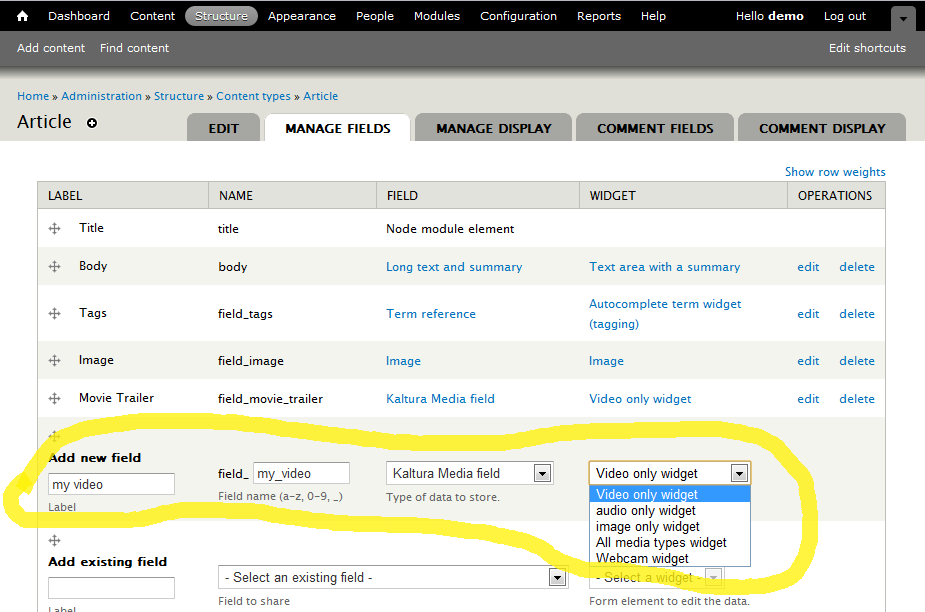
The D7 module utilizes Drupal Fields. The it works now is that you don't create nodes, but for every content type you want video on, you should add Kaltura fields.
As for the errors, why did you edit the kaltura-setting.php file? was the installation itself wrong?..
Comment #2
kinglok commentedI was following the instruction to install kaltura module:
http://drupal.org/node/527246
As for your advice, I have uninstalled the kaltura module and re-install without editing kaltura-setting.php. Still have the same error.
And I cannot find any place to 'add kaltura field'.
Comment #3
Zohar.Babin commentedThat document is only for Drupal 5 & 6. 7 has a new setup flow that shouldn't require this guide.
When you edit any of the content types in your Drupal, you should find a new field type for Kaltura - add this to your selected content:
Home » Administration » Structure » Content types » Article (or whatever the name of your content type)
Then go to the "Manage Fields" for that content type.
There you can add and remove fields for that content type. Add a field type "Kaltura Media field" and select the Widget type.
http://drupal.org/files/Kaltura-Add-Field.png
Comment #4
Zohar.Babin commentedComment #5
Zohar.Babin commentedComment #6
kinglok commentedThank you very much for giving advice.
Installation error
Regarding on the installation issue, I have done re-installation without touching the kaltura_settings.php. And the partner information of KalturaCE can be imported successfully and three ticks shows. However, everytime I go back to Home » Administration » Configuration » Kaltura Server Integration Settings, the same error messages occur.
Error right after adding kaltura media field
Right after adding the kaltura media according to Zahar.Babin advice, here comes some error message:
* Notice: Use of undefined constant KalturaSettings_CW_UICONF_ID - assumed 'KalturaSettings_CW_UICONF_ID' in field_kaltura_field_info() (line 23 of /var/www/drupal-7.0/modules/kaltura/plugins/field_kaltura/field_kaltura.module).
* Notice: Use of undefined constant KalturaSettings_CW_UICONF_ID - assumed 'KalturaSettings_CW_UICONF_ID' in field_kaltura_field_info() (line 35 of /var/www/drupal-7.0/modules/kaltura/plugins/field_kaltura/field_kaltura.module).
Error when adding new article
It seems that kaltura field can be added. However, everytime I would add content, there is an error message:
Notice: Undefined index: custom_cw in field_kaltura_field_widget_form() (line 232 of /var/www/drupal-7.0/modules/kaltura/plugins/field_kaltura/field_kaltura.module).
I wonder if anything wrong in the installation process?
Thanks for helping.
Kinglok, Fong
Comment #7
kinglok commentedHi everybody,
Here comes the graphical capture of the error messages I mentioned.
Hope this can helps with debugging.
Kinglok, Fong
Comment #8
kinglok commentedI have tried the latest module dated 30 Mar 2011 again with totally fresh drupal installation.
I still encounter the same error I described above but with different line number.
1. Installation error
Notice: Undefined index: partner_name in kaltura_settings_form() (line 306 of /var/www/drupal-7.0/modules/kaltura/includes/kaltura.admin.inc).
Notice: Undefined index: op in kaltura_settings_form() (line 316 of /var/www/drupal-7.0/modules/kaltura/includes/kaltura.admin.inc).
Notice: Undefined index: op in kaltura_settings_form() (line 327 of /var/www/drupal-7.0/modules/kaltura/includes/kaltura.admin.inc).
Notice: Undefined index: register in kaltura_settings_form() (line 353 of /var/www/drupal-7.0/modules/kaltura/includes/kaltura.admin.inc).
Notice: Undefined index: register in kaltura_settings_form() (line 570 of /var/www/drupal-7.0/modules/kaltura/includes/kaltura.admin.inc).
After entering the partner information, still see this error:
Notice: Undefined property: DatabaseStatementBase::$value in kaltura_variable_get_real() (line 1074 of /var/www/drupal-7.0/modules/kaltura/includes/kaltura.admin.inc).
Notice: Undefined index: partner_name in kaltura_settings_form() (line 306 of /var/www/drupal-7.0/modules/kaltura/includes/kaltura.admin.inc).
Notice: Undefined index: op in kaltura_settings_form() (line 316 of /var/www/drupal-7.0/modules/kaltura/includes/kaltura.admin.inc).
Notice: Undefined index: op in kaltura_settings_form() (line 327 of /var/www/drupal-7.0/modules/kaltura/includes/kaltura.admin.inc).
Notice: Undefined index: register in kaltura_settings_form() (line 570 of /var/www/drupal-7.0/modules/kaltura/includes/kaltura.admin.inc).
Notice: Undefined variable: showing_reg in kaltura_settings_form() (line 570 of /var/www/drupal-7.0/modules/kaltura/includes/kaltura.admin.inc).
Notice: Undefined index: register in kaltura_settings_form() (line 586 of /var/www/drupal-7.0/modules/kaltura/includes/kaltura.admin.inc).
Notice: Undefined index: register in kaltura_settings_form() (line 587 of /var/www/drupal-7.0/modules/kaltura/includes/kaltura.admin.inc).
Notice: Undefined index: kaltura_server_url in kaltura_settings_form() (line 624 of /var/www/drupal-7.0/modules/kaltura/includes/kaltura.admin.inc).
2. Error right after adding kaltura media field
Notice: Use of undefined constant KalturaSettings_CW_UICONF_ID - assumed 'KalturaSettings_CW_UICONF_ID' in field_kaltura_field_info() (line 23 of /var/www/drupal-7.0/modules/kaltura/plugins/field_kaltura/field_kaltura.module).
Notice: Use of undefined constant KalturaSettings_CW_UICONF_ID - assumed 'KalturaSettings_CW_UICONF_ID' in field_kaltura_field_info() (line 35 of /var/www/drupal-7.0/modules/kaltura/plugins/field_kaltura/field_kaltura.module).
3. Error when adding new article
Notice: Undefined index: custom_cw in field_kaltura_field_widget_form() (line 232 of /var/www/drupal-7.0/modules/kaltura/plugins/field_kaltura/field_kaltura.module).
Hope the development team can fix this nasty bug!
Kinglok, Fong
Comment #9
daftlad commentedHi. I'm complete newb to Drupal but since Kaltura appeared to offer the video solution I'm looking for I gave it a try. I have some experience of using mambo & joomla that enabled me to get so far but I've run into a dead end and get errors very similar to those posted by the OP. What can I do? Regards. Daftlad.
Notice: Undefined variable: error_status in kaltura_settings_form() (line 271 of /home/ddwatson/public_html/site2/modules/kaltura/includes/kaltura.admin.inc).
Notice: Undefined property: DatabaseStatementBase::$value in kaltura_variable_get_real() (line 1074 of /home/ddwatson/public_html/site2/modules/kaltura/includes/kaltura.admin.inc).
Notice: Undefined index: partner_name in kaltura_settings_form() (line 306 of /home/ddwatson/public_html/site2/modules/kaltura/includes/kaltura.admin.inc).
Notice: Undefined index: op in kaltura_settings_form() (line 316 of /home/ddwatson/public_html/site2/modules/kaltura/includes/kaltura.admin.inc).
Notice: Undefined index: op in kaltura_settings_form() (line 327 of /home/ddwatson/public_html/site2/modules/kaltura/includes/kaltura.admin.inc).
Notice: Undefined index: register in kaltura_settings_form() (line 570 of /home/ddwatson/public_html/site2/modules/kaltura/includes/kaltura.admin.inc).
Notice: Undefined variable: showing_reg in kaltura_settings_form() (line 570 of /home/ddwatson/public_html/site2/modules/kaltura/includes/kaltura.admin.inc).
Notice: Undefined index: register in kaltura_settings_form() (line 586 of /home/ddwatson/public_html/site2/modules/kaltura/includes/kaltura.admin.inc).
Notice: Undefined index: register in kaltura_settings_form() (line 587 of /home/ddwatson/public_html/site2/modules/kaltura/includes/kaltura.admin.inc).
Notice: Undefined index: kaltura_server_url in kaltura_settings_form() (line 624 of /home/ddwatson/public_html/site2/modules/kaltura/includes/kaltura.admin.inc).
Comment #10
rethinkwebdesign commentedI am getting this too.
also I cannot get the widget to load, it just stays as a blank
Comment #11
temkin commented