

 Come together with the global Drupal community in Rotterdam, 28 Sept – 1 Oct 2026. Sessions, contribution, connection, and Early Bird savings until 8 June.
Glossary doesn't escape quotes when it wraps things in <acroynm> links.
For example, if you have a glossary term like so:
foo: "foo" is not bar
Then when converted to an acronym link, it will look like this:
<acronym title=""foo" is not bar">foo</acronym>
Which obviously isn't well-formed HTML.
| Comment | File | Size | Author |
|---|---|---|---|
| #4 | acronym_rendering_01.png | 10.51 KB | inteja |

Comments
Comment #1
Frodo Looijaard commentedFixed in current CVS, which will become 4.5.0 (hopefully in not too long a time).
Have fun,
Frodo
Comment #2
inteja commentedReopened this as I think maybe it's related?
Escaping double quotes is now fixed but if the taxonomy term description is more than a single line, the acronym or anchor title attribute contains the whole block of text and, due to HTML filtering, also contains HTML tags in place of linebreaks (which shouldn't be inside the attribute).
So it looks something like this:
The display gets truncated by my broswer (Firefox 1.0) but all that extra text still needs to be downloaded, which is a waste, and it displays as a "tooltip" showing all the unwanted tags.
I've tried to reorder the filters which does give different results but not what I want.
Is it possible to have an acronym or anchor with a short title (e.g. Term: Short Description) that then links to the glossary that contains the larger body of text (which may in turn contain HTML tags for formatting)?
Does this make sense?
Comment #3
inteja commentedTo facilitate this you could you only the first line (stripped of any HTML) as the acronym or anchor title, but this may not suit everyone's needs.
Comment #4
inteja commentedOK. After more experimentation I've found that the issue isn't really with the glossary module but with web browser differences.
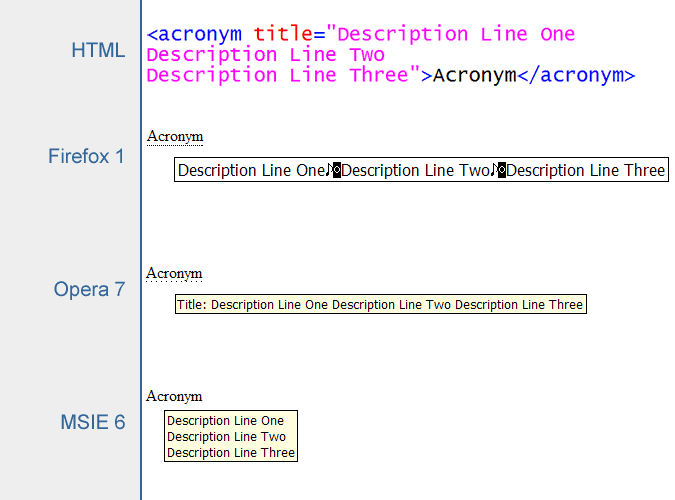
Under MSIE6, multiline title attributes are displayed correctly, whereas in Firefox1 the linebreaks are replaced with a few junk characters. Opera7 does an OK job at displaying but not as good as MSIE6.
See attached image.
Comment #5
inteja commentedApologies for all the followups on this "issue".
Multiline tooltip bug in Firefox documented here:
https://bugzilla.mozilla.org/show_bug.cgi?id=67127
Comment #6
Frodo Looijaard commentedAs you found out yourself, there is not much we can do about Firefox not displaying multiple-line tooltips at all. Theoretically, we could work around it by simulating tooltips with (a lot of nasty) javascript, but that is not the way I would like to go. If you are interested in this, look at the nicelinks module.
The fact that Firefox shows garbage characters is more serious, even though you could argue this is a browser error. I could strip newlines from the title tags; they would disappear in IE too, but as a tooltip should be as compact as possible in my opinion, this might actually be a good idea anyway. Also, I am not sure whether you are allowed to have newlines within attributes in XHTML - might be invalid, in which case we should do it anyway.
What do you think?
Thanks,
Frodo
Comment #7
moshe weitzman commentedI will not accept a patch which strips linebreaks from glossary definitions. If this is problematic for you, please get Firefox fixed.
Comment #8
Frodo Looijaard commentedJust to make sure we are talking about the same thing - I only proposed to strip them in the tooltips, not in the glossary overview page. In tooltips we are already stripping all HTML markup from the definition, anyway, and you could see the newline just as another form of markup.
Internet Explorer would still display multiple-line tooltips if the definition was too long to fit on one line.
I would like to know why you would find the above unacceptable.
Thanks,
Frodo
Comment #9
moshe weitzman commentedgood question - i am also talking about tooltips.
It is useful to manually add paragraphs to the tooltip and IE supports this presentation. So I want to preserve the ability to have multiple paragraph definitions in a tooltip. Firefox doesn't even support multiple lines, forget about multiple paragraphs. Thats a bug.
We strip other markup because no browser I know of allows bold, italic etc. in a tooltip. Worse, it prints the markup in plain text which looks stupid.
Comment #10
inteja commentedMy vote is to leave glossary tooltips as is. This is a known mozilla bug going back over 3 years. We'll just have to live with it until someone fixes the bug. There's also no point sacrificing the good tooltip rendering of MSIE just to cater to a bug in Firefox that may effect only small percentage (but growing!) of site visitors.
I agree that we shouldn't use nasty javascript hacks for tooltips - standards compliant, semantically correct and accessible XHTML all the way!
Bug closed?