

Closed (fixed)
Project:
Field Slideshow
Version:
7.x-1.0-beta1
Component:
Miscellaneous
Priority:
Normal
Category:
Support request
Assigned:
Unassigned
Reporter:
Created:
14 Mar 2011 at 10:37 UTC
Updated:
4 Oct 2011 at 05:51 UTC
Jump to comment: Most recent file


Comments
Comment #1
jdanthinne commentedHi,
the fact is the default Image field doesn't allow to assign an url per image.
I'm looking at the Media module (still in beta as well) for now, because it allows to add field to images, and if you can add a link field to the image, I could detect that field and add it to the Link option choices.
The issue #1083272: Caption support for Media Type fields is related to that as well (a description field that could be used for the captions, instead of Alt or Title)
Comment #2
bryancasler commentedsubscribe
Comment #3
jdanthinne commentedI've just pushed a new DEV version, with support of Media with links/noderef fields. (add a link or node reference field to the Media Image type)
Please test next DEV or try http://drupalcode.org/project/field_slideshow.git/patch/949abe1.
Comment #4
arkxkra commentedbeing looking for the same thing too. Subscribe
Comment #5
jdanthinne commentedSo have you tried working with Media and the latest dev?
It allows you to use a Link field with Image to give each image a specific link.
Comment #6
Fidelix commentedSubscribing...
I'll be testing this in the next weeks.
Comment #7
butler commentedIt appears the patch above has been committed in Field Slideshow 7.x-1.1. I can't however figure out where to set this up so a link field will display per image. I have Media module installed. Any possibility more details could be supplied re: using this feature?
Very cool module... thanks so much.
Comment #8
butler commentedPosting a clarification in hope of an answer (don't want to start a new thread as there are a number of existing ones all looking to address this issue - so since apparently the feature request this issue started out as has been addressed I have changed the status of this issue to support request - apologies in advance if this is not the right thing to do)... when I try to "add a link or node reference field to the Media Image type" here:
/admin/config/media/file-types/manage/image/fields
... there is a single field of type "file". When I try to add a field per the above, there is no field available in the pulldown menu of available field types labeled anything like "link or node reference" per the above. Do I need to install additional modules in order to accomplish adding a link or node reference field to the Media Image type?
Comment #9
jdanthinne commentedYes,
for a node reference, use http://drupal.org/project/references,
and for a simple link, use http://drupal.org/project/link
Comment #10
butler commentedThanks very much for the reply jdanthinne. Unfortunately this is still not working and I suspect I am missing something simple. Having installed the Link module I have been able to add a link to the Media image file type. In my slideshow content type I deleted the image field I had there and added a new image field. However when editing or adding images to my slideshow, regardless of whether I use the Media or Image widget option for my slideshow content type, I see no field to add a link or attendant info. Is this where I should expect a link field? Is there perhaps some other place the Media module uses to edit images as individual pieces of content (like there used to be in earlier Drupal versions)?
Seems I am almost there, hoping you can help... thanks...
Comment #11
jdanthinne commentedIf you go to /admin/content/media, and "edit" an image, you'll see that the additional fields are there.
Unfortunately, the Media has still to implement an easier way to do it (to be able, when creating a node, to select a file, and enter data for the other fields at the same time). See #1062304: Fill in the available fields when creating media in the WYSIWYG for the issue.
So, for now, it's a two-step process : first, add the images, then edit the additional fields via admin/content/media.
Comment #12
butler commentedHi again and thanks again for your support jdanthinne. Unfortunately, still not quite there. This may turn out to be a larger issue with the Link and/or Media module but I have found and edited the URl and Title fields for my images (thanks so much, would never have known what it was for if I ever noticed that tab)... but still no links on images in my slideshow. I have tried clearing caches, still no links... should I start a whole new slideshow or something?
Thank you, thank you, thank you...
Comment #13
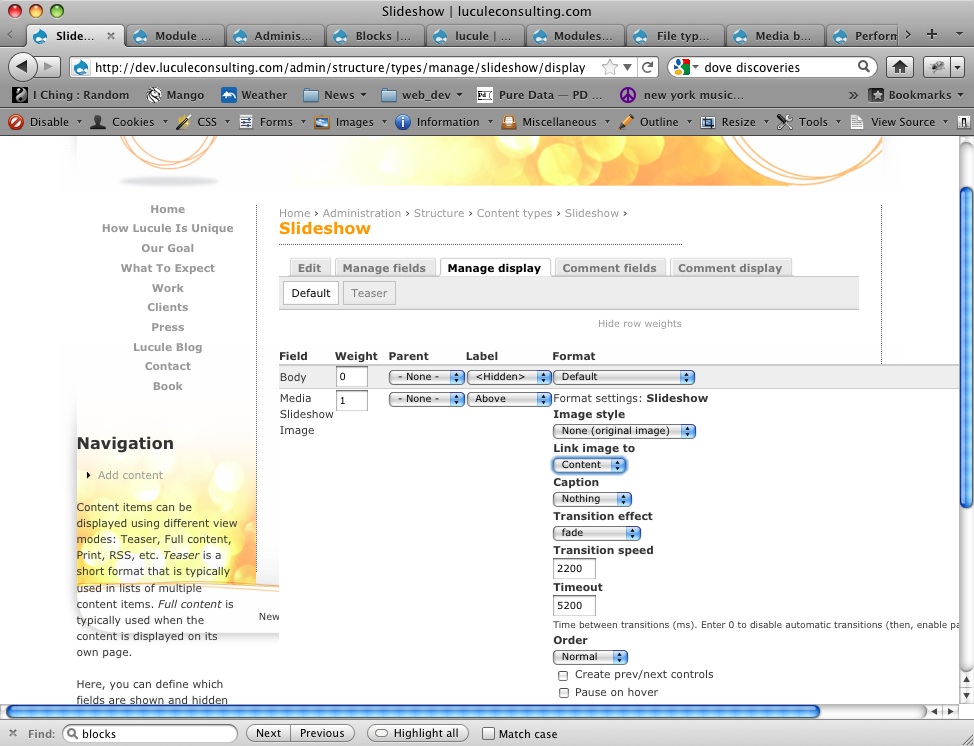
jdanthinne commentedYou just have to go the "Manage Display" of your content type (/admin/structure/types),
and there, for the Images fields, in the Slideshow options, choose the right field (there should be "Media:" before the name of the field) for "Link image to" option.
Comment #14
butler commentedI only have the default options - nothing, content, and file. Guessing there is someplace else where I need to determine what shows up in the list of "Link image to" options?
Comment #15
jdanthinne commentedWhich version are you using?
The Media module support is only available fully in the latest DEV version.
Comment #16
butler commentedAh - I am using 7.x-1.1.
I found that your patch was applied in the version I have, looked at the date of this release vs the date of the patch, saw the release was dated after the patch, and assumed that meant 7.x-1.1 would work w/ the patch committed... still don't really get how version-ing/patching stuff works sequentially for Drupal. I will try the dev version. Thanks again.
Comment #17
butler commentedWell, I installed the dev version of Field Slideshow and still only the default options - nothing, content, and file - show up in the list of "Link image to" options. Maybe I have to start a new type at /admin/structure/types?
Or, any other advice?
Thanks again for all the back and forth - it's damned awesome of you.
Comment #18
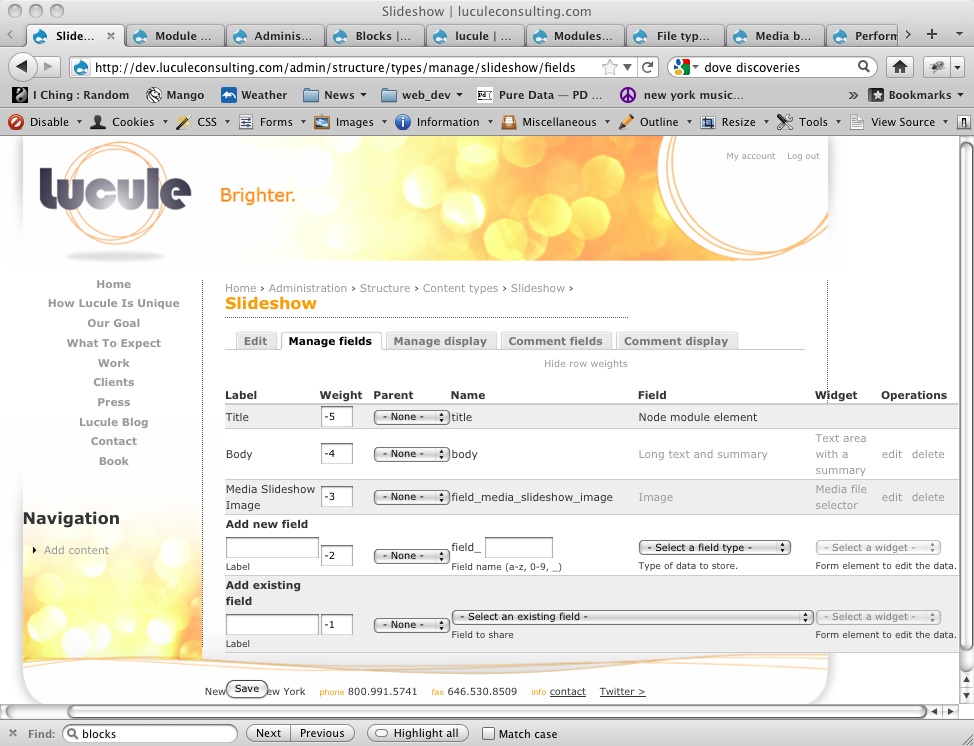
jdanthinne commentedCan I see a screenshot of your content type fields (Manage fields tab)?
Comment #19
butler commentedOf course! Fields and Display tabs attached...
Comment #20
jdanthinne commentedAahh…
You have to use a Media type field, and not an Image type field, in order to use the additional fields.
Comment #21
butler commentedAnd thanks for another essential insight jdanthinne... but there is no type "Media" in the Select a Field Type pulldown for my content type, or at /admin/config/media/file-types.
Should the Media module provide a Media type out of the box or is there perhaps another module to be installed as was the case with the link module?
Comment #22
jdanthinne commentedWoops, my fault… it's called "Multimedia asset"
Comment #23
butler commentedAha! After a little more tinkering, links are working. jdanthinne, I can't thank you enough for helping me through this. If you ever find yourself in NYC I hope you'll allow me to buy you a drink, or several.
Comment #24
jdanthinne commentedI live in Belgium… but I won't forget ;-)
Comment #25
thirdboxcar commentedI feel crazy stupid, but I'm looking for the same thing, ran through all the steps on this page, and still can't get everything to appear.
I'm running the dev version of this module, I have Media, References, and Link installed, my file field type is Multimedia asset, and yet I don't see the options from the screenshot in #13 in the Slideshow display settings.
Any ideas?
EDIT - Oh man. I knew that as soon as I posted, I would figure it out. I'd forgotten to add the Node Reference field to my Media file type. Sorry! But all fixed!! Great module.
Comment #26
jdanthinne commentedI definitely need to add this to the Doc…