Active
Project:
Acquia Slate
Version:
6.x-3.x-dev
Component:
Code
Priority:
Normal
Category:
Support request
Assigned:
Unassigned
Reporter:
Created:
14 Mar 2011 at 12:18 UTC
Updated:
29 Mar 2011 at 13:04 UTC


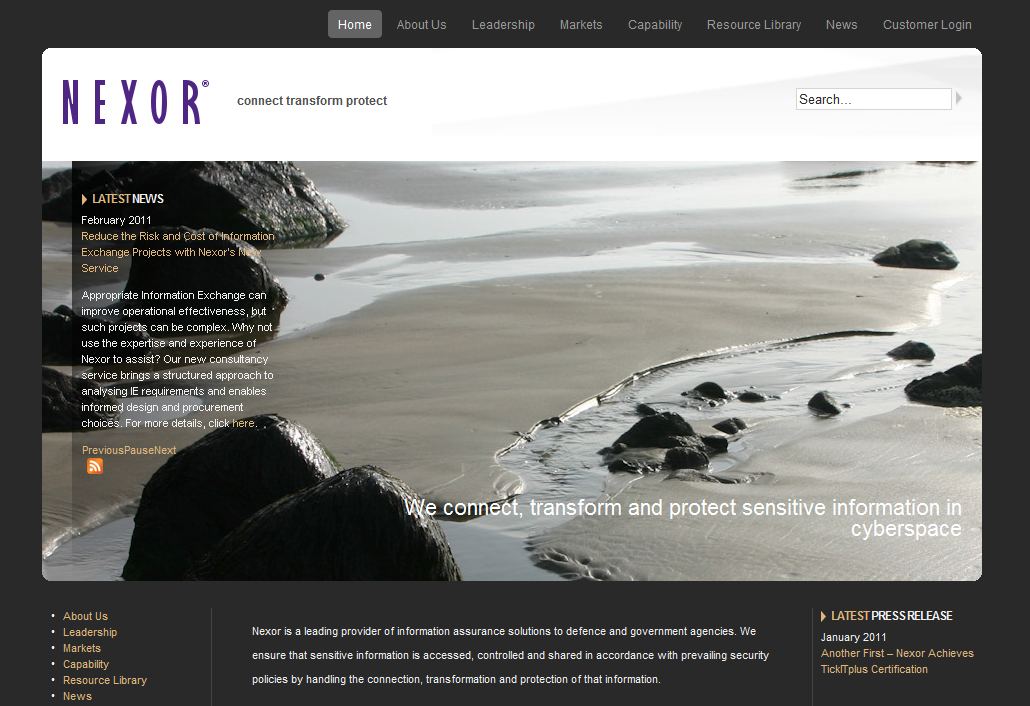
I've set up the banner image on the home page and added a block with a dark transparent background. It works great on every brower I've tried except IE. In 7 and 8 the background is too transparent (see attached image) and doesn't look like the background in the demo site http://acquiaslate.fusiondrupalthemes.com/ when viewed in IE8.
Is there some additional transparency fix I can try for IE?
| Comment | File | Size | Author |
|---|---|---|---|
| Capture.PNG | 731.93 KB | antcw |

Comments
Comment #1
jfarry commentedThis is a transparency problem native to Internet Explorer.
You'll need to get something like this: http://jquery.andreaseberhard.de/pngFix/ (i think there's a module version of this for Drupal as well). It can be a bit of a pain to get the selectors right, but have a bit of a play and see how you go :)
Due to the way transparency fixes work, I doubt that it would ever be integrated into a theme. There is the option to check every element for transparency and apply the fix, but that can be intensive on computer/browser resources.
Comment #2
antcw commentedHi. Thanks for the link. I'll have to have a play. Fortunately IE9 seems to have got its transparency sorted.